# Entity Resolution and Visualization for Legal Documents
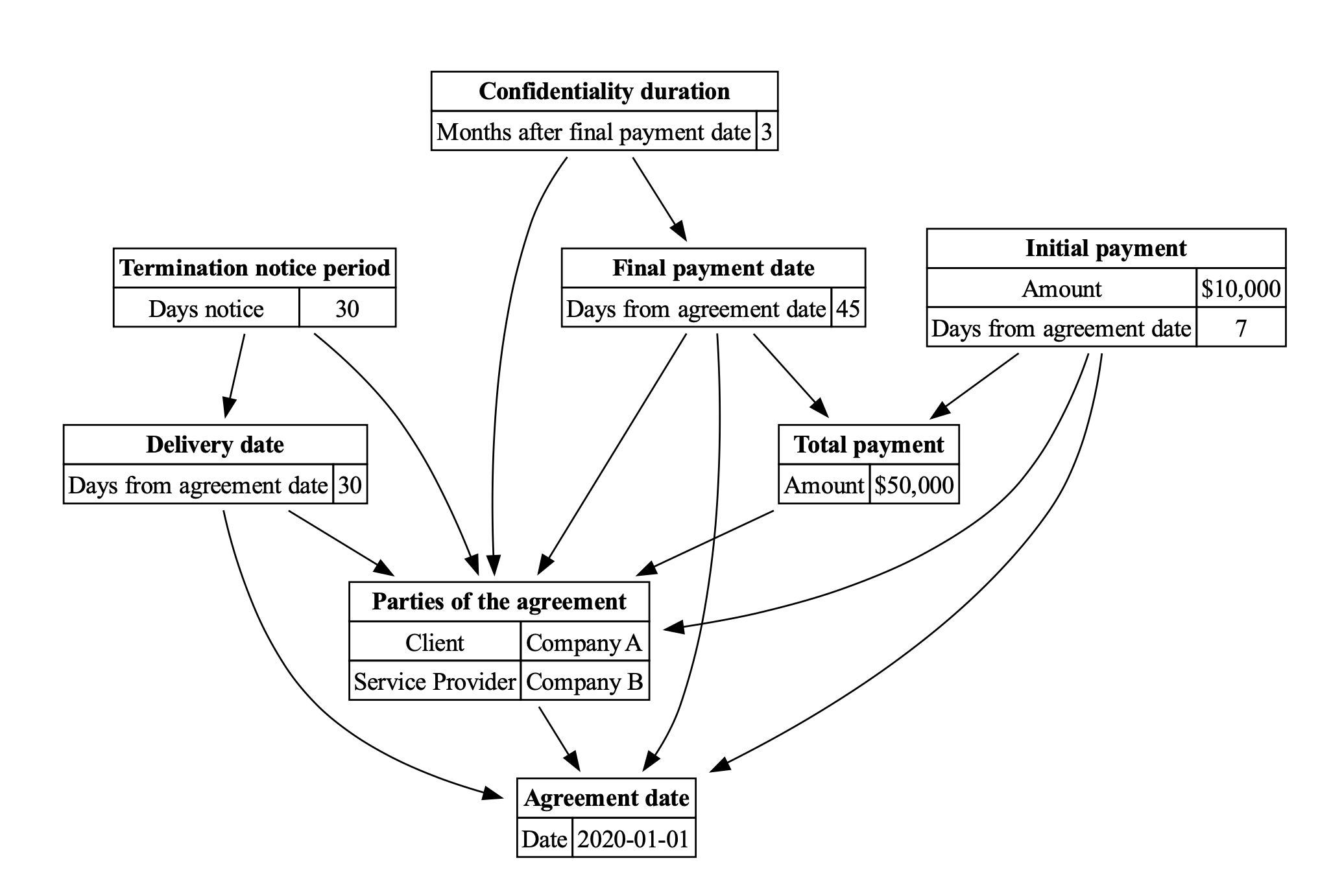
In this guide, we demonstrate how to extract and resolve entities from a sample legal contract. Then, we visualize these entities and their dependencies as an entity graph. This approach can be invaluable for legal tech applications, aiding in the understanding of complex documents.
!!! tips "Motivation"
Legal contracts are full of intricate details and interconnected clauses. Automatically extracting and visualizing these elements can make it easier to understand the document's overall structure and terms.
## Defining the Data Structures
The **`Entity`** and **`Property`** classes model extracted entities and their attributes. **`DocumentExtraction`** encapsulates a list of these entities.
```python
from pydantic import BaseModel, Field
from typing import List
class Property(BaseModel):
key: str
value: str
resolved_absolute_value: str
class Entity(BaseModel):
id: int = Field(
...,
description="Unique identifier for the entity, used for deduplication, design a scheme allows multiple entities",
)
subquote_string: List[str] = Field(
...,
description="Correctly resolved value of the entity, if the entity is a reference to another entity, this should be the id of the referenced entity, include a few more words before and after the value to allow for some context to be used in the resolution",
)
entity_title: str
properties: List[Property] = Field(
..., description="List of properties of the entity"
)
dependencies: List[int] = Field(
...,
description="List of entity ids that this entity depends or relies on to resolve it",
)
class DocumentExtraction(BaseModel):
entities: List[Entity] = Field(
...,
description="Body of the answer, each fact should be a separate object with a body and a list of sources",
)
```
## Entity Extraction and Resolution
The **`ask_ai`** function utilizes OpenAI's API to extract and resolve entities from the input content.
```python
import instructor
from openai import OpenAI
# Apply the patch to the OpenAI client
# enables response_model keyword
client = instructor.patch(OpenAI())
def ask_ai(content) -> DocumentExtraction:
return client.chat.completions.create(
model="gpt-4",
response_model=DocumentExtraction,
messages=[
{
"role": "system",
"content": "Extract and resolve a list of entities from the following document:",
},
{
"role": "user",
"content": content,
},
],
) # type: ignore
```
## Graph Visualization
**`generate_graph`** takes the extracted entities and visualizes them using Graphviz. It creates nodes for each entity and edges for their dependencies.
```python
from graphviz import Digraph
def generate_html_label(entity: Entity) -> str:
rows = [f"| {prop.key} | {prop.resolved_absolute_value} |
" for prop in entity.properties]
table_rows = "".join(rows)
return f"<| {entity.entity_title} |
{table_rows}
>"
def generate_graph(data: DocumentExtraction):
dot = Digraph(comment="Entity Graph", node_attr={"shape": "plaintext"})
for entity in data.entities:
label = generate_html_label(entity)
dot.node(str(entity.id), label)
for entity in data.entities:
for dep_id in entity.dependencies:
dot.edge(str(entity.id), str(dep_id))
dot.render("entity.gv", view=True)
```
## Execution
Finally, execute the code to visualize the entity graph for the sample legal contract.
```python
content = """
Sample Legal Contract
Agreement Contract
This Agreement is made and entered into on 2020-01-01 by and between Company A ("the Client") and Company B ("the Service Provider").
Article 1: Scope of Work
The Service Provider will deliver the software product to the Client 30 days after the agreement date.
Article 2: Payment Terms
The total payment for the service is $50,000.
An initial payment of $10,000 will be made within 7 days of the the signed date.
The final payment will be due 45 days after [SignDate].
Article 3: Confidentiality
The parties agree not to disclose any confidential information received from the other party for 3 months after the final payment date.
Article 4: Termination
The contract can be terminated with a 30-day notice, unless there are outstanding obligations that must be fulfilled after the [DeliveryDate].
""" # Your legal contract here
model = ask_ai(content)
generate_graph(model)
```
This will produce a graphical representation of the entities and their dependencies, stored as "entity.gv".