mirror of
https://github.com/kennethreitz/langchain.git
synced 2026-06-05 23:00:18 +00:00
 Noam Gat
14e8c74736
Noam Gat
14e8c74736
## Description This PR adds support for [lm-format-enforcer](https://github.com/noamgat/lm-format-enforcer) to LangChain. 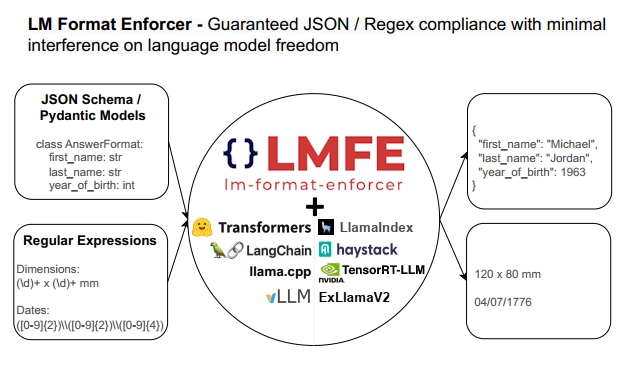 The library is similar to jsonformer / RELLM which are supported in Langchain, but has several advantages such as - Batching and Beam search support - More complete JSON Schema support - LLM has control over whitespace, improving quality - Better runtime performance due to only calling the LLM's generate() function once per generate() call. The integration is loosely based on the jsonformer integration in terms of project structure. ## Dependencies No compile-time dependency was added, but if `lm-format-enforcer` is not installed, a runtime error will occur if it is trying to be used. ## Tests Due to the integration modifying the internal parameters of the underlying huggingface transformer LLM, it is not possible to test without building a real LM, which requires internet access. So, similar to the jsonformer and RELLM integrations, the testing is via the notebook. ## Twitter Handle [@noamgat](https://twitter.com/noamgat) Looking forward to hearing feedback! --------- Co-authored-by: Bagatur <baskaryan@gmail.com>

Website
This website is built using Docusaurus 2, a modern static website generator.
Installation
$ yarn
Local Development
$ yarn start
This command starts a local development server and opens up a browser window. Most changes are reflected live without having to restart the server.
Build
$ yarn build
This command generates static content into the build directory and can be served using any static contents hosting service.
Deployment
Using SSH:
$ USE_SSH=true yarn deploy
Not using SSH:
$ GIT_USER=<Your GitHub username> yarn deploy
If you are using GitHub pages for hosting, this command is a convenient way to build the website and push to the gh-pages branch.
Continuous Integration
Some common defaults for linting/formatting have been set for you. If you integrate your project with an open-source Continuous Integration system (e.g. Travis CI, CircleCI), you may check for issues using the following command.
$ yarn ci