mirror of
https://github.com/kennethreitz/kennethreitz.org.git
synced 2026-06-21 14:50:57 +00:00

104 lines
3.9 KiB
Markdown
104 lines
3.9 KiB
Markdown
# Announcing Pipenv!
|
|
*January 2017*
|
|
|
|
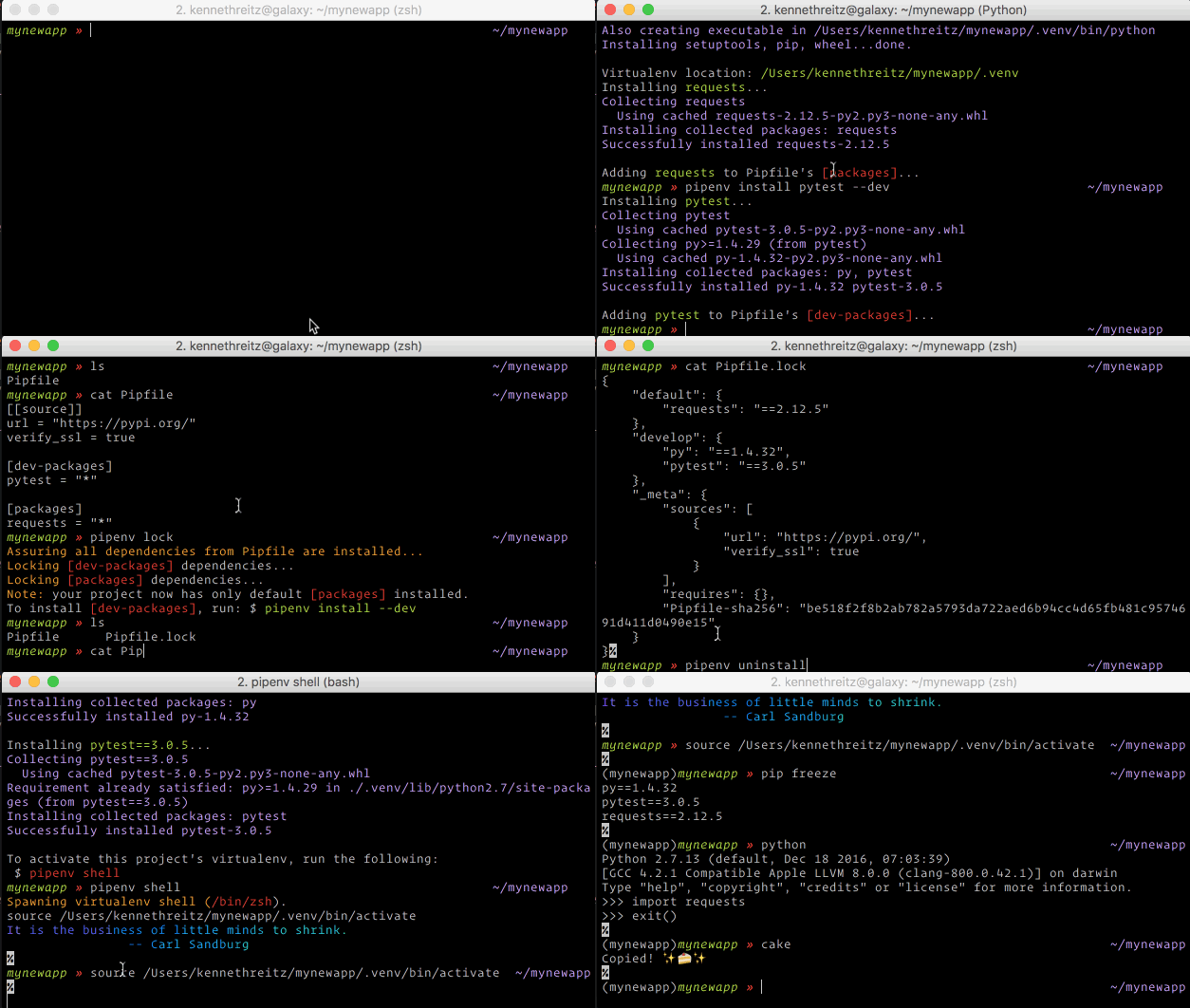
I wrote a new tool this weekend, called [Pipenv](https://github.com/pypa/pipenv). Check it out [on GitHub](https://github.com/pypa/pipenv)!
|
|
|
|
|
|
|
|
Pipenv is an experimental project that aims to bring the best of all packaging worlds to the Python world. It harnesses [Pipfile](https://github.com/pypa/pipfile), pip, and virtualenv into one single toolchain. It features very pretty terminal colors.
|
|
|
|
It automatically creates and manages a virtualenv for your projects, as well as adds/removes packages from your `Pipfile` as you install/uninstall packages. The `lock` command generates a lockfile (`Pipfile.lock`).
|
|
|
|
## Features
|
|
|
|
* Automatically finds your project home, recursively, by looking for a `Pipfile`.
|
|
* Automatically generates a `Pipfile`, if one doesn't exist.
|
|
* Automatically generates a `Pipfile.lock`, if one doesn't exist.
|
|
* Automatically creates a virtualenv in a standard location (`project/.venv`).
|
|
* Automatically adds packages to a `Pipfile` when they are installed.
|
|
* Automatically removes packages from a `Pipfile` when they are uninstalled.
|
|
* Also automatically updates pip.
|
|
|
|
The main commands are `install`, `uninstall`, and `lock`, which generates a `Pipfile.lock`. These are intended to replace `$ pip install` usage, as well as manual virtualenv management.
|
|
|
|
## Basic Concepts
|
|
|
|
* A virtualenv will automatically be created, when one doesn't exist.
|
|
* When no parameters are passed to `install`, all packages specified will be installed.
|
|
* When no parameters are passed to `uninstall`, all packages will be uninstalled.
|
|
* To initialize a Python 3 virtual environment, run `$ pipenv --three` first.
|
|
* To initialize a Python 2 virtual environment, run `$ pipenv --two` first.
|
|
* Otherwise, whatever `$ which python` will be the default.
|
|
|
|
## Other Commands
|
|
|
|
* `shell` will spawn a shell with the virtualenv activated.
|
|
* `run` will run a given command from the virtualenv, with any arguments forwarded (e.g. `$ pipenv run python`).
|
|
* `check` asserts that PEP 508 requirements are being met by the current environment.
|
|
|
|
## Usage
|
|
|
|
```
|
|
$ pipenv
|
|
Usage: pipenv [OPTIONS] COMMAND [ARGS]...
|
|
|
|
Options:
|
|
--where Output project home information.
|
|
--bare Minimal output.
|
|
--three / --two Use Python 3/2 when creating virtualenv.
|
|
--version Show the version and exit.
|
|
--help Show this message and exit.
|
|
|
|
Commands:
|
|
check Checks PEP 508 markers provided in Pipfile.
|
|
install Installs a provided package and adds it to...
|
|
lock Generates Pipfile.lock.
|
|
run Spans a command installed into the...
|
|
shell Spans a shell within the virtualenv.
|
|
uninstall Un-installs a provided package and removes it...
|
|
update Updates pip to latest version, uninstalls all...
|
|
|
|
$ pipenv --where
|
|
Pipfile found at /Users/kennethreitz/repos/kr/pip2/test/Pipfile.
|
|
Considering this to be the project home.
|
|
|
|
$ pipenv install
|
|
Creating a virtualenv for this project...
|
|
...
|
|
No package provided, installing all dependencies.
|
|
Virtualenv location: /Users/kennethreitz/repos/kr/pip2/test/.venv
|
|
Installing dependencies from Pipfile.lock...
|
|
...
|
|
To activate this project's virtualenv, run the following:
|
|
$ pipenv shell
|
|
|
|
$ pipenv install pytest --dev
|
|
Installing pytest...
|
|
...
|
|
Adding pytest to Pipfile's [dev-packages]...
|
|
|
|
$ pipenv lock
|
|
Assuring all dependencies from Pipfile are installed...
|
|
Locking [dev-packages] dependencies...
|
|
Locking [packages] dependencies...
|
|
Note: your project now has only default [packages] installed.
|
|
To install [dev-packages], run: $ pipenv install --dev
|
|
|
|
$ pipenv uninstall
|
|
No package provided, un-installing all dependencies.
|
|
Found 25 installed package(s), purging...
|
|
...
|
|
Environment now purged and fresh!
|
|
|
|
$ pipenv shell
|
|
Spawning virtualenv shell (/bin/zsh).
|
|
(test)$
|
|
```
|
|
|
|
## Installation
|
|
|
|
```
|
|
$ pip install pipenv
|
|
```
|
|
|
|
✨🍰✨ |