mirror of
https://github.com/kennethreitz/kennethreitz.org.git
synced 2026-06-21 14:50:57 +00:00

71 lines
4.2 KiB
Markdown
71 lines
4.2 KiB
Markdown
# Sublime Text 3 Heaven
|
||
*January 2017*
|
||
|
||
|
||
|
||
|
||
|
||
I decided to revisit my editor configuration the other night, and experimented with every possible editor I could think of / imagine. I heavily configured vim (neovim), PyCharm, Eclipse, Emacs (Spacemacs), VSCode, Atom, Textual, and more. I knew I was going to stay put with my choice of Sublime Text 3 (which I have been using for 5\+ years), but it's nice to have validation.
|
||
|
||
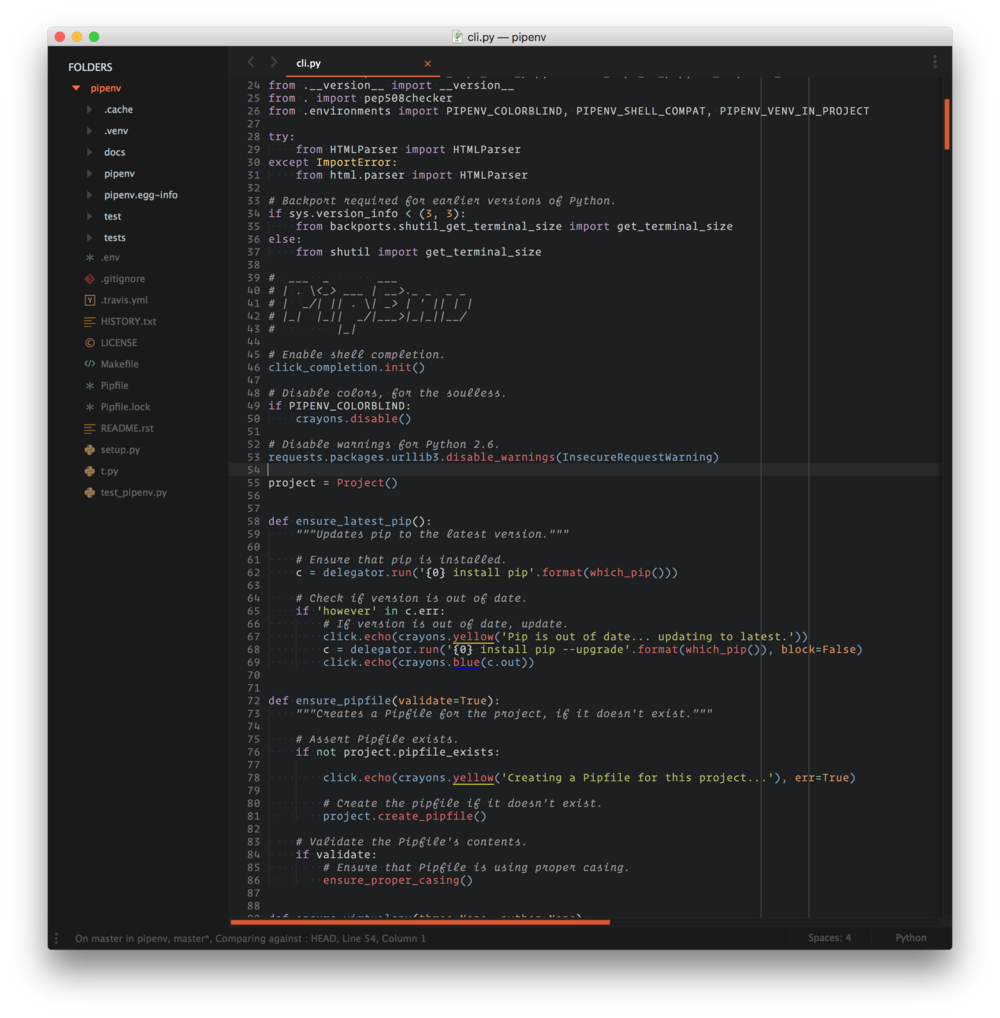
So, I decided to rebuild that configuration from scratch as well. I ended up with a very happy setup that I wanted to share with you. Here's [a screencast](http://media.kennethreitz.com.s3.amazonaws.com/sublime-screencast.mov) of myself writing a little bit of code and pushing it to GitHub with this setup.
|
||
|
||
|
||
|
||
## **Sublime UI Theme**: Material
|
||
|
||
|
||
|
||
### Sublime Text Extensions:
|
||
|
||
* **Anaconda** — fantastic Python "IDE" support for Sublime Text. Just works, does everything you'd want it to do, including code completion and PEP8 checking.
|
||
* **Color Highlighter** — highlights colors present in code as the value provided (great for css).
|
||
* **Emmet** —fantastic HTML shortcut utility.
|
||
* **Package Control** — (obviously)
|
||
* **SideBarEnhancements** —enhances the sidebar context menu options. Easily create new files and folders, etc.
|
||
* **Themr** — easily switch between themes.
|
||
|
||
###
|
||
|
||
### Version Control:
|
||
|
||
* **GitGutter** — display git diff information in the gutter of Sublime Text — extremely useful! Keeps track of added/removed lines.
|
||
* **GitSavvy** — very useful tool for committing/pushing with Git right from Sublime!
|
||
* **GitStatusBar** — shows git repo status in the bottom bar of Sublime Text.
|
||
|
||
|
||
|
||
|
||
|
||
### Syntax Packages:
|
||
|
||
* **Tomorrow Night Italics Color Scheme** — italics for code comments, for [Operator Mono](/essays/2016-01-test_driving_a_200_coding_font_operator_mono).
|
||
* **fish\-shell** — syntax highlighting for fish scripts.
|
||
* **Jinja2** — syntax hilighting and snippets for jinjia2 templates**.**
|
||
* **RestructuredText Improved** —syntax highlighting for RST files.
|
||
* **requirementstxt** — syntax highlighting for requirements.txt files.
|
||
* **TOML** — syntax highlighting for TOML.
|
||
* **VimL** — syntax highlighting for VimL.
|
||
|
||
### Fun Toys:
|
||
|
||
* **ASCII Decorator** — right click on text, and turn it into ASCII art.
|
||
* **Glue** — terminal instance within Sublime.
|
||
* **GitAutoCommit** — a nifty little plugin that lets you set certian repos to automatically commit on save (useful for notes, etc).
|
||
* **SublimeXiki** — get the power of Xiki (shown in the screencast above, at the end) in Sublime!
|
||
|
||
## User Key Bindings
|
||
|
||
|
||
```
|
||
[{ "keys": ["super+2"], "command": "next_bookmark" },{ "keys": ["super+1"], "command": "prev_bookmark" },{ "keys": ["super+3"], "command": "toggle_bookmark" },{ "keys": ["super+shift+3"], "command": "clear_bookmarks" },{"keys": ["super+g"], "command": "git_status"},{"keys": ["super+d"],"command": "set_layout","args":{"cols": [0.0, 0.5, 1.0],"rows": [0.0, 1.0],"cells": [[0, 0, 1, 1], [1, 0, 2, 1]]}},]
|
||
```
|
||
## User Settings
|
||
|
||
|
||
```
|
||
{"auto_complete": false,"close_windows_when_empty": true,"color_scheme": "Packages/User/SublimeLinter/Tomorrow-Night-Italics (SL).tmTheme","draw_white_space": "all","find_selected_text": true,"fold_buttons": false,"folder_exclude_patterns":[".svn",".git",".hg","CVS","_build","dist","build","site"],"font_face": "Operator Mono SSm Light","font_options":["subpixel_antialias"],"font_size": 12.0,"highlight_line": true,"hot_exit": false,"ignored_packages":["Git","GitSavvy","RestructuredText","SublimeLinter-flake8","Vintage"],"material_theme_accent_orange": true,"material_theme_accent_scrollbars": true,"material_theme_appbar_orange": true,"material_theme_arrow_folders": true,"material_theme_bullet_tree_indicator": true,"material_theme_compact_sidebar": true,"material_theme_contrast_mode": true,"material_theme_small_statusbar": true,"material_theme_small_tab": true,"material_theme_tree_headings": false,"remember_open_files": false,"rulers":[72,79,100],"theme": "Material-Theme-Darker.sublime-theme","translate_tabs_to_spaces": true,"trim_trailing_white_space_on_save": true}
|
||
```
|
||
That's it! Enjoy :)
|
||
|
||
|