mirror of
https://github.com/kennethreitz/responder.git
synced 2026-06-05 23:00:17 +00:00
Compare commits
1 Commits
| Author | SHA1 | Date | |
|---|---|---|---|
 Andreas Motl Andreas Motl
|
cc0fe78382 |
@@ -1,42 +0,0 @@
|
||||
Release a new version of responder to PyPI and GitHub.
|
||||
|
||||
Usage: /release <version> (e.g. /release 3.6.0)
|
||||
|
||||
If no version is provided, ask the user what version to release.
|
||||
|
||||
## Steps
|
||||
|
||||
1. **Verify clean state**: Run `git status` and ensure the working tree is clean. If not, stop and ask the user.
|
||||
|
||||
2. **Run tests**: Run `uv run pytest -x --no-header -q`. If any fail, stop and report.
|
||||
|
||||
3. **Bump version**: Update `responder/__version__.py` to the new version.
|
||||
|
||||
4. **Update changelog**:
|
||||
- Run `git log --oneline $(git describe --tags --abbrev=0)..HEAD` to get commits since last release.
|
||||
- Add a new section in `CHANGELOG.md` under `## [Unreleased]` with the date, categorized into Added/Changed/Fixed/Removed.
|
||||
- Update the compare links at the bottom of the file.
|
||||
|
||||
5. **Lock deps**: Run `uv lock`.
|
||||
|
||||
6. **Commit**: Stage `responder/__version__.py`, `CHANGELOG.md`, and `uv.lock`. Commit with message `Bump version to X.Y.Z and update changelog`.
|
||||
|
||||
7. **Push and tag**:
|
||||
```
|
||||
git push
|
||||
git tag vX.Y.Z
|
||||
git push origin vX.Y.Z
|
||||
```
|
||||
|
||||
8. **GitHub release**: Create a release with `gh release create` including highlights and a link to the full changelog.
|
||||
|
||||
9. **Build and publish**:
|
||||
```
|
||||
uv build
|
||||
uvx twine upload dist/responder-X.Y.Z*
|
||||
```
|
||||
Note: This requires a PyPI token. If twine fails due to auth, tell the user to set `TWINE_USERNAME=__token__` and `TWINE_PASSWORD` and re-run, or run `! uvx twine upload dist/responder-X.Y.Z*` interactively.
|
||||
|
||||
10. **Update GitHub release**: Edit the release to add a link to the PyPI page: `https://pypi.org/project/responder/X.Y.Z/`
|
||||
|
||||
11. **Report**: Print a summary with links to the GitHub release and PyPI page.
|
||||
@@ -1,3 +0,0 @@
|
||||
github: kennethreitz
|
||||
thanks_dev: kennethreitz
|
||||
custom: https://cash.app/$KennethReitz
|
||||
@@ -1,53 +0,0 @@
|
||||
name: "Documentation"
|
||||
|
||||
on:
|
||||
push:
|
||||
branches: [ main ]
|
||||
pull_request: ~
|
||||
workflow_dispatch:
|
||||
|
||||
# Cancel redundant in-progress jobs.
|
||||
concurrency:
|
||||
group: ${{ github.workflow }}-${{ github.ref }}
|
||||
cancel-in-progress: true
|
||||
|
||||
permissions:
|
||||
contents: write
|
||||
|
||||
jobs:
|
||||
|
||||
documentation:
|
||||
name: "Documentation"
|
||||
runs-on: ubuntu-latest
|
||||
env:
|
||||
UV_SYSTEM_PYTHON: true
|
||||
|
||||
steps:
|
||||
- uses: actions/checkout@v4
|
||||
|
||||
- name: Set up Python
|
||||
uses: actions/setup-python@v5
|
||||
with:
|
||||
python-version: "3.13"
|
||||
|
||||
- name: Set up uv
|
||||
uses: astral-sh/setup-uv@v5
|
||||
with:
|
||||
version: "latest"
|
||||
enable-cache: true
|
||||
cache-dependency-glob: |
|
||||
pyproject.toml
|
||||
|
||||
- name: Install package and documentation dependencies
|
||||
run: uv pip install '.[docs]'
|
||||
|
||||
- name: Build static HTML documentation
|
||||
run: sphinx-build -W --keep-going docs/source docs/build
|
||||
|
||||
- name: Deploy to GitHub Pages
|
||||
if: github.ref == 'refs/heads/main' && github.event_name == 'push'
|
||||
uses: peaceiris/actions-gh-pages@v4
|
||||
with:
|
||||
github_token: ${{ secrets.GITHUB_TOKEN }}
|
||||
publish_dir: ./docs/build
|
||||
cname: responder.kennethreitz.org
|
||||
+13
-30
@@ -12,47 +12,30 @@ concurrency:
|
||||
cancel-in-progress: true
|
||||
|
||||
jobs:
|
||||
|
||||
test:
|
||||
name: "Python ${{ matrix.python-version }}"
|
||||
runs-on: ubuntu-latest
|
||||
name: "Python ${{ matrix.python-version }} on ${{ matrix.os }}"
|
||||
runs-on: ${{ matrix.os }}
|
||||
strategy:
|
||||
fail-fast: false
|
||||
matrix:
|
||||
os: [
|
||||
"ubuntu-latest",
|
||||
"macos-12",
|
||||
"macos-latest",
|
||||
]
|
||||
python-version: [
|
||||
"3.10",
|
||||
"3.11",
|
||||
"3.12",
|
||||
"3.13",
|
||||
"3.14",
|
||||
"3.14t",
|
||||
"pypy3.11",
|
||||
"pypy3.10",
|
||||
]
|
||||
env:
|
||||
UV_SYSTEM_PYTHON: true
|
||||
|
||||
steps:
|
||||
- uses: actions/checkout@v4
|
||||
- uses: actions/setup-node@v4
|
||||
with:
|
||||
node-version: 22
|
||||
|
||||
- name: Set up Python
|
||||
uses: actions/setup-python@v5
|
||||
- uses: actions/checkout@v3
|
||||
- uses: actions/setup-python@v5
|
||||
with:
|
||||
python-version: ${{ matrix.python-version }}
|
||||
|
||||
- name: Set up uv
|
||||
uses: astral-sh/setup-uv@v5
|
||||
with:
|
||||
version: "latest"
|
||||
enable-cache: true
|
||||
cache-suffix: ${{ matrix.python-version }}
|
||||
cache-dependency-glob: |
|
||||
pyproject.toml
|
||||
|
||||
- name: Install package
|
||||
run: uv pip install '.[develop,test]'
|
||||
|
||||
- name: Run tests
|
||||
run: pytest
|
||||
- uses: yezz123/setup-uv@v4
|
||||
- run: uv pip install --editable '.[graphql,develop,test]' --system
|
||||
- run: poe check
|
||||
|
||||
@@ -7,8 +7,6 @@
|
||||
.pytest_cache
|
||||
.DS_Store
|
||||
coverage.xml
|
||||
.coverage*
|
||||
*.lock
|
||||
|
||||
__pycache__
|
||||
tests/__pycache__
|
||||
|
||||
+47
-177
@@ -5,133 +5,7 @@ All notable changes to this project will be documented in this file.
|
||||
The format is based on [Keep a Changelog](https://keepachangelog.com/en/1.0.0/), and
|
||||
this project adheres to [Semantic Versioning](https://semver.org/spec/v2.0.0.html).
|
||||
|
||||
## [v3.5.0] - 2026-03-24
|
||||
|
||||
### Added
|
||||
|
||||
- CI validation for Python 3.14, 3.14 free-threaded, and PyPy 3.11
|
||||
- Marimo notebook mounting docs and example
|
||||
- Type annotations for `routes.py`
|
||||
|
||||
### Changed
|
||||
|
||||
- Replaced deprecated `asyncio.iscoroutinefunction` with `inspect.iscoroutinefunction` ahead of Python 3.16 removal
|
||||
- Narrowed broad `except Exception` to specific exceptions in response model serialization and websocket chat example
|
||||
- Improved GraphQL API interface with expanded test coverage
|
||||
- Code formatting cleanup via pyproject-fmt and ruff
|
||||
- Dropped Python 3.9 from CI
|
||||
|
||||
### Fixed
|
||||
|
||||
- WSGI mount returning 400 when requesting the exact mount root path
|
||||
- Werkzeug 3.1.7 compatibility for trusted host validation in tests
|
||||
- `future.result` bare property access in background task test (now properly calls `future.result()`)
|
||||
- OpenAPI template packaging and static file serving
|
||||
- RST title underline warning breaking docs CI
|
||||
|
||||
### Removed
|
||||
|
||||
- Read the Docs configuration (docs hosted on GitHub Pages)
|
||||
|
||||
## [v3.4.0] - 2026-03-22
|
||||
|
||||
### Changed
|
||||
|
||||
- Upgraded to Starlette 1.0
|
||||
- Added comprehensive docstrings across the codebase
|
||||
- Expanded API reference documentation
|
||||
|
||||
## [v3.3.0] - 2026-03-22
|
||||
|
||||
### Added
|
||||
|
||||
- Full documentation rewrite: tutorials for REST APIs, SQLAlchemy, Flask migration
|
||||
- Auth, WebSocket, middleware, and configuration guides
|
||||
- Testing docs with prose, examples, and tips
|
||||
- GitHub Pages deployment for docs
|
||||
|
||||
### Changed
|
||||
|
||||
- Reworked homepage prose
|
||||
- Rewrote CLI and API reference docs
|
||||
|
||||
## [v3.2.0] - 2026-03-22
|
||||
|
||||
### Added
|
||||
|
||||
- Pydantic auto-validation: `request_model` validates input, returns 422 on failure
|
||||
- Pydantic auto-serialization: `response_model` strips extra fields from responses
|
||||
- Server-Sent Events: `@resp.sse` for real-time streaming
|
||||
- `resp.stream_file()` for streaming large files without loading into memory
|
||||
- `@api.after_request()` hooks
|
||||
- `api.group("/prefix")` for route groups and API versioning
|
||||
- `api.graphql("/path", schema=schema)` one-liner GraphQL setup
|
||||
- `api = responder.API(request_id=True)` for automatic request ID generation
|
||||
- Built-in rate limiter: `RateLimiter(requests=100, period=60).install(api)`
|
||||
- MessagePack format support: `await req.media("msgpack")`
|
||||
- `req.is_json`, `req.path_params`, `req.client` properties
|
||||
- `api.exception_handler()` decorator for custom error handling
|
||||
- Lifespan context manager support
|
||||
- `uuid` and `path` route convertors
|
||||
- PEP 561 `py.typed` marker
|
||||
- Pydantic support for OpenAPI schema generation
|
||||
|
||||
### Changed
|
||||
|
||||
- Dependencies flattened: `pip install responder` gets everything
|
||||
- Core deps reduced to starlette + uvicorn
|
||||
- TestClient lazy-loaded (no httpx import in production)
|
||||
- Before-request hooks can short-circuit by setting status code
|
||||
- Removed poethepoet task runner
|
||||
|
||||
### Fixed
|
||||
|
||||
- Multipart parser losing headers when parts have multiple headers
|
||||
- `url_for()` with typed route params (`{id:int}`)
|
||||
- `resp.body` encoding crash on bytes content
|
||||
- GraphQL text query missing `await`
|
||||
- Streaming responses not sending Content-Type headers
|
||||
- Python 3.9 compatibility for union type syntax
|
||||
|
||||
## [v3.0.0] - 2026-03-22
|
||||
|
||||
### Added
|
||||
|
||||
- Platform: Added support for Python 3.10 - Python 3.13
|
||||
- CLI: `responder run` now also accepts a filesystem path on its `<target>`
|
||||
argument, enabling usage on single-file applications.
|
||||
- CLI: `responder run` now also accepts URLs.
|
||||
|
||||
### Changed
|
||||
|
||||
- Platform: Minimum Python version is now 3.9 (dropped 3.6, 3.7, 3.8)
|
||||
- Dependencies: Dramatically reduced core dependency count (10 → 5)
|
||||
- Removed `requests`, `requests-toolbelt`, `rfc3986`, `whitenoise`
|
||||
- Moved `apispec` and `marshmallow` to `openapi` optional extra
|
||||
- Replaced `rfc3986` with stdlib `urllib.parse`
|
||||
- Replaced `requests-toolbelt` multipart decoder with `python-multipart`
|
||||
- Replaced deprecated `starlette.middleware.wsgi` with `a2wsgi`
|
||||
- Switched from WhiteNoise to ServeStatic
|
||||
- Dependencies: Pinned `starlette[full]>=0.40` (was unpinned)
|
||||
- GraphQL: Upgraded to `graphene>=3` and `graphql-core>=3.1`
|
||||
(from `graphene<3` and `graphql-server-core`, which is unmaintained)
|
||||
- GraphQL: Updated GraphiQL UI from 0.12.0 (2018) to 3.0.6 with React 18
|
||||
- Extensions: All of CLI-, GraphQL-, and OpenAPI-Support modules are
|
||||
extensions now, found within the `responder.ext` module namespace.
|
||||
- Packaging: Migrated from `setup.py` to declarative `pyproject.toml`
|
||||
|
||||
### Removed
|
||||
|
||||
- Platform: Removed support for EOL Python 3.6, 3.7, 3.8
|
||||
- Status codes: Removed deprecated `resume_incomplete` and `resume`
|
||||
aliases for HTTP 308 (marked for removal in 3.0)
|
||||
- CLI: `responder run --build` ceased to exist
|
||||
|
||||
### Fixed
|
||||
|
||||
- Routing: Fixed dispatching `static_route=None` on Windows
|
||||
- uvicorn: `--debug` now maps to uvicorn's `log_level = "debug"`
|
||||
- Tests: Fixed deprecated httpx TestClient usage
|
||||
## [Unreleased]
|
||||
|
||||
## [v2.0.5] - 2019-12-15
|
||||
|
||||
@@ -459,53 +333,49 @@ this project adheres to [Semantic Versioning](https://semver.org/spec/v2.0.0.htm
|
||||
|
||||
- Conception!
|
||||
|
||||
[v3.5.0]: https://github.com/kennethreitz/responder/compare/v3.4.0..v3.5.0
|
||||
[v3.4.0]: https://github.com/kennethreitz/responder/compare/v3.3.0..v3.4.0
|
||||
[v3.3.0]: https://github.com/kennethreitz/responder/compare/v3.2.0..v3.3.0
|
||||
[v3.2.0]: https://github.com/kennethreitz/responder/compare/v3.0.0..v3.2.0
|
||||
[v3.0.0]: https://github.com/kennethreitz/responder/compare/v2.0.5..v3.0.0
|
||||
[v2.0.5]: https://github.com/kennethreitz/responder/compare/v2.0.4..v2.0.5
|
||||
[v2.0.4]: https://github.com/kennethreitz/responder/compare/v2.0.3..v2.0.4
|
||||
[v2.0.3]: https://github.com/kennethreitz/responder/compare/v2.0.2..v2.0.3
|
||||
[v2.0.2]: https://github.com/kennethreitz/responder/compare/v2.0.1..v2.0.2
|
||||
[v2.0.1]: https://github.com/kennethreitz/responder/compare/v2.0.0..v2.0.1
|
||||
[v2.0.0]: https://github.com/kennethreitz/responder/compare/v1.3.2..v2.0.0
|
||||
[v1.3.2]: https://github.com/kennethreitz/responder/compare/v1.3.1..v1.3.2
|
||||
[v1.3.1]: https://github.com/kennethreitz/responder/compare/v1.3.0..v1.3.1
|
||||
[v1.3.0]: https://github.com/kennethreitz/responder/compare/v1.2.0..v1.3.0
|
||||
[v1.2.0]: https://github.com/kennethreitz/responder/compare/v1.1.3..v1.2.0
|
||||
[v1.1.3]: https://github.com/kennethreitz/responder/compare/v1.1.2..v1.1.3
|
||||
[v1.1.2]: https://github.com/kennethreitz/responder/compare/v1.1.1..v1.1.2
|
||||
[v1.1.1]: https://github.com/kennethreitz/responder/compare/v1.1.0..v1.1.1
|
||||
[v1.1.0]: https://github.com/kennethreitz/responder/compare/v1.0.5..v1.1.0
|
||||
[v1.0.5]: https://github.com/kennethreitz/responder/compare/v1.0.4..v1.0.5
|
||||
[v1.0.4]: https://github.com/kennethreitz/responder/compare/v1.0.3..v1.0.4
|
||||
[v1.0.3]: https://github.com/kennethreitz/responder/compare/v1.0.2..v1.0.3
|
||||
[v1.0.2]: https://github.com/kennethreitz/responder/compare/v1.0.1..v1.0.2
|
||||
[v1.0.1]: https://github.com/kennethreitz/responder/compare/v1.0.0..v1.0.1
|
||||
[v1.0.0]: https://github.com/kennethreitz/responder/compare/v0.3.3..v1.0.0
|
||||
[v0.3.3]: https://github.com/kennethreitz/responder/compare/v0.3.2..v0.3.3
|
||||
[v0.3.2]: https://github.com/kennethreitz/responder/compare/v0.3.1..v0.3.2
|
||||
[v0.3.1]: https://github.com/kennethreitz/responder/compare/v0.3.0..v0.3.1
|
||||
[v0.3.0]: https://github.com/kennethreitz/responder/compare/v0.2.3..v0.3.0
|
||||
[v0.2.3]: https://github.com/kennethreitz/responder/compare/v0.2.2..v0.2.3
|
||||
[v0.2.2]: https://github.com/kennethreitz/responder/compare/v0.2.1..v0.2.2
|
||||
[v0.2.1]: https://github.com/kennethreitz/responder/compare/v0.2.0..v0.2.1
|
||||
[v0.2.0]: https://github.com/kennethreitz/responder/compare/v0.1.6..v0.2.0
|
||||
[v0.1.6]: https://github.com/kennethreitz/responder/compare/v0.1.5..v0.1.6
|
||||
[v0.1.5]: https://github.com/kennethreitz/responder/compare/v0.1.4..v0.1.5
|
||||
[v0.1.4]: https://github.com/kennethreitz/responder/compare/v0.1.3..v0.1.4
|
||||
[v0.1.3]: https://github.com/kennethreitz/responder/compare/v0.1.2..v0.1.3
|
||||
[v0.1.2]: https://github.com/kennethreitz/responder/compare/v0.1.1..v0.1.2
|
||||
[v0.1.1]: https://github.com/kennethreitz/responder/compare/v0.1.0..v0.1.1
|
||||
[v0.1.0]: https://github.com/kennethreitz/responder/compare/v0.0.10..v0.1.0
|
||||
[v0.0.10]: https://github.com/kennethreitz/responder/compare/v0.0.9..v0.0.10
|
||||
[v0.0.9]: https://github.com/kennethreitz/responder/compare/v0.0.8..v0.0.9
|
||||
[v0.0.8]: https://github.com/kennethreitz/responder/compare/v0.0.7..v0.0.8
|
||||
[v0.0.7]: https://github.com/kennethreitz/responder/compare/v0.0.6..v0.0.7
|
||||
[v0.0.6]: https://github.com/kennethreitz/responder/compare/v0.0.5..v0.0.6
|
||||
[v0.0.5]: https://github.com/kennethreitz/responder/compare/v0.0.4..v0.0.5
|
||||
[v0.0.4]: https://github.com/kennethreitz/responder/compare/v0.0.3..v0.0.4
|
||||
[v0.0.3]: https://github.com/kennethreitz/responder/compare/v0.0.2..v0.0.3
|
||||
[v0.0.2]: https://github.com/kennethreitz/responder/compare/v0.0.1..v0.0.2
|
||||
[v0.0.1]: https://github.com/kennethreitz/responder/compare/v0.0.0..v0.0.1
|
||||
[unreleased]: https://github.com/taoufik07/responder/compare/v2.0.5..HEAD
|
||||
[v2.0.5]: https://github.com/taoufik07/responder/compare/v2.0.4..v2.0.5
|
||||
[v2.0.4]: https://github.com/taoufik07/responder/compare/v2.0.3..v2.0.4
|
||||
[v2.0.3]: https://github.com/taoufik07/responder/compare/v2.0.2..v2.0.3
|
||||
[v2.0.2]: https://github.com/taoufik07/responder/compare/v2.0.1..v2.0.2
|
||||
[v2.0.1]: https://github.com/taoufik07/responder/compare/v2.0.0..v2.0.1
|
||||
[v2.0.0]: https://github.com/taoufik07/responder/compare/v1.3.2..v2.0.0
|
||||
[v1.3.2]: https://github.com/taoufik07/responder/compare/v1.3.1..v1.3.2
|
||||
[v1.3.1]: https://github.com/taoufik07/responder/compare/v1.3.0..v1.3.1
|
||||
[v1.3.0]: https://github.com/taoufik07/responder/compare/v1.2.0..v1.3.0
|
||||
[v1.2.0]: https://github.com/taoufik07/responder/compare/v1.1.3..v1.2.0
|
||||
[v1.1.3]: https://github.com/taoufik07/responder/compare/v1.1.2..v1.1.3
|
||||
[v1.1.2]: https://github.com/taoufik07/responder/compare/v1.1.1..v1.1.2
|
||||
[v1.1.1]: https://github.com/taoufik07/responder/compare/v1.1.0..v1.1.1
|
||||
[v1.1.0]: https://github.com/taoufik07/responder/compare/v1.0.5..v1.1.0
|
||||
[v1.0.5]: https://github.com/taoufik07/responder/compare/v1.0.4..v1.0.5
|
||||
[v1.0.4]: https://github.com/taoufik07/responder/compare/v1.0.3..v1.0.4
|
||||
[v1.0.3]: https://github.com/taoufik07/responder/compare/v1.0.2..v1.0.3
|
||||
[v1.0.2]: https://github.com/taoufik07/responder/compare/v1.0.1..v1.0.2
|
||||
[v1.0.1]: https://github.com/taoufik07/responder/compare/v1.0.0..v1.0.1
|
||||
[v1.0.0]: https://github.com/taoufik07/responder/compare/v0.3.3..v1.0.0
|
||||
[v0.3.3]: https://github.com/taoufik07/responder/compare/v0.3.2..v0.3.3
|
||||
[v0.3.2]: https://github.com/taoufik07/responder/compare/v0.3.1..v0.3.2
|
||||
[v0.3.1]: https://github.com/taoufik07/responder/compare/v0.3.0..v0.3.1
|
||||
[v0.3.0]: https://github.com/taoufik07/responder/compare/v0.2.3..v0.3.0
|
||||
[v0.2.3]: https://github.com/taoufik07/responder/compare/v0.2.2..v0.2.3
|
||||
[v0.2.2]: https://github.com/taoufik07/responder/compare/v0.2.1..v0.2.2
|
||||
[v0.2.1]: https://github.com/taoufik07/responder/compare/v0.2.0..v0.2.1
|
||||
[v0.2.0]: https://github.com/taoufik07/responder/compare/v0.1.6..v0.2.0
|
||||
[v0.1.6]: https://github.com/taoufik07/responder/compare/v0.1.5..v0.1.6
|
||||
[v0.1.5]: https://github.com/taoufik07/responder/compare/v0.1.4..v0.1.5
|
||||
[v0.1.4]: https://github.com/taoufik07/responder/compare/v0.1.3..v0.1.4
|
||||
[v0.1.3]: https://github.com/taoufik07/responder/compare/v0.1.2..v0.1.3
|
||||
[v0.1.2]: https://github.com/taoufik07/responder/compare/v0.1.1..v0.1.2
|
||||
[v0.1.1]: https://github.com/taoufik07/responder/compare/v0.1.0..v0.1.1
|
||||
[v0.1.0]: https://github.com/taoufik07/responder/compare/v0.0.10..v0.1.0
|
||||
[v0.0.10]: https://github.com/taoufik07/responder/compare/v0.0.9..v0.0.10
|
||||
[v0.0.9]: https://github.com/taoufik07/responder/compare/v0.0.8..v0.0.9
|
||||
[v0.0.8]: https://github.com/taoufik07/responder/compare/v0.0.7..v0.0.8
|
||||
[v0.0.7]: https://github.com/taoufik07/responder/compare/v0.0.6..v0.0.7
|
||||
[v0.0.6]: https://github.com/taoufik07/responder/compare/v0.0.5..v0.0.6
|
||||
[v0.0.5]: https://github.com/taoufik07/responder/compare/v0.0.4..v0.0.5
|
||||
[v0.0.4]: https://github.com/taoufik07/responder/compare/v0.0.3..v0.0.4
|
||||
[v0.0.3]: https://github.com/taoufik07/responder/compare/v0.0.2..v0.0.3
|
||||
[v0.0.2]: https://github.com/taoufik07/responder/compare/v0.0.1..v0.0.2
|
||||
[v0.0.1]: https://github.com/taoufik07/responder/compare/v0.0.0..v0.0.1
|
||||
|
||||
@@ -1,44 +0,0 @@
|
||||
# Responder
|
||||
|
||||
A familiar HTTP Service Framework for Python, by Kenneth Reitz.
|
||||
|
||||
## Commands
|
||||
|
||||
- **Tests**: `uv run pytest` (runs full suite with coverage)
|
||||
- **Single test**: `uv run pytest tests/test_responder.py::test_name -xvs`
|
||||
- **Lint**: `uv run ruff check .`
|
||||
- **Type check**: `uv run mypy`
|
||||
- **Build docs**: `cd docs && uv run make html`
|
||||
- **Build package**: `uv build`
|
||||
- **Lock deps**: `uv lock`
|
||||
|
||||
## Architecture
|
||||
|
||||
- `responder/api.py` — Main `API` class, the entry point for all apps
|
||||
- `responder/routes.py` — `Router`, `Route`, `WebSocketRoute` dispatch
|
||||
- `responder/models.py` — `Request` and `Response` wrappers around Starlette
|
||||
- `responder/ext/` — Extensions: CLI, GraphQL, OpenAPI, rate limiting
|
||||
- `responder/background.py` — Background task queue
|
||||
- `responder/formats.py` — Content negotiation (JSON, YAML, msgpack)
|
||||
- `responder/__version__.py` — Single source of truth for version string
|
||||
|
||||
## Conventions
|
||||
|
||||
- Python 3.10+ only. Use `from __future__ import annotations` where present.
|
||||
- Use `inspect.iscoroutinefunction` (not `asyncio.iscoroutinefunction`).
|
||||
- Tests use `api.requests` (Starlette TestClient) with `allowed_hosts=[";"]` or `["localhost"]`.
|
||||
- Werkzeug 3.1.7+ rejects invalid Host headers — use `localhost` when mounting WSGI apps in tests.
|
||||
- Version is in `responder/__version__.py`, bump it there.
|
||||
- Changelog follows [Keep a Changelog](https://keepachangelog.com/) format in `CHANGELOG.md`.
|
||||
- Compare links at the bottom of CHANGELOG.md must be updated when adding a release.
|
||||
- All deps managed via `uv`. Lock file (`uv.lock`) is not committed.
|
||||
|
||||
## Release Process
|
||||
|
||||
1. Bump version in `responder/__version__.py`
|
||||
2. Add changelog entry in `CHANGELOG.md` (update compare links too)
|
||||
3. `uv lock` to refresh the lock file
|
||||
4. Commit: `Bump version to X.Y.Z and update changelog`
|
||||
5. `git tag vX.Y.Z && git push && git push origin vX.Y.Z`
|
||||
6. `gh release create vX.Y.Z --title "vX.Y.Z" --notes "..."`
|
||||
7. `uv build && uvx twine upload dist/responder-X.Y.Z*`
|
||||
+33
@@ -0,0 +1,33 @@
|
||||
# Development Sandbox
|
||||
|
||||
## Setup
|
||||
|
||||
Acquire sources and install project in editable mode.
|
||||
```shell
|
||||
git clone https://github.com/kennethreitz/responder
|
||||
cd responder
|
||||
python3 -m venv .venv
|
||||
source .venv/bin/activate
|
||||
pip install --editable '.[graphql,develop,release,test]'
|
||||
```
|
||||
|
||||
## Operations
|
||||
|
||||
Invoke linter and software tests.
|
||||
```shell
|
||||
poe check
|
||||
```
|
||||
|
||||
Format code.
|
||||
```shell
|
||||
poe format
|
||||
```
|
||||
|
||||
|
||||
## Release
|
||||
|
||||
```shell
|
||||
git tag v2.1.0
|
||||
git push --tags
|
||||
poe release
|
||||
```
|
||||
@@ -0,0 +1 @@
|
||||
include LICENSE
|
||||
@@ -1,109 +1,91 @@
|
||||
# Responder
|
||||
# Responder: a familiar HTTP Service Framework for Python
|
||||
|
||||
A familiar HTTP Service Framework for Python, powered by [Starlette](https://www.starlette.io/).
|
||||
[](https://github.com/kennethreitz/responder/actions/workflows/test.yaml)
|
||||
[](https://responder.kennethreitz.org/)
|
||||
[](https://pypi.org/project/responder/)
|
||||
[](https://pypi.org/project/responder/)
|
||||
[](https://pypi.org/project/responder/)
|
||||
[](https://github.com/kennethreitz/responder/graphs/contributors)
|
||||
[](https://pepy.tech/project/responder/)
|
||||
[](https://pypi.org/project/responder/)
|
||||
[](https://pypi.org/project/responder/)
|
||||
|
||||
```python
|
||||
import responder
|
||||
[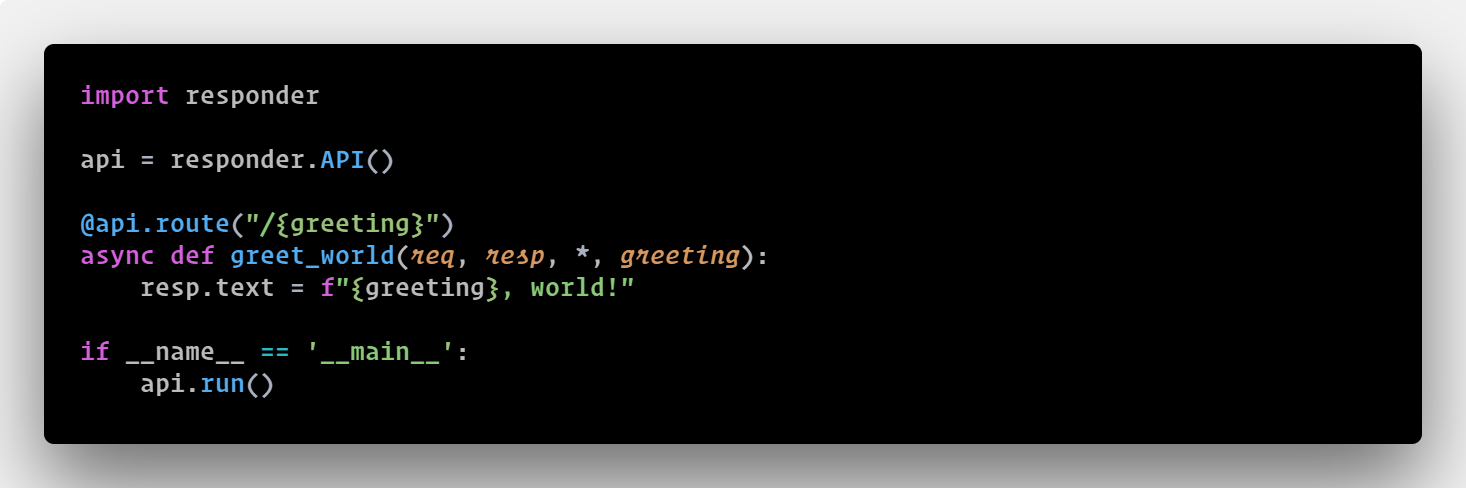](https://responder.readthedocs.io)
|
||||
|
||||
api = responder.API()
|
||||
Powered by [Starlette](https://www.starlette.io/). That `async` declaration is optional.
|
||||
[View documentation](https://responder.readthedocs.io).
|
||||
|
||||
@api.route("/{greeting}")
|
||||
async def greet_world(req, resp, *, greeting):
|
||||
resp.text = f"{greeting}, world!"
|
||||
This gets you a ASGI app, with a production static files server pre-installed, jinja2
|
||||
templating (without additional imports), and a production webserver based on uvloop,
|
||||
serving up requests with gzip compression automatically.
|
||||
|
||||
if __name__ == "__main__":
|
||||
api.run()
|
||||
```
|
||||
## Testimonials
|
||||
|
||||
$ pip install responder
|
||||
> "Pleasantly very taken with python-responder.
|
||||
> [@kennethreitz](https://twitter.com/kennethreitz) at his absolute best." —Rudraksh
|
||||
> M.K.
|
||||
|
||||
That's it. Supports Python 3.10+.
|
||||
> "ASGI is going to enable all sorts of new high-performance web services. It's awesome
|
||||
> to see Responder starting to take advantage of that." — Tom Christie author of
|
||||
> [Django REST Framework](https://www.django-rest-framework.org/)
|
||||
|
||||
## The Basics
|
||||
> "I love that you are exploring new patterns. Go go go!" — Danny Greenfield, author of
|
||||
> [Two Scoops of Django]()
|
||||
|
||||
- `resp.text` sends back text. `resp.html` sends back HTML. `resp.content` sends back bytes.
|
||||
- `resp.media` sends back JSON (or YAML, with content negotiation).
|
||||
- `resp.file("path.pdf")` serves a file with automatic content-type detection.
|
||||
- `req.headers` is case-insensitive. `req.params` gives you query parameters.
|
||||
- Both sync and async views work — the `async` is optional.
|
||||
## More Examples
|
||||
|
||||
## Highlights
|
||||
See
|
||||
[the documentation's feature tour](https://responder.readthedocs.io/en/latest/tour.html)
|
||||
for more details on features available in Responder.
|
||||
|
||||
```python
|
||||
# Type-safe route parameters
|
||||
@api.route("/users/{user_id:int}")
|
||||
async def get_user(req, resp, *, user_id):
|
||||
resp.media = {"id": user_id}
|
||||
# Installing Responder
|
||||
|
||||
# HTTP method filtering
|
||||
@api.route("/items", methods=["POST"])
|
||||
async def create_item(req, resp):
|
||||
data = await req.media()
|
||||
resp.media = {"created": data}
|
||||
Install the most recent stable release:
|
||||
|
||||
# Class-based views
|
||||
@api.route("/things/{id}")
|
||||
class ThingResource:
|
||||
def on_get(self, req, resp, *, id):
|
||||
resp.media = {"id": id}
|
||||
def on_post(self, req, resp, *, id):
|
||||
resp.text = "created"
|
||||
pip install --upgrade responder
|
||||
|
||||
# Before-request hooks (auth, rate limiting, etc.)
|
||||
@api.route(before_request=True)
|
||||
def check_auth(req, resp):
|
||||
if not req.headers.get("Authorization"):
|
||||
resp.status_code = 401
|
||||
resp.media = {"error": "unauthorized"}
|
||||
Or, install directly from the repository:
|
||||
|
||||
# Custom error handling
|
||||
@api.exception_handler(ValueError)
|
||||
async def handle_error(req, resp, exc):
|
||||
resp.status_code = 400
|
||||
resp.media = {"error": str(exc)}
|
||||
pip install 'responder @ git+https://github.com/kennethreitz/responder.git'
|
||||
|
||||
# Lifespan events
|
||||
from contextlib import asynccontextmanager
|
||||
Only **Python 3.6+** is supported.
|
||||
|
||||
@asynccontextmanager
|
||||
async def lifespan(app):
|
||||
print("starting up")
|
||||
yield
|
||||
print("shutting down")
|
||||
# The Basic Idea
|
||||
|
||||
api = responder.API(lifespan=lifespan)
|
||||
The primary concept here is to bring the niceties that are brought forth from both Flask
|
||||
and Falcon and unify them into a single framework, along with some new ideas I have. I
|
||||
also wanted to take some of the API primitives that are instilled in the Requests
|
||||
library and put them into a web framework. So, you'll find a lot of parallels here with
|
||||
Requests.
|
||||
|
||||
# GraphQL
|
||||
import graphene
|
||||
api.graphql("/graphql", schema=graphene.Schema(query=Query))
|
||||
- Setting `resp.content` sends back bytes.
|
||||
- Setting `resp.text` sends back unicode, while setting `resp.html` sends back HTML.
|
||||
- Setting `resp.media` sends back JSON/YAML (`.text`/`.html`/`.content` override this).
|
||||
- Case-insensitive `req.headers` dict (from Requests directly).
|
||||
- `resp.status_code`, `req.method`, `req.url`, and other familiar friends.
|
||||
|
||||
# WebSockets
|
||||
@api.route("/ws", websocket=True)
|
||||
async def websocket(ws):
|
||||
await ws.accept()
|
||||
while True:
|
||||
name = await ws.receive_text()
|
||||
await ws.send_text(f"Hello {name}!")
|
||||
## Ideas
|
||||
|
||||
# Mount WSGI/ASGI apps
|
||||
from flask import Flask
|
||||
flask_app = Flask(__name__)
|
||||
api.mount("/flask", flask_app)
|
||||
- Flask-style route expression, with new capabilities -- all while using Python 3.6+'s
|
||||
new f-string syntax.
|
||||
- I love Falcon's "every request and response is passed into to each view and mutated"
|
||||
methodology, especially `response.media`, and have used it here. In addition to
|
||||
supporting JSON, I have decided to support YAML as well, as Kubernetes is slowly
|
||||
taking over the world, and it uses YAML for all the things. Content-negotiation and
|
||||
all that.
|
||||
- **A built in testing client that uses the actual Requests you know and love**.
|
||||
- The ability to mount other WSGI apps easily.
|
||||
- Automatic gzipped-responses.
|
||||
- In addition to Falcon's `on_get`, `on_post`, etc methods, Responder features an
|
||||
`on_request` method, which gets called on every type of request, much like Requests.
|
||||
- A production static file server is built-in.
|
||||
- Uvicorn built-in as a production web server. I would have chosen Gunicorn, but it
|
||||
doesn't run on Windows. Plus, Uvicorn serves well to protect against slowloris
|
||||
attacks, making nginx unnecessary in production.
|
||||
- GraphQL support, via Graphene. The goal here is to have any GraphQL query exposable at
|
||||
any route, magically.
|
||||
- Provide an official way to run webpack.
|
||||
|
||||
# Background tasks
|
||||
@api.route("/work")
|
||||
def do_work(req, resp):
|
||||
@api.background.task
|
||||
def process():
|
||||
import time; time.sleep(10)
|
||||
process()
|
||||
resp.media = {"status": "processing"}
|
||||
```
|
||||
## Development
|
||||
|
||||
Built-in OpenAPI docs, cookie-based sessions, gzip compression, static file serving, Jinja2 templates, and a production uvicorn server.
|
||||
|
||||
Route convertors: `str`, `int`, `float`, `uuid`, `path`.
|
||||
|
||||
## Documentation
|
||||
|
||||
https://responder.kennethreitz.org
|
||||
See [Development Sandbox](DEVELOP.md).
|
||||
|
||||
@@ -0,0 +1,37 @@
|
||||
# ruff: noqa: S605, S607
|
||||
"""
|
||||
Build and publish a .deb package.
|
||||
https://pypi.python.org/pypi/stdeb/0.8.5#quickstart-2-just-tell-me-the-fastest-way-to-make-a-deb
|
||||
"""
|
||||
|
||||
import os
|
||||
from shutil import rmtree
|
||||
|
||||
here = os.path.abspath(os.path.dirname(__file__))
|
||||
|
||||
|
||||
def get_version():
|
||||
import responder
|
||||
|
||||
return responder.__version__
|
||||
|
||||
|
||||
def run():
|
||||
version = get_version()
|
||||
try:
|
||||
print("Removing previous builds")
|
||||
rmtree(os.path.join(here, "deb_dist"))
|
||||
except FileNotFoundError:
|
||||
pass
|
||||
print("Creating Debian package manifest")
|
||||
os.system(
|
||||
"python setup.py --command-packages=stdeb.command sdist_dsc "
|
||||
"-z artful --package3=pipenv --depends3=python3-virtualenv-clone"
|
||||
)
|
||||
print("Building .deb")
|
||||
os.chdir(f"deb_dist/pipenv-{version}")
|
||||
os.system("dpkg-buildpackage -rfakeroot -uc -us")
|
||||
|
||||
|
||||
if __name__ == "__main__":
|
||||
run()
|
||||
@@ -0,0 +1,6 @@
|
||||
alabaster<0.8
|
||||
jinja2<3.2
|
||||
markupsafe<4
|
||||
readme-renderer<45
|
||||
sphinx>=5,<9
|
||||
sphinxcontrib-websupport<2.1
|
||||
@@ -0,0 +1,7 @@
|
||||
/* Hide module name and default value for environment variable section */
|
||||
div[id$="environment-variables"] code.descclassname {
|
||||
display: none;
|
||||
}
|
||||
div[id$="environment-variables"] em.property {
|
||||
display: none;
|
||||
}
|
||||
Binary file not shown.
File diff suppressed because one or more lines are too long
File diff suppressed because one or more lines are too long
File diff suppressed because one or more lines are too long
@@ -0,0 +1,19 @@
|
||||
|
||||
/*
|
||||
Copyright (C) 2011-2018 Hoefler & Co.
|
||||
This software is the property of Hoefler & Co. (H&Co).
|
||||
Your right to access and use this software is subject to the
|
||||
applicable License Agreement, or Terms of Service, that exists
|
||||
between you and H&Co. If no such agreement exists, you may not
|
||||
access or use this software for any purpose.
|
||||
This software may only be hosted at the locations specified in
|
||||
the applicable License Agreement or Terms of Service, and only
|
||||
for the purposes expressly set forth therein. You may not copy,
|
||||
modify, convert, create derivative works from or distribute this
|
||||
software in any way, or make it accessible to any third party,
|
||||
without first obtaining the written permission of H&Co.
|
||||
For more information, please visit us at http://typography.com.
|
||||
148887-130097-20181011
|
||||
*/
|
||||
|
||||
<!-- sorry your browser is not supported. -->
|
||||
Binary file not shown.
File diff suppressed because one or more lines are too long
File diff suppressed because one or more lines are too long
Binary file not shown.
File diff suppressed because one or more lines are too long
Binary file not shown.
File diff suppressed because one or more lines are too long
File diff suppressed because one or more lines are too long
File diff suppressed because one or more lines are too long
File diff suppressed because one or more lines are too long
File diff suppressed because one or more lines are too long
File diff suppressed because one or more lines are too long
Binary file not shown.
Binary file not shown.
Binary file not shown.
Binary file not shown.
Binary file not shown.
File diff suppressed because one or more lines are too long
File diff suppressed because one or more lines are too long
Binary file not shown.
File diff suppressed because one or more lines are too long
File diff suppressed because one or more lines are too long
Binary file not shown.
File diff suppressed because one or more lines are too long
@@ -0,0 +1,177 @@
|
||||
/*
|
||||
Copyright (C) 2011-2018 Hoefler & Co.
|
||||
This software is the property of Hoefler & Co. (H&Co).
|
||||
Your right to access and use this software is subject to the
|
||||
applicable License Agreement, or Terms of Service, that exists
|
||||
between you and H&Co. If no such agreement exists, you may not
|
||||
access or use this software for any purpose.
|
||||
This software may only be hosted at the locations specified in
|
||||
the applicable License Agreement or Terms of Service, and only
|
||||
for the purposes expressly set forth therein. You may not copy,
|
||||
modify, convert, create derivative works from or distribute this
|
||||
software in any way, or make it accessible to any third party,
|
||||
without first obtaining the written permission of H&Co.
|
||||
For more information, please visit us at http://typography.com.
|
||||
148887-130097-20181011
|
||||
*/
|
||||
|
||||
@font-face {
|
||||
font-family: "Mercury Text G1 A";
|
||||
src: url("http://python-responder.org/en/latest/_static/fonts/692185/AA83D0999C9464BC6.eot");
|
||||
src: url("http://python-responder.org/en/latest/_static/fonts/692185/AA83D0999C9464BC6.eot?#hco")
|
||||
format("embedded-opentype");
|
||||
font-style: normal;
|
||||
font-weight: 400;
|
||||
}
|
||||
@font-face {
|
||||
font-family: "Mercury Text G1 4r";
|
||||
src: url("http://python-responder.org/en/latest/_static/fonts/692185/AA83D0999C9464BC6.eot");
|
||||
src: url("http://python-responder.org/en/latest/_static/fonts/692185/AA83D0999C9464BC6.eot?#hco")
|
||||
format("embedded-opentype");
|
||||
font-style: normal;
|
||||
font-weight: 400;
|
||||
}
|
||||
@font-face {
|
||||
font-family: "Mercury Text G1 A";
|
||||
src: url("http://python-responder.org/en/latest/_static/fonts/692185/005CED86771E6F899.eot");
|
||||
src: url("http://python-responder.org/en/latest/_static/fonts/692185/005CED86771E6F899.eot?#hco")
|
||||
format("embedded-opentype");
|
||||
font-style: italic;
|
||||
font-weight: 400;
|
||||
}
|
||||
@font-face {
|
||||
font-family: "Mercury Text G1 4i";
|
||||
src: url("http://python-responder.org/en/latest/_static/fonts/692185/005CED86771E6F899.eot");
|
||||
src: url("http://python-responder.org/en/latest/_static/fonts/692185/005CED86771E6F899.eot?#hco")
|
||||
format("embedded-opentype");
|
||||
font-style: italic;
|
||||
font-weight: 400;
|
||||
}
|
||||
@font-face {
|
||||
font-family: "Mercury Text G1 A";
|
||||
src: url("http://python-responder.org/en/latest/_static/fonts/692185/40351B0A9DF3B9622.eot");
|
||||
src: url("http://python-responder.org/en/latest/_static/fonts/692185/40351B0A9DF3B9622.eot?#hco")
|
||||
format("embedded-opentype");
|
||||
font-style: normal;
|
||||
font-weight: 600;
|
||||
}
|
||||
@font-face {
|
||||
font-family: "Mercury Text G1 6r";
|
||||
src: url("http://python-responder.org/en/latest/_static/fonts/692185/40351B0A9DF3B9622.eot");
|
||||
src: url("http://python-responder.org/en/latest/_static/fonts/692185/40351B0A9DF3B9622.eot?#hco")
|
||||
format("embedded-opentype");
|
||||
font-style: normal;
|
||||
font-weight: 600;
|
||||
}
|
||||
@font-face {
|
||||
font-family: "Mercury Text G1 A";
|
||||
src: url("http://python-responder.org/en/latest/_static/fonts/692185/3A39878E22934F8AD.eot");
|
||||
src: url("http://python-responder.org/en/latest/_static/fonts/692185/3A39878E22934F8AD.eot?#hco")
|
||||
format("embedded-opentype");
|
||||
font-style: italic;
|
||||
font-weight: 600;
|
||||
}
|
||||
@font-face {
|
||||
font-family: "Mercury Text G1 6i";
|
||||
src: url("http://python-responder.org/en/latest/_static/fonts/692185/3A39878E22934F8AD.eot");
|
||||
src: url("http://python-responder.org/en/latest/_static/fonts/692185/3A39878E22934F8AD.eot?#hco")
|
||||
format("embedded-opentype");
|
||||
font-style: italic;
|
||||
font-weight: 600;
|
||||
}
|
||||
@font-face {
|
||||
font-family: "Mercury Text G1 A";
|
||||
src: url("http://python-responder.org/en/latest/_static/fonts/692185/DD7AD6D5FDE05ABCA.eot");
|
||||
src: url("http://python-responder.org/en/latest/_static/fonts/692185/DD7AD6D5FDE05ABCA.eot?#hco")
|
||||
format("embedded-opentype");
|
||||
font-style: normal;
|
||||
font-weight: 700;
|
||||
}
|
||||
@font-face {
|
||||
font-family: "Mercury Text G1 7r";
|
||||
src: url("http://python-responder.org/en/latest/_static/fonts/692185/DD7AD6D5FDE05ABCA.eot");
|
||||
src: url("http://python-responder.org/en/latest/_static/fonts/692185/DD7AD6D5FDE05ABCA.eot?#hco")
|
||||
format("embedded-opentype");
|
||||
font-style: normal;
|
||||
font-weight: 700;
|
||||
}
|
||||
@font-face {
|
||||
font-family: "Mercury Text G1 A";
|
||||
src: url("http://python-responder.org/en/latest/_static/fonts/692185/777143010DB6642D4.eot");
|
||||
src: url("http://python-responder.org/en/latest/_static/fonts/692185/777143010DB6642D4.eot?#hco")
|
||||
format("embedded-opentype");
|
||||
font-style: italic;
|
||||
font-weight: 700;
|
||||
}
|
||||
@font-face {
|
||||
font-family: "Mercury Text G1 7i";
|
||||
src: url("http://python-responder.org/en/latest/_static/fonts/692185/777143010DB6642D4.eot");
|
||||
src: url("http://python-responder.org/en/latest/_static/fonts/692185/777143010DB6642D4.eot?#hco")
|
||||
format("embedded-opentype");
|
||||
font-style: italic;
|
||||
font-weight: 700;
|
||||
}
|
||||
@font-face {
|
||||
font-family: "Operator Mono SSm A";
|
||||
src: url("http://python-responder.org/en/latest/_static/fonts/692185/4A801A74B6CEC6B76.eot");
|
||||
src: url("http://python-responder.org/en/latest/_static/fonts/692185/4A801A74B6CEC6B76.eot?#hco")
|
||||
format("embedded-opentype");
|
||||
font-style: normal;
|
||||
font-weight: 400;
|
||||
}
|
||||
@font-face {
|
||||
font-family: "Operator Mono SSm 4r";
|
||||
src: url("http://python-responder.org/en/latest/_static/fonts/692185/4A801A74B6CEC6B76.eot");
|
||||
src: url("http://python-responder.org/en/latest/_static/fonts/692185/4A801A74B6CEC6B76.eot?#hco")
|
||||
format("embedded-opentype");
|
||||
font-style: normal;
|
||||
font-weight: 400;
|
||||
}
|
||||
@font-face {
|
||||
font-family: "Operator Mono SSm A";
|
||||
src: url("http://python-responder.org/en/latest/_static/fonts/692185/7E9ADDBCA2C8BD433.eot");
|
||||
src: url("http://python-responder.org/en/latest/_static/fonts/692185/7E9ADDBCA2C8BD433.eot?#hco")
|
||||
format("embedded-opentype");
|
||||
font-style: italic;
|
||||
font-weight: 400;
|
||||
}
|
||||
@font-face {
|
||||
font-family: "Operator Mono SSm 4i";
|
||||
src: url("http://python-responder.org/en/latest/_static/fonts/692185/7E9ADDBCA2C8BD433.eot");
|
||||
src: url("http://python-responder.org/en/latest/_static/fonts/692185/7E9ADDBCA2C8BD433.eot?#hco")
|
||||
format("embedded-opentype");
|
||||
font-style: italic;
|
||||
font-weight: 400;
|
||||
}
|
||||
@font-face {
|
||||
font-family: "Operator Mono SSm A";
|
||||
src: url("http://python-responder.org/en/latest/_static/fonts/692185/13B223000FA5C8685.eot");
|
||||
src: url("http://python-responder.org/en/latest/_static/fonts/692185/13B223000FA5C8685.eot?#hco")
|
||||
format("embedded-opentype");
|
||||
font-style: normal;
|
||||
font-weight: 700;
|
||||
}
|
||||
@font-face {
|
||||
font-family: "Operator Mono SSm 7r";
|
||||
src: url("http://python-responder.org/en/latest/_static/fonts/692185/13B223000FA5C8685.eot");
|
||||
src: url("http://python-responder.org/en/latest/_static/fonts/692185/13B223000FA5C8685.eot?#hco")
|
||||
format("embedded-opentype");
|
||||
font-style: normal;
|
||||
font-weight: 700;
|
||||
}
|
||||
@font-face {
|
||||
font-family: "Operator Mono SSm A";
|
||||
src: url("http://python-responder.org/en/latest/_static/fonts/692185/0AC552691F872135E.eot");
|
||||
src: url("http://python-responder.org/en/latest/_static/fonts/692185/0AC552691F872135E.eot?#hco")
|
||||
format("embedded-opentype");
|
||||
font-style: italic;
|
||||
font-weight: 700;
|
||||
}
|
||||
@font-face {
|
||||
font-family: "Operator Mono SSm 7i";
|
||||
src: url("http://python-responder.org/en/latest/_static/fonts/692185/0AC552691F872135E.eot");
|
||||
src: url("http://python-responder.org/en/latest/_static/fonts/692185/0AC552691F872135E.eot?#hco")
|
||||
format("embedded-opentype");
|
||||
font-style: italic;
|
||||
font-weight: 700;
|
||||
}
|
||||
File diff suppressed because one or more lines are too long
File diff suppressed because one or more lines are too long
Binary file not shown.
File diff suppressed because one or more lines are too long
Binary file not shown.
@@ -0,0 +1,177 @@
|
||||
/*
|
||||
Copyright (C) 2011-2018 Hoefler & Co.
|
||||
This software is the property of Hoefler & Co. (H&Co).
|
||||
Your right to access and use this software is subject to the
|
||||
applicable License Agreement, or Terms of Service, that exists
|
||||
between you and H&Co. If no such agreement exists, you may not
|
||||
access or use this software for any purpose.
|
||||
This software may only be hosted at the locations specified in
|
||||
the applicable License Agreement or Terms of Service, and only
|
||||
for the purposes expressly set forth therein. You may not copy,
|
||||
modify, convert, create derivative works from or distribute this
|
||||
software in any way, or make it accessible to any third party,
|
||||
without first obtaining the written permission of H&Co.
|
||||
For more information, please visit us at http://typography.com.
|
||||
148887-130097-20181011
|
||||
*/
|
||||
|
||||
@font-face {
|
||||
font-family: "Mercury Text G1 A";
|
||||
src: url("http://python-responder.org/en/latest/_static/fonts/692185/7D0605C11BA3A93EF.eot");
|
||||
src: url("http://python-responder.org/en/latest/_static/fonts/692185/7D0605C11BA3A93EF.eot?#hco")
|
||||
format("embedded-opentype");
|
||||
font-style: normal;
|
||||
font-weight: 400;
|
||||
}
|
||||
@font-face {
|
||||
font-family: "Mercury Text G1 4r";
|
||||
src: url("http://python-responder.org/en/latest/_static/fonts/692185/7D0605C11BA3A93EF.eot");
|
||||
src: url("http://python-responder.org/en/latest/_static/fonts/692185/7D0605C11BA3A93EF.eot?#hco")
|
||||
format("embedded-opentype");
|
||||
font-style: normal;
|
||||
font-weight: 400;
|
||||
}
|
||||
@font-face {
|
||||
font-family: "Mercury Text G1 A";
|
||||
src: url("http://python-responder.org/en/latest/_static/fonts/692185/81A13EBFC10447CAC.eot");
|
||||
src: url("http://python-responder.org/en/latest/_static/fonts/692185/81A13EBFC10447CAC.eot?#hco")
|
||||
format("embedded-opentype");
|
||||
font-style: italic;
|
||||
font-weight: 400;
|
||||
}
|
||||
@font-face {
|
||||
font-family: "Mercury Text G1 4i";
|
||||
src: url("http://python-responder.org/en/latest/_static/fonts/692185/81A13EBFC10447CAC.eot");
|
||||
src: url("http://python-responder.org/en/latest/_static/fonts/692185/81A13EBFC10447CAC.eot?#hco")
|
||||
format("embedded-opentype");
|
||||
font-style: italic;
|
||||
font-weight: 400;
|
||||
}
|
||||
@font-face {
|
||||
font-family: "Mercury Text G1 A";
|
||||
src: url("http://python-responder.org/en/latest/_static/fonts/692185/25E3F5D50DDE1C555.eot");
|
||||
src: url("http://python-responder.org/en/latest/_static/fonts/692185/25E3F5D50DDE1C555.eot?#hco")
|
||||
format("embedded-opentype");
|
||||
font-style: normal;
|
||||
font-weight: 600;
|
||||
}
|
||||
@font-face {
|
||||
font-family: "Mercury Text G1 6r";
|
||||
src: url("http://python-responder.org/en/latest/_static/fonts/692185/25E3F5D50DDE1C555.eot");
|
||||
src: url("http://python-responder.org/en/latest/_static/fonts/692185/25E3F5D50DDE1C555.eot?#hco")
|
||||
format("embedded-opentype");
|
||||
font-style: normal;
|
||||
font-weight: 600;
|
||||
}
|
||||
@font-face {
|
||||
font-family: "Mercury Text G1 A";
|
||||
src: url("http://python-responder.org/en/latest/_static/fonts/692185/F526A6C670B9765E2.eot");
|
||||
src: url("http://python-responder.org/en/latest/_static/fonts/692185/F526A6C670B9765E2.eot?#hco")
|
||||
format("embedded-opentype");
|
||||
font-style: italic;
|
||||
font-weight: 600;
|
||||
}
|
||||
@font-face {
|
||||
font-family: "Mercury Text G1 6i";
|
||||
src: url("http://python-responder.org/en/latest/_static/fonts/692185/F526A6C670B9765E2.eot");
|
||||
src: url("http://python-responder.org/en/latest/_static/fonts/692185/F526A6C670B9765E2.eot?#hco")
|
||||
format("embedded-opentype");
|
||||
font-style: italic;
|
||||
font-weight: 600;
|
||||
}
|
||||
@font-face {
|
||||
font-family: "Mercury Text G1 A";
|
||||
src: url("http://python-responder.org/en/latest/_static/fonts/692185/7DCD4B5CCAEE3223E.eot");
|
||||
src: url("http://python-responder.org/en/latest/_static/fonts/692185/7DCD4B5CCAEE3223E.eot?#hco")
|
||||
format("embedded-opentype");
|
||||
font-style: normal;
|
||||
font-weight: 700;
|
||||
}
|
||||
@font-face {
|
||||
font-family: "Mercury Text G1 7r";
|
||||
src: url("http://python-responder.org/en/latest/_static/fonts/692185/7DCD4B5CCAEE3223E.eot");
|
||||
src: url("http://python-responder.org/en/latest/_static/fonts/692185/7DCD4B5CCAEE3223E.eot?#hco")
|
||||
format("embedded-opentype");
|
||||
font-style: normal;
|
||||
font-weight: 700;
|
||||
}
|
||||
@font-face {
|
||||
font-family: "Mercury Text G1 A";
|
||||
src: url("http://python-responder.org/en/latest/_static/fonts/692185/C08332ABD7F145352.eot");
|
||||
src: url("http://python-responder.org/en/latest/_static/fonts/692185/C08332ABD7F145352.eot?#hco")
|
||||
format("embedded-opentype");
|
||||
font-style: italic;
|
||||
font-weight: 700;
|
||||
}
|
||||
@font-face {
|
||||
font-family: "Mercury Text G1 7i";
|
||||
src: url("http://python-responder.org/en/latest/_static/fonts/692185/C08332ABD7F145352.eot");
|
||||
src: url("http://python-responder.org/en/latest/_static/fonts/692185/C08332ABD7F145352.eot?#hco")
|
||||
format("embedded-opentype");
|
||||
font-style: italic;
|
||||
font-weight: 700;
|
||||
}
|
||||
@font-face {
|
||||
font-family: "Operator Mono SSm A";
|
||||
src: url("http://python-responder.org/en/latest/_static/fonts/692185/C579DF5B35B145D49.eot");
|
||||
src: url("http://python-responder.org/en/latest/_static/fonts/692185/C579DF5B35B145D49.eot?#hco")
|
||||
format("embedded-opentype");
|
||||
font-style: normal;
|
||||
font-weight: 400;
|
||||
}
|
||||
@font-face {
|
||||
font-family: "Operator Mono SSm 4r";
|
||||
src: url("http://python-responder.org/en/latest/_static/fonts/692185/C579DF5B35B145D49.eot");
|
||||
src: url("http://python-responder.org/en/latest/_static/fonts/692185/C579DF5B35B145D49.eot?#hco")
|
||||
format("embedded-opentype");
|
||||
font-style: normal;
|
||||
font-weight: 400;
|
||||
}
|
||||
@font-face {
|
||||
font-family: "Operator Mono SSm A";
|
||||
src: url("http://python-responder.org/en/latest/_static/fonts/692185/E3597D43523236FD8.eot");
|
||||
src: url("http://python-responder.org/en/latest/_static/fonts/692185/E3597D43523236FD8.eot?#hco")
|
||||
format("embedded-opentype");
|
||||
font-style: italic;
|
||||
font-weight: 400;
|
||||
}
|
||||
@font-face {
|
||||
font-family: "Operator Mono SSm 4i";
|
||||
src: url("http://python-responder.org/en/latest/_static/fonts/692185/E3597D43523236FD8.eot");
|
||||
src: url("http://python-responder.org/en/latest/_static/fonts/692185/E3597D43523236FD8.eot?#hco")
|
||||
format("embedded-opentype");
|
||||
font-style: italic;
|
||||
font-weight: 400;
|
||||
}
|
||||
@font-face {
|
||||
font-family: "Operator Mono SSm A";
|
||||
src: url("http://python-responder.org/en/latest/_static/fonts/692185/3CBFC66855DD9B6EA.eot");
|
||||
src: url("http://python-responder.org/en/latest/_static/fonts/692185/3CBFC66855DD9B6EA.eot?#hco")
|
||||
format("embedded-opentype");
|
||||
font-style: normal;
|
||||
font-weight: 700;
|
||||
}
|
||||
@font-face {
|
||||
font-family: "Operator Mono SSm 7r";
|
||||
src: url("http://python-responder.org/en/latest/_static/fonts/692185/3CBFC66855DD9B6EA.eot");
|
||||
src: url("http://python-responder.org/en/latest/_static/fonts/692185/3CBFC66855DD9B6EA.eot?#hco")
|
||||
format("embedded-opentype");
|
||||
font-style: normal;
|
||||
font-weight: 700;
|
||||
}
|
||||
@font-face {
|
||||
font-family: "Operator Mono SSm A";
|
||||
src: url("http://python-responder.org/en/latest/_static/fonts/692185/09E151FC31ECEF374.eot");
|
||||
src: url("http://python-responder.org/en/latest/_static/fonts/692185/09E151FC31ECEF374.eot?#hco")
|
||||
format("embedded-opentype");
|
||||
font-style: italic;
|
||||
font-weight: 700;
|
||||
}
|
||||
@font-face {
|
||||
font-family: "Operator Mono SSm 7i";
|
||||
src: url("http://python-responder.org/en/latest/_static/fonts/692185/09E151FC31ECEF374.eot");
|
||||
src: url("http://python-responder.org/en/latest/_static/fonts/692185/09E151FC31ECEF374.eot?#hco")
|
||||
format("embedded-opentype");
|
||||
font-style: italic;
|
||||
font-weight: 700;
|
||||
}
|
||||
File diff suppressed because one or more lines are too long
File diff suppressed because one or more lines are too long
Binary file not shown.
File diff suppressed because one or more lines are too long
Binary file not shown.
File diff suppressed because one or more lines are too long
File diff suppressed because one or more lines are too long
File diff suppressed because one or more lines are too long
File diff suppressed because one or more lines are too long
Binary file not shown.
File diff suppressed because one or more lines are too long
File diff suppressed because one or more lines are too long
Binary file not shown.
Binary file not shown.
Binary file not shown.
File diff suppressed because one or more lines are too long
File diff suppressed because one or more lines are too long
File diff suppressed because one or more lines are too long
File diff suppressed because one or more lines are too long
Binary file not shown.
File diff suppressed because one or more lines are too long
File diff suppressed because one or more lines are too long
@@ -0,0 +1,19 @@
|
||||
|
||||
/*
|
||||
Copyright (C) 2011-2018 Hoefler & Co.
|
||||
This software is the property of Hoefler & Co. (H&Co).
|
||||
Your right to access and use this software is subject to the
|
||||
applicable License Agreement, or Terms of Service, that exists
|
||||
between you and H&Co. If no such agreement exists, you may not
|
||||
access or use this software for any purpose.
|
||||
This software may only be hosted at the locations specified in
|
||||
the applicable License Agreement or Terms of Service, and only
|
||||
for the purposes expressly set forth therein. You may not copy,
|
||||
modify, convert, create derivative works from or distribute this
|
||||
software in any way, or make it accessible to any third party,
|
||||
without first obtaining the written permission of H&Co.
|
||||
For more information, please visit us at http://typography.com.
|
||||
148887-130097-20181011
|
||||
*/
|
||||
|
||||
<!-- sorry your browser is not supported. -->
|
||||
File diff suppressed because one or more lines are too long
@@ -0,0 +1,161 @@
|
||||
/*
|
||||
* Konami-JS ~
|
||||
* :: Now with support for touch events and multiple instances for
|
||||
* :: those situations that call for multiple easter eggs!
|
||||
* Code: https://github.com/snaptortoise/konami-js
|
||||
* Copyright (c) 2009 George Mandis (georgemandis.com, snaptortoise.com)
|
||||
* Version: 1.6.2 (7/17/2018)
|
||||
* Licensed under the MIT License (http://opensource.org/licenses/MIT)
|
||||
* Tested in: Safari 4+, Google Chrome 4+, Firefox 3+, IE7+, Mobile Safari 2.2.1+ and Android
|
||||
*/
|
||||
|
||||
var Konami = function (callback) {
|
||||
var konami = {
|
||||
addEvent: function (obj, type, fn, ref_obj) {
|
||||
if (obj.addEventListener) obj.addEventListener(type, fn, false);
|
||||
else if (obj.attachEvent) {
|
||||
// IE
|
||||
obj["e" + type + fn] = fn;
|
||||
obj[type + fn] = function () {
|
||||
obj["e" + type + fn](window.event, ref_obj);
|
||||
};
|
||||
obj.attachEvent("on" + type, obj[type + fn]);
|
||||
}
|
||||
},
|
||||
removeEvent: function (obj, eventName, eventCallback) {
|
||||
if (obj.removeEventListener) {
|
||||
obj.removeEventListener(eventName, eventCallback);
|
||||
} else if (obj.attachEvent) {
|
||||
obj.detachEvent(eventName);
|
||||
}
|
||||
},
|
||||
input: "",
|
||||
pattern: "38384040373937396665",
|
||||
keydownHandler: function (e, ref_obj) {
|
||||
if (ref_obj) {
|
||||
konami = ref_obj;
|
||||
} // IE
|
||||
konami.input += e ? e.keyCode : event.keyCode;
|
||||
if (konami.input.length > konami.pattern.length) {
|
||||
konami.input = konami.input.substr(konami.input.length - konami.pattern.length);
|
||||
}
|
||||
if (konami.input === konami.pattern) {
|
||||
konami.code(konami._currentLink);
|
||||
konami.input = "";
|
||||
e.preventDefault();
|
||||
return false;
|
||||
}
|
||||
},
|
||||
load: function (link) {
|
||||
this._currentLink = link;
|
||||
this.addEvent(document, "keydown", this.keydownHandler, this);
|
||||
this.iphone.load(link);
|
||||
},
|
||||
unload: function () {
|
||||
this.removeEvent(document, "keydown", this.keydownHandler);
|
||||
this.iphone.unload();
|
||||
},
|
||||
code: function (link) {
|
||||
window.location = link;
|
||||
},
|
||||
iphone: {
|
||||
start_x: 0,
|
||||
start_y: 0,
|
||||
stop_x: 0,
|
||||
stop_y: 0,
|
||||
tap: false,
|
||||
capture: false,
|
||||
orig_keys: "",
|
||||
keys: [
|
||||
"UP",
|
||||
"UP",
|
||||
"DOWN",
|
||||
"DOWN",
|
||||
"LEFT",
|
||||
"RIGHT",
|
||||
"LEFT",
|
||||
"RIGHT",
|
||||
"TAP",
|
||||
"TAP",
|
||||
],
|
||||
input: [],
|
||||
code: function (link) {
|
||||
konami.code(link);
|
||||
},
|
||||
touchmoveHandler: function (e) {
|
||||
if (e.touches.length === 1 && konami.iphone.capture === true) {
|
||||
var touch = e.touches[0];
|
||||
konami.iphone.stop_x = touch.pageX;
|
||||
konami.iphone.stop_y = touch.pageY;
|
||||
konami.iphone.tap = false;
|
||||
konami.iphone.capture = false;
|
||||
konami.iphone.check_direction();
|
||||
}
|
||||
},
|
||||
touchendHandler: function () {
|
||||
konami.iphone.input.push(konami.iphone.check_direction());
|
||||
|
||||
if (konami.iphone.input.length > konami.iphone.keys.length)
|
||||
konami.iphone.input.shift();
|
||||
|
||||
if (konami.iphone.input.length === konami.iphone.keys.length) {
|
||||
var match = true;
|
||||
for (var i = 0; i < konami.iphone.keys.length; i++) {
|
||||
if (konami.iphone.input[i] !== konami.iphone.keys[i]) {
|
||||
match = false;
|
||||
}
|
||||
}
|
||||
if (match) {
|
||||
konami.iphone.code(konami._currentLink);
|
||||
}
|
||||
}
|
||||
},
|
||||
touchstartHandler: function (e) {
|
||||
konami.iphone.start_x = e.changedTouches[0].pageX;
|
||||
konami.iphone.start_y = e.changedTouches[0].pageY;
|
||||
konami.iphone.tap = true;
|
||||
konami.iphone.capture = true;
|
||||
},
|
||||
load: function (link) {
|
||||
this.orig_keys = this.keys;
|
||||
konami.addEvent(document, "touchmove", this.touchmoveHandler);
|
||||
konami.addEvent(document, "touchend", this.touchendHandler, false);
|
||||
konami.addEvent(document, "touchstart", this.touchstartHandler);
|
||||
},
|
||||
unload: function () {
|
||||
konami.removeEvent(document, "touchmove", this.touchmoveHandler);
|
||||
konami.removeEvent(document, "touchend", this.touchendHandler);
|
||||
konami.removeEvent(document, "touchstart", this.touchstartHandler);
|
||||
},
|
||||
check_direction: function () {
|
||||
x_magnitude = Math.abs(this.start_x - this.stop_x);
|
||||
y_magnitude = Math.abs(this.start_y - this.stop_y);
|
||||
x = this.start_x - this.stop_x < 0 ? "RIGHT" : "LEFT";
|
||||
y = this.start_y - this.stop_y < 0 ? "DOWN" : "UP";
|
||||
result = x_magnitude > y_magnitude ? x : y;
|
||||
result = this.tap === true ? "TAP" : result;
|
||||
return result;
|
||||
},
|
||||
},
|
||||
};
|
||||
|
||||
typeof callback === "string" && konami.load(callback);
|
||||
if (typeof callback === "function") {
|
||||
konami.code = callback;
|
||||
konami.load();
|
||||
}
|
||||
|
||||
return konami;
|
||||
};
|
||||
|
||||
if (typeof module !== "undefined" && typeof module.exports !== "undefined") {
|
||||
module.exports = Konami;
|
||||
} else {
|
||||
if (typeof define === "function" && define.amd) {
|
||||
define([], function () {
|
||||
return Konami;
|
||||
});
|
||||
} else {
|
||||
window.Konami = Konami;
|
||||
}
|
||||
}
|
||||
@@ -1,21 +1,240 @@
|
||||
<link
|
||||
rel="stylesheet"
|
||||
type="text/css"
|
||||
href="https://cloud.typography.com/7584432/7586812/css/fonts.css"
|
||||
/>
|
||||
<script type="text/javascript">
|
||||
$("#searchbox").hide(0);
|
||||
</script>
|
||||
<!--Alabaster (krTheme++) Hacks -->
|
||||
|
||||
<!-- CSS Adjustments (I'm very picky.) -->
|
||||
<style type="text/css">
|
||||
/* Make the document a little wider. */
|
||||
/* Rezzy requires precise alignment. */
|
||||
img.logo {
|
||||
margin-left: -20px !important;
|
||||
}
|
||||
|
||||
h1 {
|
||||
font-family: "Mercury Text G1 A", "Mercury Text G1 B" !important;
|
||||
font-style: normal !important;
|
||||
font-weight: 600 !important;
|
||||
}
|
||||
|
||||
.section {
|
||||
font-family: "Mercury Text G1 A", "Mercury Text G1 B" !important;
|
||||
font-style: normal !important;
|
||||
font-weight: 400 !important;
|
||||
}
|
||||
|
||||
pre,
|
||||
.pre,
|
||||
.class em,
|
||||
.descname,
|
||||
.method em {
|
||||
font-family: "Operator Mono SSm A", "Operator Mono SSm B", monospace !important;
|
||||
font-weight: 400 !important;
|
||||
}
|
||||
|
||||
.property {
|
||||
color: lightgrey !important;
|
||||
}
|
||||
|
||||
.method .descname {
|
||||
color: #220a54;
|
||||
}
|
||||
|
||||
.method {
|
||||
margin-bottom: 2em;
|
||||
}
|
||||
|
||||
.si,
|
||||
.s2,
|
||||
.s1,
|
||||
.method em,
|
||||
.class em {
|
||||
font-style: italic !important;
|
||||
color: grey;
|
||||
}
|
||||
|
||||
.method em,
|
||||
.class em {
|
||||
margin-left: 0.3em;
|
||||
margin-right: 0.3em;
|
||||
}
|
||||
|
||||
.method p,
|
||||
.class p {
|
||||
font-family: "Mercury Text G1 A", "Mercury Text G1 B";
|
||||
font-style: italic !important;
|
||||
font-weight: 400 !important;
|
||||
font-size: 1.15em;
|
||||
}
|
||||
|
||||
.method p:first,
|
||||
.class p:first {
|
||||
background: #fffcbf;
|
||||
}
|
||||
|
||||
.class .property {
|
||||
display: none;
|
||||
}
|
||||
|
||||
#testimonials p.attribution {
|
||||
margin-top: -1em;
|
||||
}
|
||||
|
||||
/* "Quick Search" should be not be shown for now. */
|
||||
div#searchbox h3 {
|
||||
display: none;
|
||||
}
|
||||
|
||||
/* Make the document a little wider, less code is cut-off. */
|
||||
div.document {
|
||||
width: 1008px;
|
||||
}
|
||||
|
||||
/* Better spacing around code blocks. */
|
||||
/* Much-improved spacing around code blocks. */
|
||||
div.highlight pre {
|
||||
padding: 11px 14px;
|
||||
}
|
||||
|
||||
/* Responsive layout. */
|
||||
/* Remain Responsive! */
|
||||
@media screen and (max-width: 1008px) {
|
||||
div.sphinxsidebar {
|
||||
display: none;
|
||||
}
|
||||
|
||||
div.document {
|
||||
width: 100% !important;
|
||||
}
|
||||
|
||||
/* Have code blocks escape the document right-margin. */
|
||||
div.highlight pre {
|
||||
margin-right: -30px;
|
||||
}
|
||||
}
|
||||
</style>
|
||||
|
||||
<!-- Analytics tracking for Kenneth. -->
|
||||
<script async src="https://www.googletagmanager.com/gtag/js?id=UA-127383416-1"></script>
|
||||
<script>
|
||||
window.dataLayer = window.dataLayer || [];
|
||||
function gtag() {
|
||||
dataLayer.push(arguments);
|
||||
}
|
||||
gtag("js", new Date());
|
||||
|
||||
gtag("config", "UA-127383416-1");
|
||||
</script>
|
||||
|
||||
<!-- There are no more hacks. -->
|
||||
<!-- இڿڰۣ-ڰۣ— -->
|
||||
<!-- Love, Kenneth Reitz -->
|
||||
|
||||
<script src="{{ pathto('_static/', 1) }}/konami.js"></script>
|
||||
<script>
|
||||
var easter_egg = new Konami(
|
||||
"https://www.myfortunecookie.co.uk/fortunes/" +
|
||||
(Math.floor(Math.random() * 152) + 1)
|
||||
);
|
||||
</script>
|
||||
|
||||
<style>
|
||||
.injected {
|
||||
display: none !important;
|
||||
}
|
||||
</style>
|
||||
|
||||
<!-- GitHub Logo -->
|
||||
<a
|
||||
href="https://github.com/kennethreitz/responder"
|
||||
class="github-corner"
|
||||
aria-label="View source on GitHub"
|
||||
>
|
||||
<svg
|
||||
width="80"
|
||||
height="80"
|
||||
viewBox="0 0 250 250"
|
||||
style="fill: #151513; color: #fff; position: absolute; top: 0; border: 0; right: 0"
|
||||
aria-hidden="true"
|
||||
>
|
||||
<path d="M0,0 L115,115 L130,115 L142,142 L250,250 L250,0 Z"></path>
|
||||
<path
|
||||
d="M128.3,109.0 C113.8,99.7 119.0,89.6 119.0,89.6 C122.0,82.7 120.5,78.6 120.5,78.6 C119.2,72.0 123.4,76.3 123.4,76.3 C127.3,80.9 125.5,87.3 125.5,87.3 C122.9,97.6 130.6,101.9 134.4,103.2"
|
||||
fill="currentColor"
|
||||
style="transform-origin: 130px 106px"
|
||||
class="octo-arm"
|
||||
></path>
|
||||
<path
|
||||
d="M115.0,115.0 C114.9,115.1 118.7,116.5 119.8,115.4 L133.7,101.6 C136.9,99.2 139.9,98.4 142.2,98.6 C133.8,88.0 127.5,74.4 143.8,58.0 C148.5,53.4 154.0,51.2 159.7,51.0 C160.3,49.4 163.2,43.6 171.4,40.1 C171.4,40.1 176.1,42.5 178.8,56.2 C183.1,58.6 187.2,61.8 190.9,65.4 C194.5,69.0 197.7,73.2 200.1,77.6 C213.8,80.2 216.3,84.9 216.3,84.9 C212.7,93.1 206.9,96.0 205.4,96.6 C205.1,102.4 203.0,107.8 198.3,112.5 C181.9,128.9 168.3,122.5 157.7,114.1 C157.9,116.9 156.7,120.9 152.7,124.9 L141.0,136.5 C139.8,137.7 141.6,141.9 141.8,141.8 Z"
|
||||
fill="currentColor"
|
||||
class="octo-body"
|
||||
></path>
|
||||
</svg>
|
||||
</a>
|
||||
<style>
|
||||
.github-corner:hover .octo-arm {
|
||||
animation: octocat-wave 560ms ease-in-out;
|
||||
}
|
||||
|
||||
@keyframes octocat-wave {
|
||||
0%,
|
||||
100% {
|
||||
transform: rotate(0);
|
||||
}
|
||||
|
||||
20%,
|
||||
60% {
|
||||
transform: rotate(-25deg);
|
||||
}
|
||||
|
||||
40%,
|
||||
80% {
|
||||
transform: rotate(10deg);
|
||||
}
|
||||
}
|
||||
|
||||
@media (max-width: 500px) {
|
||||
.github-corner:hover .octo-arm {
|
||||
animation: none;
|
||||
}
|
||||
|
||||
.github-corner .octo-arm {
|
||||
animation: octocat-wave 560ms ease-in-out;
|
||||
}
|
||||
}
|
||||
</style>
|
||||
|
||||
<!-- That was not a hack. That was art.
|
||||
|
||||
<!-- UserVoice JavaScript SDK (only needed once on a page) -->
|
||||
<script>
|
||||
(function () {
|
||||
var uv = document.createElement("script");
|
||||
uv.type = "text/javascript";
|
||||
uv.async = true;
|
||||
uv.src = "//widget.uservoice.com/f4AQraEfwInlMzkexfRLg.js";
|
||||
var s = document.getElementsByTagName("script")[0];
|
||||
s.parentNode.insertBefore(uv, s);
|
||||
})();
|
||||
</script>
|
||||
|
||||
<!-- A tab to launch the Classic Widget -->
|
||||
<script>
|
||||
UserVoice = window.UserVoice || [];
|
||||
UserVoice.push([
|
||||
"showTab",
|
||||
"classic_widget",
|
||||
{
|
||||
mode: "feedback",
|
||||
primary_color: "#fa8c28",
|
||||
link_color: "#0a8cc6",
|
||||
forum_id: 913660,
|
||||
tab_label: "Got feedback?",
|
||||
tab_color: "#00994f",
|
||||
tab_position: "bottom-left",
|
||||
tab_inverted: true,
|
||||
},
|
||||
]);
|
||||
</script>
|
||||
|
||||
@@ -1,16 +1,94 @@
|
||||
<p class="logo">
|
||||
<a href="{{ pathto(master_doc) }}">
|
||||
<img class="logo" src="{{ pathto('_static/responder.png', 1) }}" />
|
||||
<img
|
||||
class="logo"
|
||||
src="{{ pathto('_static/responder.png', 1) }}"
|
||||
title="https://kennethreitz.org/tattoos"
|
||||
/>
|
||||
</a>
|
||||
</p>
|
||||
|
||||
<p>
|
||||
<strong>Responder</strong> — a familiar HTTP service framework for Python.
|
||||
<br />
|
||||
<small>v{{ version }}</small>
|
||||
<iframe
|
||||
src="https://ghbtns.com/github-btn.html?user=kennethreitz&repo=responder&type=watch&count=true&size=large"
|
||||
allowtransparency="true"
|
||||
frameborder="0"
|
||||
scrolling="0"
|
||||
width="200px"
|
||||
height="35px"
|
||||
></iframe>
|
||||
</p>
|
||||
<link
|
||||
rel="stylesheet"
|
||||
href="https://cdn.jsdelivr.net/npm/docsearch.js@2/dist/cdn/docsearch.min.css"
|
||||
/>
|
||||
<style>
|
||||
.algolia-autocomplete {
|
||||
width: 100%;
|
||||
height: 1.5em;
|
||||
}
|
||||
.algolia-autocomplete a {
|
||||
border-bottom: none !important;
|
||||
}
|
||||
#doc_search {
|
||||
width: 100%;
|
||||
height: 100%;
|
||||
}
|
||||
</style>
|
||||
<input id="doc_search" placeholder="Search the doc" autofocus />
|
||||
<script
|
||||
type="text/javascript"
|
||||
src="https://cdn.jsdelivr.net/npm/docsearch.js@2/dist/cdn/docsearch.min.js"
|
||||
onload="docsearch({
|
||||
apiKey: 'ac965312db252e0496283c75c6f76f0b',
|
||||
indexName: 'python-responder',
|
||||
inputSelector: '#doc_search',
|
||||
debug: false // Set debug to true if you want to inspect the dropdown
|
||||
})"
|
||||
async
|
||||
></script>
|
||||
|
||||
<p><strong>Responder</strong> is a web service framework, written for human beings.</p>
|
||||
|
||||
<h3>Stay Informed</h3>
|
||||
<p>Receive updates on new releases and upcoming projects.</p>
|
||||
|
||||
<p>
|
||||
<iframe
|
||||
src="https://ghbtns.com/github-btn.html?user=kennethreitz&type=follow&count=true"
|
||||
allowtransparency="true"
|
||||
frameborder="0"
|
||||
scrolling="0"
|
||||
width="200"
|
||||
height="20"
|
||||
></iframe>
|
||||
</p>
|
||||
|
||||
<p>
|
||||
<a
|
||||
href="https://twitter.com/kennethreitz"
|
||||
class="twitter-follow-button"
|
||||
data-show-count="false"
|
||||
>Follow @kennethreitz</a
|
||||
>
|
||||
<script>
|
||||
!(function (d, s, id) {
|
||||
var js,
|
||||
fjs = d.getElementsByTagName(s)[0],
|
||||
p = /^http:/.test(d.location) ? "http" : "https";
|
||||
if (!d.getElementById(id)) {
|
||||
js = d.createElement(s);
|
||||
js.id = id;
|
||||
js.src = p + "://platform.twitter.com/widgets.js";
|
||||
fjs.parentNode.insertBefore(js, fjs);
|
||||
}
|
||||
})(document, "script", "twitter-wjs");
|
||||
</script>
|
||||
</p>
|
||||
|
||||
<h3>Useful Links</h3>
|
||||
<ul>
|
||||
<li><a href="https://github.com/kennethreitz/responder">Responder @ GitHub</a></li>
|
||||
<li><a href="https://pypi.org/project/responder/">Responder @ PyPI</a></li>
|
||||
<li><a href="https://github.com/kennethreitz/responder/issues">Issue Tracker</a></li>
|
||||
<li><a href="http://github.com/kennethreitz/responder">Responder @ GitHub</a></li>
|
||||
<li><a href="http://pypi.python.org/pypi/responder">Responder @ PyPI</a></li>
|
||||
<li><a href="http://github.com/kennethreitz/responder/issues">Issue Tracker</a></li>
|
||||
</ul>
|
||||
|
||||
@@ -0,0 +1,94 @@
|
||||
<p class="logo">
|
||||
<a href="{{ pathto(master_doc) }}">
|
||||
<img
|
||||
class="logo"
|
||||
src="{{ pathto('_static/responder.png', 1) }}"
|
||||
title="https://kennethreitz.org/tattoos"
|
||||
/>
|
||||
</a>
|
||||
</p>
|
||||
|
||||
<p>
|
||||
<iframe
|
||||
src="https://ghbtns.com/github-btn.html?user=kennethreitz&repo=responder&type=watch&count=true&size=large"
|
||||
allowtransparency="true"
|
||||
frameborder="0"
|
||||
scrolling="0"
|
||||
width="200px"
|
||||
height="35px"
|
||||
></iframe>
|
||||
</p>
|
||||
<link
|
||||
rel="stylesheet"
|
||||
href="https://cdn.jsdelivr.net/npm/docsearch.js@2/dist/cdn/docsearch.min.css"
|
||||
/>
|
||||
<style>
|
||||
.algolia-autocomplete {
|
||||
width: 100%;
|
||||
height: 1.5em;
|
||||
}
|
||||
.algolia-autocomplete a {
|
||||
border-bottom: none !important;
|
||||
}
|
||||
#doc_search {
|
||||
width: 100%;
|
||||
height: 100%;
|
||||
}
|
||||
</style>
|
||||
<input id="doc_search" placeholder="Search the doc" autofocus />
|
||||
<script
|
||||
type="text/javascript"
|
||||
src="https://cdn.jsdelivr.net/npm/docsearch.js@2/dist/cdn/docsearch.min.js"
|
||||
onload="docsearch({
|
||||
apiKey: 'ac965312db252e0496283c75c6f76f0b',
|
||||
indexName: 'python-responder',
|
||||
inputSelector: '#doc_search',
|
||||
debug: false // Set debug to true if you want to inspect the dropdown
|
||||
})"
|
||||
async
|
||||
></script>
|
||||
|
||||
<p><strong>Responder</strong> is a web service framework, written for human beings.</p>
|
||||
|
||||
<h3>Stay Informed</h3>
|
||||
<p>Receive updates on new releases and upcoming projects.</p>
|
||||
|
||||
<p>
|
||||
<iframe
|
||||
src="https://ghbtns.com/github-btn.html?user=kennethreitz&type=follow&count=true"
|
||||
allowtransparency="true"
|
||||
frameborder="0"
|
||||
scrolling="0"
|
||||
width="200"
|
||||
height="20"
|
||||
></iframe>
|
||||
</p>
|
||||
|
||||
<p>
|
||||
<a
|
||||
href="https://twitter.com/kennethreitz"
|
||||
class="twitter-follow-button"
|
||||
data-show-count="false"
|
||||
>Follow @kennethreitz</a
|
||||
>
|
||||
<script>
|
||||
!(function (d, s, id) {
|
||||
var js,
|
||||
fjs = d.getElementsByTagName(s)[0],
|
||||
p = /^http:/.test(d.location) ? "http" : "https";
|
||||
if (!d.getElementById(id)) {
|
||||
js = d.createElement(s);
|
||||
js.id = id;
|
||||
js.src = p + "://platform.twitter.com/widgets.js";
|
||||
fjs.parentNode.insertBefore(js, fjs);
|
||||
}
|
||||
})(document, "script", "twitter-wjs");
|
||||
</script>
|
||||
</p>
|
||||
|
||||
<h3>Useful Links</h3>
|
||||
<ul>
|
||||
<li><a href="http://github.com/kennethreitz/responder">Responder @ GitHub</a></li>
|
||||
<li><a href="http://pypi.python.org/pypi/responder">Responder @ PyPI</a></li>
|
||||
<li><a href="http://github.com/kennethreitz/responder/issues">Issue Tracker</a></li>
|
||||
</ul>
|
||||
+13
-160
@@ -1,182 +1,35 @@
|
||||
API Reference
|
||||
=============
|
||||
|
||||
This page documents Responder's public Python API. For usage examples
|
||||
and explanations, see the :doc:`quickstart` and :doc:`tour`.
|
||||
API Documentation
|
||||
=================
|
||||
|
||||
|
||||
The API Class
|
||||
-------------
|
||||
|
||||
The central object of every Responder application. It holds your routes,
|
||||
middleware, templates, and configuration. Create one at the top of your
|
||||
module and use it to define your entire web service.
|
||||
|
||||
Quick example::
|
||||
|
||||
import responder
|
||||
|
||||
api = responder.API(
|
||||
title="My Service", # OpenAPI title
|
||||
version="1.0", # OpenAPI version
|
||||
openapi="3.0.2", # enable OpenAPI
|
||||
docs_route="/docs", # Swagger UI at /docs
|
||||
cors=True, # enable CORS
|
||||
secret_key="change-me", # session signing key
|
||||
allowed_hosts=["example.com"],
|
||||
)
|
||||
|
||||
Web Service (API) Class
|
||||
-----------------------
|
||||
.. module:: responder
|
||||
|
||||
.. autoclass:: API
|
||||
:inherited-members:
|
||||
|
||||
Requests & Responses
|
||||
--------------------
|
||||
|
||||
Request
|
||||
-------
|
||||
|
||||
The request object is passed into every view as the first argument. It
|
||||
gives you access to everything the client sent — headers, query
|
||||
parameters, the request body, cookies, and more.
|
||||
|
||||
Most properties are synchronous, but reading the body requires ``await``
|
||||
because it involves I/O.
|
||||
|
||||
Common patterns::
|
||||
|
||||
# Headers (case-insensitive)
|
||||
token = req.headers.get("Authorization")
|
||||
|
||||
# Query parameters: /search?q=python&page=2
|
||||
query = req.params["q"]
|
||||
|
||||
# JSON body
|
||||
data = await req.media()
|
||||
|
||||
# Form data
|
||||
form = await req.media("form")
|
||||
|
||||
# File uploads
|
||||
files = await req.media("files")
|
||||
|
||||
# Client info
|
||||
ip, port = req.client
|
||||
is_https = req.is_secure
|
||||
|
||||
.. autoclass:: Request
|
||||
:inherited-members:
|
||||
|
||||
|
||||
Response
|
||||
--------
|
||||
|
||||
The response object is passed into every view as the second argument.
|
||||
Mutate it to control what gets sent back to the client — the body,
|
||||
status code, headers, and cookies.
|
||||
|
||||
Common patterns::
|
||||
|
||||
resp.text = "plain text" # text/plain
|
||||
resp.html = "<h1>Hello</h1>" # text/html
|
||||
resp.media = {"key": "value"} # application/json
|
||||
resp.content = b"raw bytes" # application/octet-stream
|
||||
resp.file("path/to/file.pdf") # auto content-type
|
||||
resp.stream_file("large/export.csv") # streamed
|
||||
|
||||
resp.status_code = 201
|
||||
resp.headers["X-Custom"] = "value"
|
||||
resp.cookies["session"] = "abc123"
|
||||
|
||||
.. autoclass:: Response
|
||||
:inherited-members:
|
||||
|
||||
|
||||
Route Groups
|
||||
------------
|
||||
Utility Functions
|
||||
-----------------
|
||||
|
||||
Group related routes under a shared URL prefix — useful for API versioning
|
||||
and organizing large applications::
|
||||
.. autofunction:: responder.API.status_codes.is_100
|
||||
|
||||
v1 = api.group("/v1")
|
||||
.. autofunction:: responder.API.status_codes.is_200
|
||||
|
||||
@v1.route("/users")
|
||||
def list_users(req, resp):
|
||||
resp.media = []
|
||||
.. autofunction:: responder.API.status_codes.is_300
|
||||
|
||||
.. autoclass:: responder.api.RouteGroup
|
||||
:members:
|
||||
.. autofunction:: responder.API.status_codes.is_400
|
||||
|
||||
|
||||
Background Queue
|
||||
----------------
|
||||
|
||||
Run tasks in background threads without blocking the response. Available
|
||||
as ``api.background``::
|
||||
|
||||
@api.route("/submit")
|
||||
async def submit(req, resp):
|
||||
data = await req.media()
|
||||
|
||||
@api.background.task
|
||||
def process(data):
|
||||
# runs in a thread pool
|
||||
...
|
||||
|
||||
process(data)
|
||||
resp.media = {"status": "accepted"}
|
||||
|
||||
.. autoclass:: responder.background.BackgroundQueue
|
||||
:members:
|
||||
|
||||
|
||||
Query Dict
|
||||
----------
|
||||
|
||||
A dictionary subclass for query string parameters with multi-value support.
|
||||
Behaves like a normal dict for single values, but supports ``getlist()``
|
||||
for parameters that appear multiple times (e.g. ``?tag=a&tag=b``).
|
||||
|
||||
.. autoclass:: responder.models.QueryDict
|
||||
:members:
|
||||
|
||||
|
||||
Rate Limiter
|
||||
------------
|
||||
|
||||
In-memory token bucket rate limiter. Limits requests per client IP address
|
||||
and returns ``429 Too Many Requests`` when exceeded::
|
||||
|
||||
from responder.ext.ratelimit import RateLimiter
|
||||
|
||||
limiter = RateLimiter(requests=100, period=60) # 100 req/min
|
||||
limiter.install(api)
|
||||
|
||||
Response headers: ``X-RateLimit-Limit``, ``X-RateLimit-Remaining``,
|
||||
and ``Retry-After`` (when limited).
|
||||
|
||||
.. autoclass:: responder.ext.ratelimit.RateLimiter
|
||||
:members:
|
||||
|
||||
|
||||
Status Code Helpers
|
||||
-------------------
|
||||
|
||||
Convenience functions for checking which category a status code falls
|
||||
into. Useful in middleware and after-request hooks::
|
||||
|
||||
from responder.status_codes import is_200, is_400, is_500
|
||||
|
||||
@api.after_request()
|
||||
def log_errors(req, resp):
|
||||
if is_400(resp.status_code) or is_500(resp.status_code):
|
||||
print(f"Error: {req.method} {req.url.path} -> {resp.status_code}")
|
||||
|
||||
.. autofunction:: responder.status_codes.is_100
|
||||
|
||||
.. autofunction:: responder.status_codes.is_200
|
||||
|
||||
.. autofunction:: responder.status_codes.is_300
|
||||
|
||||
.. autofunction:: responder.status_codes.is_400
|
||||
|
||||
.. autofunction:: responder.status_codes.is_500
|
||||
.. autofunction:: responder.API.status_codes.is_500
|
||||
|
||||
@@ -1,8 +0,0 @@
|
||||
# Backlog
|
||||
|
||||
## Future Ideas
|
||||
- WebSocket before_request short-circuit support (reject before accept)
|
||||
- Per-route rate limiting (different limits for different endpoints)
|
||||
- Built-in structured logging with request context
|
||||
- OpenAPI 3.1 support
|
||||
- Dependency injection for route handlers
|
||||
@@ -1 +0,0 @@
|
||||
../../CHANGELOG.md
|
||||
@@ -1,100 +0,0 @@
|
||||
Command Line Interface
|
||||
======================
|
||||
|
||||
Responder installs a ``responder`` command that lets you launch
|
||||
applications from the terminal. You can point it at a Python module,
|
||||
a local file, or even a URL — and it will find your ``API`` instance
|
||||
and start serving.
|
||||
|
||||
|
||||
Launching from a Module
|
||||
-----------------------
|
||||
|
||||
The most common way to run a Responder application in production. Use
|
||||
Python's standard dotted module path::
|
||||
|
||||
$ responder run acme.app
|
||||
|
||||
This imports ``acme.app`` and looks for an attribute called ``api``
|
||||
(a ``responder.API`` instance). It's the same import system Python
|
||||
uses everywhere — your ``PYTHONPATH`` and virtual environment are
|
||||
respected.
|
||||
|
||||
|
||||
Launching from a File
|
||||
---------------------
|
||||
|
||||
During development, you often have a single file you want to run::
|
||||
|
||||
$ responder run helloworld.py
|
||||
|
||||
This loads the file directly and starts the server. Quick and easy for
|
||||
prototyping and single-file applications.
|
||||
|
||||
You can test it with a simple HTTP request::
|
||||
|
||||
$ curl http://127.0.0.1:5042/hello
|
||||
hello, world!
|
||||
|
||||
|
||||
Launching from a URL
|
||||
--------------------
|
||||
|
||||
Responder can fetch and run a Python file from any URL — great for
|
||||
demos, sharing examples, and running code from GitHub::
|
||||
|
||||
$ responder run https://github.com/kennethreitz/responder/raw/refs/heads/main/examples/helloworld.py
|
||||
|
||||
This also works with ``github://`` URLs and any filesystem protocol
|
||||
supported by `fsspec <https://filesystem-spec.readthedocs.io/>`_::
|
||||
|
||||
$ responder run github://kennethreitz:responder@/examples/helloworld.py
|
||||
|
||||
Cloud storage is supported too — Azure Blob Storage, Google Cloud
|
||||
Storage, S3, HDFS, SFTP, and more. Install ``fsspec[full]`` for all
|
||||
protocols::
|
||||
|
||||
$ uv pip install 'fsspec[full]'
|
||||
|
||||
|
||||
Custom Instance Names
|
||||
---------------------
|
||||
|
||||
By default, Responder looks for an attribute called ``api``. If your
|
||||
application uses a different name, specify it with a colon::
|
||||
|
||||
$ responder run acme.app:service
|
||||
$ responder run myapp.py:application
|
||||
|
||||
For URLs, use a fragment::
|
||||
|
||||
$ responder run https://example.com/app.py#service
|
||||
|
||||
|
||||
Environment Variables
|
||||
---------------------
|
||||
|
||||
Responder automatically reads the ``PORT`` environment variable at
|
||||
runtime:
|
||||
|
||||
- ``PORT`` — bind to ``0.0.0.0`` on this port (cloud platform convention)
|
||||
|
||||
When ``PORT`` is set, the server binds to all interfaces automatically.
|
||||
This is how cloud platforms like Fly.io, Railway, and Heroku inject the
|
||||
listen port.
|
||||
|
||||
For other settings like ``SECRET_KEY``, read them in your application
|
||||
code and pass them to ``responder.API()``::
|
||||
|
||||
import os
|
||||
api = responder.API(secret_key=os.environ["SECRET_KEY"])
|
||||
|
||||
|
||||
Building Frontend Assets
|
||||
-------------------------
|
||||
|
||||
If your project includes a JavaScript frontend with a ``package.json``,
|
||||
the ``build`` subcommand runs ``npm run build``::
|
||||
|
||||
$ responder build
|
||||
$ responder build /path/to/frontend
|
||||
+181
-23
@@ -1,35 +1,91 @@
|
||||
# Sphinx configuration for Responder documentation.
|
||||
# -*- coding: utf-8 -*-
|
||||
#
|
||||
# Configuration file for the Sphinx documentation builder.
|
||||
#
|
||||
# This file does only contain a selection of the most common options. For a
|
||||
# full list see the documentation:
|
||||
# http://www.sphinx-doc.org/en/master/config
|
||||
|
||||
import os
|
||||
# -- Path setup --------------------------------------------------------------
|
||||
|
||||
# If extensions (or modules to document with autodoc) are in another directory,
|
||||
# add these directories to sys.path here. If the directory is relative to the
|
||||
# documentation root, use os.path.abspath to make it absolute, like shown here.
|
||||
#
|
||||
# import os
|
||||
# import sys
|
||||
# sys.path.insert(0, os.path.abspath('.'))
|
||||
|
||||
|
||||
# -- Project information -----------------------------------------------------
|
||||
|
||||
project = "responder"
|
||||
copyright = "2018-2026, Kenneth Reitz"
|
||||
copyright = "2024, A Kenneth Reitz project"
|
||||
author = "Kenneth Reitz"
|
||||
|
||||
here = os.path.abspath(os.path.dirname(__file__))
|
||||
about = {}
|
||||
with open(os.path.join(here, "..", "..", "responder", "__version__.py")) as f:
|
||||
exec(f.read(), about)
|
||||
# The short X.Y version
|
||||
version = ""
|
||||
|
||||
version = about["__version__"]
|
||||
release = about["__version__"]
|
||||
# -- General configuration ---------------------------------------------------
|
||||
|
||||
# If your documentation needs a minimal Sphinx version, state it here.
|
||||
#
|
||||
# needs_sphinx = '1.0'
|
||||
|
||||
# Add any Sphinx extension module names here, as strings. They can be
|
||||
# extensions coming with Sphinx (named 'sphinx.ext.*') or your custom
|
||||
# ones.
|
||||
extensions = [
|
||||
"sphinx.ext.autodoc",
|
||||
"sphinx.ext.doctest",
|
||||
"sphinx.ext.intersphinx",
|
||||
"sphinx.ext.todo",
|
||||
"sphinx.ext.coverage",
|
||||
"sphinx.ext.mathjax",
|
||||
"sphinx.ext.ifconfig",
|
||||
"sphinx.ext.viewcode",
|
||||
"myst_parser",
|
||||
"sphinx_copybutton",
|
||||
"sphinx_design_elements",
|
||||
"sphinx.ext.githubpages",
|
||||
]
|
||||
|
||||
# Add any paths that contain templates here, relative to this directory.
|
||||
templates_path = ["_templates"]
|
||||
source_suffix = {".rst": "restructuredtext"}
|
||||
|
||||
# The suffix(es) of source filenames.
|
||||
# You can specify multiple suffix as a list of string:
|
||||
#
|
||||
# source_suffix = ['.rst', '.md']
|
||||
source_suffix = ".rst"
|
||||
|
||||
# The master toctree document.
|
||||
master_doc = "index"
|
||||
|
||||
# The language for content autogenerated by Sphinx. Refer to documentation
|
||||
# for a list of supported languages.
|
||||
#
|
||||
# This is also used if you do content translation via gettext catalogs.
|
||||
# Usually you set "language" from the command line for these cases.
|
||||
language = "en"
|
||||
|
||||
# List of patterns, relative to source directory, that match files and
|
||||
# directories to ignore when looking for source files.
|
||||
# This pattern also affects html_static_path and html_extra_path.
|
||||
exclude_patterns = []
|
||||
|
||||
# Theme
|
||||
# The name of the Pygments (syntax highlighting) style to use.
|
||||
pygments_style = None
|
||||
|
||||
|
||||
# -- Options for HTML output -------------------------------------------------
|
||||
|
||||
# The theme to use for HTML and HTML Help pages. See the documentation for
|
||||
# a list of builtin themes.
|
||||
#
|
||||
html_theme = "alabaster"
|
||||
|
||||
# Theme options are theme-specific and customize the look and feel of a theme
|
||||
# further. For a list of options available for each theme, see the
|
||||
# documentation.
|
||||
#
|
||||
html_theme_options = {
|
||||
"show_powered_by": False,
|
||||
"github_user": "kennethreitz",
|
||||
@@ -37,16 +93,118 @@ html_theme_options = {
|
||||
"github_banner": False,
|
||||
"show_related": False,
|
||||
}
|
||||
html_static_path = ["_static"]
|
||||
|
||||
|
||||
html_sidebars = {
|
||||
"index": ["sidebarintro.html", "searchbox.html"],
|
||||
"**": ["sidebarintro.html", "localtoc.html", "searchbox.html"],
|
||||
"index": ["sidebarintro.html", "sourcelink.html", "searchbox.html", "hacks.html"],
|
||||
"**": [
|
||||
"sidebarlogo.html",
|
||||
"localtoc.html",
|
||||
"relations.html",
|
||||
"sourcelink.html",
|
||||
"searchbox.html",
|
||||
"hacks.html",
|
||||
],
|
||||
}
|
||||
|
||||
# MyST
|
||||
myst_heading_anchors = 3
|
||||
# Add any paths that contain custom static files (such as style sheets) here,
|
||||
# relative to this directory. They are copied after the builtin static files,
|
||||
# so a file named "default.css" will overwrite the builtin "default.css".
|
||||
html_static_path = ["_static"]
|
||||
|
||||
# Copybutton
|
||||
copybutton_remove_prompts = True
|
||||
copybutton_prompt_text = r">>> |\.\.\. |\$ "
|
||||
copybutton_prompt_is_regexp = True
|
||||
# Custom sidebar templates, must be a dictionary that maps document names
|
||||
# to template names.
|
||||
#
|
||||
# The default sidebars (for documents that don't match any pattern) are
|
||||
# defined by theme itself. Builtin themes are using these templates by
|
||||
# default: ``['localtoc.html', 'relations.html', 'sourcelink.html',
|
||||
# 'searchbox.html']``.
|
||||
#
|
||||
# html_sidebars = {}
|
||||
|
||||
|
||||
# -- Options for HTMLHelp output ---------------------------------------------
|
||||
|
||||
# Output file base name for HTML help builder.
|
||||
htmlhelp_basename = "responderdoc"
|
||||
|
||||
|
||||
# -- Options for LaTeX output ------------------------------------------------
|
||||
|
||||
latex_elements = {
|
||||
# The paper size ('letterpaper' or 'a4paper').
|
||||
#
|
||||
# 'papersize': 'letterpaper',
|
||||
# The font size ('10pt', '11pt' or '12pt').
|
||||
#
|
||||
# 'pointsize': '10pt',
|
||||
# Additional stuff for the LaTeX preamble.
|
||||
#
|
||||
# 'preamble': '',
|
||||
# Latex figure (float) alignment
|
||||
#
|
||||
# 'figure_align': 'htbp',
|
||||
}
|
||||
|
||||
# Grouping the document tree into LaTeX files. List of tuples
|
||||
# (source start file, target name, title,
|
||||
# author, documentclass [howto, manual, or own class]).
|
||||
latex_documents = [
|
||||
(master_doc, "responder.tex", "responder Documentation", "Kenneth Reitz", "manual")
|
||||
]
|
||||
|
||||
|
||||
# -- Options for manual page output ------------------------------------------
|
||||
|
||||
# One entry per manual page. List of tuples
|
||||
# (source start file, name, description, authors, manual section).
|
||||
man_pages = [(master_doc, "responder", "responder Documentation", [author], 1)]
|
||||
|
||||
|
||||
# -- Options for Texinfo output ----------------------------------------------
|
||||
|
||||
# Grouping the document tree into Texinfo files. List of tuples
|
||||
# (source start file, target name, title, author,
|
||||
# dir menu entry, description, category)
|
||||
texinfo_documents = [
|
||||
(
|
||||
master_doc,
|
||||
"responder",
|
||||
"responder Documentation",
|
||||
author,
|
||||
"responder",
|
||||
"One line description of project.",
|
||||
"Miscellaneous",
|
||||
)
|
||||
]
|
||||
|
||||
|
||||
# -- Options for Epub output -------------------------------------------------
|
||||
|
||||
# Bibliographic Dublin Core info.
|
||||
epub_title = project
|
||||
|
||||
# The unique identifier of the text. This can be a ISBN number
|
||||
# or the project homepage.
|
||||
#
|
||||
# epub_identifier = ''
|
||||
|
||||
# A unique identification for the text.
|
||||
#
|
||||
# epub_uid = ''
|
||||
|
||||
# A list of files that should not be packed into the epub file.
|
||||
epub_exclude_files = ["search.html"]
|
||||
|
||||
|
||||
# -- Extension configuration -------------------------------------------------
|
||||
|
||||
# -- Options for intersphinx extension ---------------------------------------
|
||||
|
||||
# Example configuration for intersphinx: refer to the Python standard library.
|
||||
intersphinx_mapping = {"https://docs.python.org/": None}
|
||||
|
||||
# -- Options for todo extension ----------------------------------------------
|
||||
|
||||
# If true, `todo` and `todoList` produce output, else they produce nothing.
|
||||
todo_include_todos = True
|
||||
|
||||
+47
-176
@@ -1,187 +1,58 @@
|
||||
Deployment
|
||||
==========
|
||||
Deploying Responder
|
||||
===================
|
||||
|
||||
Responder applications are standard `ASGI <https://asgi.readthedocs.io/>`_
|
||||
apps. ASGI (Asynchronous Server Gateway Interface) is the modern successor
|
||||
to WSGI — it supports async, WebSockets, and HTTP/2. This means you can
|
||||
deploy a Responder app anywhere that runs Python, using any ASGI server.
|
||||
You can deploy Responder anywhere you can deploy a basic Python application.
|
||||
|
||||
Docker Deployment
|
||||
-----------------
|
||||
|
||||
Running Locally
|
||||
---------------
|
||||
Assuming existing ``api.py`` and ``Pipfile.lock`` containing ``responder``.
|
||||
|
||||
During development, ``api.run()`` is all you need::
|
||||
``Dockerfile``::
|
||||
|
||||
FROM kennethreitz/pipenv
|
||||
ENV PORT '80'
|
||||
COPY . /app
|
||||
CMD python3 api.py
|
||||
EXPOSE 80
|
||||
|
||||
That's it!
|
||||
|
||||
Heroku Deployment
|
||||
-----------------
|
||||
|
||||
The basics::
|
||||
|
||||
$ mkdir my-api
|
||||
$ cd my-api
|
||||
$ git init
|
||||
$ heroku create
|
||||
...
|
||||
|
||||
Install Responder::
|
||||
|
||||
$ pipenv install responder
|
||||
...
|
||||
|
||||
Write out an ``api.py``::
|
||||
|
||||
import responder
|
||||
|
||||
api = responder.API()
|
||||
|
||||
@api.route("/")
|
||||
async def hello(req, resp):
|
||||
resp.text = "hello, world!"
|
||||
|
||||
if __name__ == "__main__":
|
||||
api.run()
|
||||
|
||||
This starts a `uvicorn <https://www.uvicorn.org/>`_ server on
|
||||
``127.0.0.1:5042``. Uvicorn is a lightning-fast ASGI server built on
|
||||
`uvloop <https://uvloop.readthedocs.io/>`_ — it handles thousands of
|
||||
concurrent connections efficiently and protects against slowloris attacks,
|
||||
making a reverse proxy like nginx optional for many deployments.
|
||||
Write out a ``Procfile``::
|
||||
|
||||
web: python api.py
|
||||
|
||||
Docker
|
||||
------
|
||||
That's it! Next, we commit and push to Heroku::
|
||||
|
||||
Docker is the most common way to package and deploy web applications.
|
||||
Here's a minimal Dockerfile::
|
||||
|
||||
FROM python:3.13-slim
|
||||
WORKDIR /app
|
||||
COPY --from=ghcr.io/astral-sh/uv:latest /uv /usr/local/bin/uv
|
||||
COPY . .
|
||||
RUN uv pip install --system responder
|
||||
ENV PORT=80
|
||||
EXPOSE 80
|
||||
CMD ["python", "api.py"]
|
||||
|
||||
Build and run::
|
||||
|
||||
$ docker build -t myapi .
|
||||
$ docker run -p 8000:80 myapi
|
||||
|
||||
The ``python:3.13-slim`` image is about 150MB — small enough for fast
|
||||
deploys but includes everything you need. Using ``uv`` for installs
|
||||
is significantly faster than pip. For even smaller images, you can use
|
||||
``python:3.13-alpine``, though some packages may need extra build
|
||||
dependencies.
|
||||
|
||||
|
||||
Cloud Platforms
|
||||
---------------
|
||||
|
||||
Responder automatically honors the ``PORT`` environment variable. When
|
||||
``PORT`` is set, the server binds to ``0.0.0.0`` on that port — this is
|
||||
the convention that virtually every cloud platform uses.
|
||||
|
||||
This means zero configuration on:
|
||||
|
||||
- **Fly.io** — ``fly launch`` and you're done
|
||||
- **Railway** — push your code, Railway sets ``PORT``
|
||||
- **Render** — set start command to ``python api.py``
|
||||
- **Google Cloud Run** — containerize and deploy
|
||||
- **Azure Container Apps** — same pattern
|
||||
- **AWS App Runner** — and here too
|
||||
|
||||
The pattern is always the same: deploy your code, set the start command
|
||||
to ``python api.py``, and the platform handles the rest.
|
||||
|
||||
|
||||
Health Check Endpoint
|
||||
---------------------
|
||||
|
||||
Every production deployment needs a health check — a lightweight endpoint
|
||||
that monitoring tools, load balancers, and orchestrators can poll to verify
|
||||
your service is running::
|
||||
|
||||
@api.route("/health")
|
||||
def health(req, resp):
|
||||
resp.media = {"status": "healthy"}
|
||||
|
||||
Keep it simple. Don't query the database or do expensive work — the health
|
||||
check should return instantly. Cloud platforms, Docker, and Kubernetes all
|
||||
look for an HTTP 200 to confirm your service is alive.
|
||||
|
||||
For Docker, add a ``HEALTHCHECK`` instruction::
|
||||
|
||||
HEALTHCHECK --interval=30s --timeout=3s \
|
||||
CMD curl -f http://localhost/health || exit 1
|
||||
|
||||
|
||||
Uvicorn Directly
|
||||
----------------
|
||||
|
||||
For production deployments where you want more control, bypass
|
||||
``api.run()`` and use uvicorn directly::
|
||||
|
||||
$ uvicorn api:api --host 0.0.0.0 --port 8000 --workers 4
|
||||
|
||||
The ``--workers`` flag spawns multiple processes, each handling requests
|
||||
independently. A good starting point is 2-4 workers per CPU core.
|
||||
|
||||
Uvicorn supports many options — SSL certificates, access logging, graceful
|
||||
shutdown timeouts, and more. See the
|
||||
`uvicorn documentation <https://www.uvicorn.org/deployment/>`_ for details.
|
||||
|
||||
For platforms like Heroku or Railway that use a ``Procfile``::
|
||||
|
||||
web: uvicorn api:api --host 0.0.0.0 --port $PORT --workers 4
|
||||
|
||||
|
||||
Docker Compose
|
||||
--------------
|
||||
|
||||
For local development with databases and other services, Docker Compose
|
||||
ties everything together::
|
||||
|
||||
# docker-compose.yml
|
||||
services:
|
||||
api:
|
||||
build: .
|
||||
ports:
|
||||
- "5042:80"
|
||||
environment:
|
||||
- PORT=80
|
||||
- DATABASE_URL=postgresql+asyncpg://user:pass@db/myapp
|
||||
- SECRET_KEY=dev-secret
|
||||
depends_on:
|
||||
- db
|
||||
|
||||
db:
|
||||
image: docker.io/postgres:16-alpine
|
||||
environment:
|
||||
POSTGRES_USER: user
|
||||
POSTGRES_PASSWORD: pass
|
||||
POSTGRES_DB: myapp
|
||||
volumes:
|
||||
- pgdata:/var/lib/postgresql/data
|
||||
|
||||
volumes:
|
||||
pgdata:
|
||||
|
||||
Run with ``docker compose up``. The API waits for ``db`` to start, then
|
||||
connects using the ``DATABASE_URL`` environment variable.
|
||||
|
||||
|
||||
Reverse Proxy
|
||||
-------------
|
||||
|
||||
For high-traffic production deployments, you may want a reverse proxy like
|
||||
`nginx <https://nginx.org/>`_ or `Caddy <https://caddyserver.com/>`_ in
|
||||
front of your application for:
|
||||
|
||||
- **SSL/TLS termination** — let the proxy handle HTTPS certificates
|
||||
- **Load balancing** — distribute traffic across multiple app instances
|
||||
- **Static asset serving** — offload static files to the proxy
|
||||
- **Rate limiting** — at the infrastructure level
|
||||
|
||||
A minimal Caddy config that handles HTTPS automatically::
|
||||
|
||||
# Caddyfile
|
||||
example.com {
|
||||
reverse_proxy localhost:5042
|
||||
}
|
||||
|
||||
Responder's ``TrustedHostMiddleware`` and ``HTTPSRedirectMiddleware`` work
|
||||
correctly behind proxies that set standard forwarding headers
|
||||
(``X-Forwarded-For``, ``X-Forwarded-Proto``).
|
||||
|
||||
That said, uvicorn is production-ready on its own. Many applications run
|
||||
uvicorn directly without a reverse proxy and do just fine.
|
||||
|
||||
|
||||
Production Checklist
|
||||
--------------------
|
||||
|
||||
Before going live:
|
||||
|
||||
- **Set a secret key** — ``SECRET_KEY`` env var, never the default
|
||||
- **Disable debug mode** — ``DEBUG=false`` or omit it entirely
|
||||
- **Set allowed hosts** — restrict to your actual domain names
|
||||
- **Use multiple workers** — ``--workers 4`` or more, depending on CPU cores
|
||||
- **Add a health check** — ``/health`` endpoint for monitoring
|
||||
- **Enable HTTPS** — via your proxy, cloud platform, or uvicorn's ``--ssl-*`` flags
|
||||
- **Set up logging** — uvicorn logs requests by default; pipe them to your log aggregator
|
||||
- **Pin your dependencies** — use a lock file or pinned requirements for reproducible deploys
|
||||
$ git add -A
|
||||
$ git commit -m 'initial commit'
|
||||
$ git push heroku master
|
||||
|
||||
@@ -1,172 +0,0 @@
|
||||
Configuration
|
||||
=============
|
||||
|
||||
Every application needs different settings for different environments —
|
||||
debug mode in development, real secrets in production, different database
|
||||
URLs for testing. This guide covers how to manage configuration cleanly.
|
||||
|
||||
|
||||
Environment Variables
|
||||
---------------------
|
||||
|
||||
The simplest and most universal approach. Environment variables work
|
||||
everywhere — locally, in Docker, on cloud platforms — and keep secrets
|
||||
out of your source code::
|
||||
|
||||
import os
|
||||
import responder
|
||||
|
||||
api = responder.API(
|
||||
debug=os.getenv("DEBUG", "false").lower() == "true",
|
||||
secret_key=os.environ["SECRET_KEY"],
|
||||
cors=os.getenv("CORS_ENABLED", "false").lower() == "true",
|
||||
)
|
||||
|
||||
Some variables Responder handles automatically:
|
||||
|
||||
- ``PORT`` — when set, the server binds to ``0.0.0.0`` on this port
|
||||
|
||||
Set variables in your shell::
|
||||
|
||||
$ export SECRET_KEY="your-secret-here"
|
||||
$ export DEBUG=true
|
||||
$ python app.py
|
||||
|
||||
Or in a ``.env`` file (don't commit this to git)::
|
||||
|
||||
SECRET_KEY=your-secret-here
|
||||
DEBUG=true
|
||||
|
||||
|
||||
Using .env Files
|
||||
----------------
|
||||
|
||||
For local development, a ``.env`` file is convenient. Install
|
||||
``python-dotenv`` and load it at the top of your app::
|
||||
|
||||
$ uv pip install python-dotenv
|
||||
|
||||
::
|
||||
|
||||
from dotenv import load_dotenv
|
||||
load_dotenv()
|
||||
|
||||
import os
|
||||
import responder
|
||||
|
||||
api = responder.API(
|
||||
secret_key=os.environ["SECRET_KEY"],
|
||||
)
|
||||
|
||||
Add ``.env`` to your ``.gitignore`` — never commit secrets.
|
||||
|
||||
|
||||
Configuration Class Pattern
|
||||
----------------------------
|
||||
|
||||
For larger applications, a configuration class keeps things organized::
|
||||
|
||||
import os
|
||||
|
||||
class Config:
|
||||
SECRET_KEY = os.environ.get("SECRET_KEY", "dev-secret")
|
||||
DEBUG = os.environ.get("DEBUG", "false").lower() == "true"
|
||||
DATABASE_URL = os.environ.get("DATABASE_URL", "sqlite:///dev.db")
|
||||
CORS_ORIGINS = os.environ.get("CORS_ORIGINS", "").split(",")
|
||||
|
||||
config = Config()
|
||||
|
||||
api = responder.API(
|
||||
debug=config.DEBUG,
|
||||
secret_key=config.SECRET_KEY,
|
||||
cors=bool(config.CORS_ORIGINS[0]),
|
||||
cors_params={"allow_origins": config.CORS_ORIGINS},
|
||||
)
|
||||
|
||||
This makes it easy to see all your settings in one place.
|
||||
|
||||
|
||||
Secret Key
|
||||
----------
|
||||
|
||||
The ``secret_key`` is used to sign session cookies. If someone knows your
|
||||
secret key, they can forge session data and impersonate any user.
|
||||
|
||||
Rules:
|
||||
|
||||
- **Never use the default** in production
|
||||
- **Generate a random key**: ``python -c "import secrets; print(secrets.token_hex(32))"``
|
||||
- **Store it in an environment variable**, not in code
|
||||
- **Rotate it** if it's ever compromised (this invalidates all sessions)
|
||||
|
||||
::
|
||||
|
||||
api = responder.API(secret_key=os.environ["SECRET_KEY"])
|
||||
|
||||
|
||||
Debug Mode
|
||||
----------
|
||||
|
||||
Debug mode controls error page behavior:
|
||||
|
||||
- **On** (``debug=True``): detailed error pages with tracebacks. Never
|
||||
use this in production — it exposes your source code.
|
||||
- **Off** (``debug=False``): generic error pages. This is the default.
|
||||
|
||||
::
|
||||
|
||||
api = responder.API(debug=True) # development only
|
||||
|
||||
A common pattern is to read it from the environment::
|
||||
|
||||
api = responder.API(debug=os.getenv("DEBUG") == "true")
|
||||
|
||||
|
||||
Allowed Hosts
|
||||
-------------
|
||||
|
||||
In production, always set ``allowed_hosts`` to prevent Host header
|
||||
attacks. This should match the domain names your application serves::
|
||||
|
||||
api = responder.API(
|
||||
allowed_hosts=["example.com", "www.example.com"],
|
||||
)
|
||||
|
||||
In development, you can use ``["*"]`` (the default) or specific local
|
||||
addresses::
|
||||
|
||||
api = responder.API(allowed_hosts=["localhost", "127.0.0.1"])
|
||||
|
||||
|
||||
Putting It All Together
|
||||
-----------------------
|
||||
|
||||
A production-ready configuration setup::
|
||||
|
||||
import os
|
||||
from dotenv import load_dotenv
|
||||
|
||||
load_dotenv()
|
||||
|
||||
import responder
|
||||
|
||||
api = responder.API(
|
||||
debug=os.getenv("DEBUG", "false") == "true",
|
||||
secret_key=os.environ["SECRET_KEY"],
|
||||
allowed_hosts=os.getenv("ALLOWED_HOSTS", "*").split(","),
|
||||
cors=bool(os.getenv("CORS_ORIGINS")),
|
||||
cors_params={
|
||||
"allow_origins": os.getenv("CORS_ORIGINS", "").split(","),
|
||||
"allow_methods": ["GET", "POST", "PUT", "DELETE"],
|
||||
},
|
||||
)
|
||||
|
||||
With a ``.env`` file for local development::
|
||||
|
||||
SECRET_KEY=dev-secret-do-not-use-in-prod
|
||||
DEBUG=true
|
||||
ALLOWED_HOSTS=localhost,127.0.0.1
|
||||
CORS_ORIGINS=http://localhost:3000
|
||||
|
||||
And environment variables set properly in production (via your cloud
|
||||
platform's dashboard, Docker secrets, or a secrets manager).
|
||||
+102
-94
@@ -1,7 +1,25 @@
|
||||
Responder
|
||||
=========
|
||||
.. responder documentation master file, created by
|
||||
sphinx-quickstart on Thu Oct 11 12:58:34 2018.
|
||||
You can adapt this file completely to your liking, but it should at least
|
||||
contain the root `toctree` directive.
|
||||
|
||||
A familiar HTTP Service Framework for Python.
|
||||
A familiar HTTP Service Framework
|
||||
=================================
|
||||
|
||||
|Build Status| |image1| |image2| |image3| |image4| |image5|
|
||||
|
||||
.. |Build Status| image:: https://github.com/kennethreitz/responder/actions/workflows/test.yaml/badge.svg
|
||||
:target: https://github.com/kennethreitz/responder/actions/workflows/test.yaml
|
||||
.. |image1| image:: https://img.shields.io/pypi/v/responder.svg
|
||||
:target: https://pypi.org/project/responder/
|
||||
.. |image2| image:: https://img.shields.io/pypi/l/responder.svg
|
||||
:target: https://pypi.org/project/responder/
|
||||
.. |image3| image:: https://img.shields.io/pypi/pyversions/responder.svg
|
||||
:target: https://pypi.org/project/responder/
|
||||
.. |image4| image:: https://img.shields.io/github/contributors/kennethreitz/responder.svg
|
||||
:target: https://github.com/kennethreitz/responder/graphs/contributors
|
||||
.. |image5| image:: https://img.shields.io/badge/Say%20Thanks-!-1EAEDB.svg
|
||||
:target: https://saythanks.io/to/kennethreitz
|
||||
|
||||
.. code:: python
|
||||
|
||||
@@ -16,119 +34,109 @@ A familiar HTTP Service Framework for Python.
|
||||
if __name__ == '__main__':
|
||||
api.run()
|
||||
|
||||
Powered by `Starlette`_, `uvicorn`_, and good intentions. The ``async`` is optional.
|
||||
Powered by `Starlette <https://www.starlette.io/>`_. That ``async`` declaration is optional.
|
||||
|
||||
This gets you a ASGI app, with a production static files server
|
||||
(`WhiteNoise <http://whitenoise.evans.io/en/stable/>`_)
|
||||
pre-installed, jinja2 templating (without additional imports), and a
|
||||
production webserver based on uvloop, serving up requests with
|
||||
automatic gzip compression.
|
||||
|
||||
The Idea
|
||||
Features
|
||||
--------
|
||||
|
||||
If you've ever used `Flask`_, the routing will look familiar. If you've
|
||||
used `Falcon`_, the request/response pattern will click immediately. And
|
||||
if you've used `Requests`_ — well, you'll feel right at home.
|
||||
- A pleasant API, with a single import statement.
|
||||
- Class-based views without inheritance.
|
||||
- `ASGI <https://asgi.readthedocs.io>`_ framework, the future of Python web services.
|
||||
- WebSocket support!
|
||||
- The ability to mount any ASGI / WSGI app at a subroute.
|
||||
- `f-string syntax <https://docs.python.org/3/whatsnew/3.6.html#pep-498-formatted-string-literals>`_ route declaration.
|
||||
- Mutable response object, passed into each view. No need to return anything.
|
||||
- Background tasks, spawned off in a ``ThreadPoolExecutor``.
|
||||
- GraphQL (with *GraphiQL*) support!
|
||||
- OpenAPI schema generation, with interactive documentation!
|
||||
- Single-page webapp support!
|
||||
|
||||
Responder takes these ideas and brings them together. Every view receives
|
||||
a request and a response. You read from one and write to the other. No
|
||||
return values, no special response classes, no boilerplate.
|
||||
|
||||
- ``resp.text`` sends text. ``resp.html`` sends HTML. ``resp.media`` sends JSON.
|
||||
- ``resp.file("path")`` serves a file. ``resp.content`` sends raw bytes.
|
||||
- ``req.headers`` is case-insensitive. ``req.params`` holds query parameters.
|
||||
- ``resp.status_code``, ``req.method``, ``req.url`` — the familiar ones.
|
||||
|
||||
Set ``resp.media`` to a dict and the right thing happens. If the client
|
||||
asks for YAML, it gets YAML. Content negotiation is automatic.
|
||||
|
||||
Responder and `FastAPI`_ are siblings — both built on Starlette, both
|
||||
born around the same time, both part of the push that made ASGI the
|
||||
future of Python web services. FastAPI went deep on type annotations
|
||||
and automatic validation. Responder went for simplicity and a mutable
|
||||
request/response pattern. Both projects are better for the other
|
||||
existing. Use whichever feels right.
|
||||
|
||||
This is a passion project. It exists because building a web framework
|
||||
from scratch is one of the best ways to understand how the web works.
|
||||
It's a great fit for personal projects, prototyping, teaching, research,
|
||||
and anyone who values a clean API over a sprawling ecosystem. If you
|
||||
need battle-tested infrastructure at scale, FastAPI and Django will
|
||||
serve you well. If you want something small, expressive, and fun to
|
||||
work with — welcome.
|
||||
|
||||
|
||||
What You Get
|
||||
Testimonials
|
||||
------------
|
||||
|
||||
One ``pip install``, batteries included:
|
||||
“Pleasantly very taken with python-responder.
|
||||
`@kennethreitz <https://twitter.com/kennethreitz>`_ at his absolute
|
||||
best.”
|
||||
|
||||
- Pydantic request validation and response serialization.
|
||||
- Mount Flask, Django, or any WSGI/ASGI app at a subroute.
|
||||
- Gzip compression, HSTS, CORS, and trusted host validation.
|
||||
- Before-request and after-request hooks for auth and logging.
|
||||
- A test client for fast, in-process testing with pytest.
|
||||
- Route parameters with f-string syntax and type convertors.
|
||||
- Lifespan context managers for startup and shutdown logic.
|
||||
- Custom exception handlers for clean error responses.
|
||||
- `GraphQL`_ with Graphene and a built-in GraphiQL IDE.
|
||||
- Server-Sent Events for real-time streaming.
|
||||
- File serving with automatic content-type detection.
|
||||
- Sync and async views — ``async`` is always optional.
|
||||
- Class-based views with ``on_get``, ``on_post``, ``on_request``.
|
||||
- Built-in rate limiting with ``X-RateLimit`` headers.
|
||||
- Content negotiation: JSON, YAML, and MessagePack.
|
||||
- A pleasant API with a single import statement.
|
||||
- OpenAPI schema generation with Swagger UI.
|
||||
- A production `uvicorn`_ server, ready to deploy.
|
||||
- Route groups for API versioning.
|
||||
- Signed cookie-based sessions.
|
||||
- Background tasks in a thread pool.
|
||||
- WebSocket support.
|
||||
—Rudraksh M.K.
|
||||
|
||||
|
||||
Installation
|
||||
------------
|
||||
|
||||
.. code-block:: shell
|
||||
..
|
||||
|
||||
$ uv pip install responder
|
||||
"ASGI is going to enable all sorts of new high-performance web services. It's awesome to see Responder starting to take advantage of that."
|
||||
|
||||
Python 3.10 and above. That's it.
|
||||
—Tom Christie, author of `Django REST Framework`_
|
||||
|
||||
..
|
||||
|
||||
|
||||
“I love that you are exploring new patterns. Go go go!”
|
||||
|
||||
— Danny Greenfield, author of `Two Scoops of Django`_
|
||||
|
||||
|
||||
.. _Django REST Framework: https://www.django-rest-framework.org/
|
||||
.. _Two Scoops of Django: https://www.feldroy.com/two-scoops-press#two-scoops-of-django
|
||||
|
||||
User Guides
|
||||
-----------
|
||||
|
||||
.. toctree::
|
||||
:maxdepth: 2
|
||||
:caption: User Guide
|
||||
|
||||
quickstart
|
||||
tour
|
||||
deployment
|
||||
testing
|
||||
api
|
||||
cli
|
||||
|
||||
.. toctree::
|
||||
:maxdepth: 2
|
||||
:caption: Tutorials
|
||||
|
||||
tutorial-rest
|
||||
tutorial-sqlalchemy
|
||||
tutorial-auth
|
||||
tutorial-websockets
|
||||
tutorial-middleware
|
||||
tutorial-flask
|
||||
guide-config
|
||||
|
||||
.. toctree::
|
||||
:maxdepth: 1
|
||||
:caption: Project
|
||||
|
||||
changes
|
||||
Sandbox <sandbox>
|
||||
backlog
|
||||
|
||||
|
||||
.. _Starlette: https://www.starlette.io/
|
||||
.. _uvicorn: https://www.uvicorn.org/
|
||||
.. _Flask: https://flask.palletsprojects.com/
|
||||
.. _Falcon: https://falconframework.org/
|
||||
.. _FastAPI: https://fastapi.tiangolo.com/
|
||||
.. _GraphQL: https://graphql.org/
|
||||
.. _Requests: https://requests.readthedocs.io/
|
||||
Installing Responder
|
||||
--------------------
|
||||
|
||||
.. code-block:: shell
|
||||
|
||||
$ pipenv install responder
|
||||
✨🍰✨
|
||||
|
||||
Only **Python 3.6+** is supported.
|
||||
|
||||
|
||||
The Basic Idea
|
||||
--------------
|
||||
|
||||
The primary concept here is to bring the niceties that are brought forth from both Flask and Falcon and unify them into a single framework, along with some new ideas I have. I also wanted to take some of the API primitives that are instilled in the Requests library and put them into a web framework. So, you'll find a lot of parallels here with Requests.
|
||||
|
||||
- Setting ``resp.content`` sends back bytes.
|
||||
- Setting ``resp.text`` sends back unicode, while setting ``resp.html`` sends back HTML.
|
||||
- Setting ``resp.media`` sends back JSON/YAML (``.text``/``.html``/``.content`` override this).
|
||||
- Case-insensitive ``req.headers`` dict (from Requests directly).
|
||||
- ``resp.status_code``, ``req.method``, ``req.url``, and other familiar friends.
|
||||
|
||||
Ideas
|
||||
-----
|
||||
|
||||
- Flask-style route expression, with new capabilities -- all while using Python 3.6+'s new f-string syntax.
|
||||
- I love Falcon's "every request and response is passed into each view and mutated" methodology, especially ``response.media``, and have used it here. In addition to supporting JSON, I have decided to support YAML as well, as Kubernetes is slowly taking over the world, and it uses YAML for all the things. Content-negotiation and all that.
|
||||
- **A built in testing client that uses the actual Requests you know and love**.
|
||||
- The ability to mount other WSGI apps easily.
|
||||
- Automatic gzipped-responses.
|
||||
- In addition to Falcon's ``on_get``, ``on_post``, etc methods, Responder features an ``on_request`` method, which gets called on every type of request, much like Requests.
|
||||
- A production static files server is built-in.
|
||||
- `Uvicorn <https://www.uvicorn.org/>`_ is built-in as a production web server. I would have chosen Gunicorn, but it doesn't run on Windows. Plus, Uvicorn serves well to protect against `slowloris <https://en.wikipedia.org/wiki/Slowloris_(computer_security)>`_ attacks, making nginx unnecessary in production.
|
||||
- GraphQL support, via Graphene. The goal here is to have any GraphQL query exposable at any route, magically.
|
||||
|
||||
|
||||
Indices and tables
|
||||
==================
|
||||
|
||||
* :ref:`genindex`
|
||||
* :ref:`modindex`
|
||||
* :ref:`search`
|
||||
|
||||
+92
-299
@@ -1,384 +1,177 @@
|
||||
Quick Start
|
||||
===========
|
||||
Quick Start!
|
||||
============
|
||||
|
||||
This guide will walk you through the basics of building a web service with
|
||||
Responder. By the end, you'll understand how HTTP requests and responses
|
||||
work, how to define routes, read data from clients, send data back, render
|
||||
HTML templates, and process work in the background.
|
||||
This section of the documentation exists to provide an introduction to the Responder interface,
|
||||
as well as educate the user on basic functionality.
|
||||
|
||||
|
||||
Create a Web Service
|
||||
--------------------
|
||||
Declare a Web Service
|
||||
---------------------
|
||||
|
||||
Every web application starts with a single object — the application
|
||||
instance. In Responder, this is the ``API`` class. It holds your routes,
|
||||
middleware, templates, and configuration. Think of it as the central
|
||||
nervous system of your web service::
|
||||
The first thing you need to do is declare a web service::
|
||||
|
||||
import responder
|
||||
|
||||
api = responder.API()
|
||||
|
||||
That's it. One import, one line. You now have a fully functional ASGI
|
||||
application with gzip compression, static file serving, session support,
|
||||
and a production-ready server — all wired up and ready to go.
|
||||
Hello World!
|
||||
------------
|
||||
|
||||
Then, you can add a view / route to it.
|
||||
|
||||
Hello World
|
||||
-----------
|
||||
|
||||
A web service isn't very useful until it can respond to requests. In HTTP,
|
||||
a *route* maps a URL path to a function that handles it. When a client
|
||||
(like a browser or ``curl``) sends a request to that path, your function
|
||||
runs and produces a response.
|
||||
|
||||
Here's the simplest possible route::
|
||||
Here, we'll make the root URL say "hello world!"::
|
||||
|
||||
@api.route("/")
|
||||
def hello_world(req, resp):
|
||||
resp.text = "hello, world!"
|
||||
|
||||
Two things to notice:
|
||||
|
||||
1. Every view function receives two arguments: ``req`` (the incoming
|
||||
request) and ``resp`` (the outgoing response).
|
||||
2. You don't return anything. Instead, you *mutate* the response object
|
||||
directly. This is a deliberate design choice — it keeps the API
|
||||
consistent whether you're setting text, JSON, headers, cookies, or
|
||||
status codes.
|
||||
|
||||
|
||||
Run the Server
|
||||
--------------
|
||||
|
||||
Start your web service with a single call::
|
||||
Next, we can run our web service easily, with ``api.run()``::
|
||||
|
||||
api.run()
|
||||
|
||||
This spins up a production-grade `uvicorn <https://www.uvicorn.org/>`_
|
||||
server on port ``5042``, ready for incoming HTTP requests. Open
|
||||
``http://localhost:5042`` in your browser and you'll see your hello world
|
||||
response.
|
||||
This will spin up a production web server on port ``5042``, ready for incoming HTTP requests.
|
||||
|
||||
You can customize the port with ``api.run(port=8000)``. The ``PORT``
|
||||
environment variable is also honored automatically — when set, Responder
|
||||
binds to ``0.0.0.0`` on that port, which is what cloud platforms expect.
|
||||
|
||||
.. note::
|
||||
|
||||
Both sync and async views are supported. The ``async`` keyword is always
|
||||
optional — use it when you need to ``await`` something, like reading a
|
||||
request body or querying a database.
|
||||
Note: you can pass ``port=5000`` if you want to customize the port. The ``PORT`` environment variable for established web service providers (e.g. Heroku) will automatically be honored and will set the listening address to ``0.0.0.0`` automatically (also configurable through the ``address`` keyword argument).
|
||||
|
||||
|
||||
Route Parameters
|
||||
----------------
|
||||
Accept Route Arguments
|
||||
----------------------
|
||||
|
||||
Static URLs like ``/about`` are useful, but most applications need dynamic
|
||||
routes — URLs that contain variable data, like a user ID or a product slug.
|
||||
|
||||
In Responder, you declare route parameters using Python's f-string syntax::
|
||||
If you want dynamic URLs, you can use Python's familiar *f-string syntax* to declare variables in your routes::
|
||||
|
||||
@api.route("/hello/{who}")
|
||||
def hello_to(req, resp, *, who):
|
||||
resp.text = f"hello, {who}!"
|
||||
|
||||
A ``GET`` request to ``/hello/world`` will respond with ``hello, world!``.
|
||||
A request to ``/hello/guido`` will respond with ``hello, guido!``.
|
||||
A ``GET`` request to ``/hello/brettcannon`` will result in a response of ``hello, brettcannon!``.
|
||||
|
||||
Route parameters are passed as *keyword-only* arguments (after the ``*``
|
||||
in the function signature). This is a Python feature that makes the
|
||||
interface explicit — you always know which arguments come from the URL.
|
||||
|
||||
|
||||
Type Convertors
|
||||
^^^^^^^^^^^^^^^
|
||||
|
||||
By default, route parameters are strings. But often you want them as
|
||||
integers, UUIDs, or other types. Responder can convert them automatically
|
||||
using type annotations in the route pattern::
|
||||
Type convertors are also available::
|
||||
|
||||
@api.route("/add/{a:int}/{b:int}")
|
||||
async def add(req, resp, *, a, b):
|
||||
resp.text = f"{a} + {b} = {a + b}"
|
||||
|
||||
Here, ``a`` and ``b`` will arrive as Python ``int`` objects, not strings.
|
||||
If someone requests ``/add/3/hello``, they'll get a 404 — the route won't
|
||||
match because ``hello`` isn't a valid integer.
|
||||
Supported types: ``str``, ``int`` and ``float``.
|
||||
|
||||
Supported types:
|
||||
Returning JSON / YAML
|
||||
---------------------
|
||||
|
||||
- ``str`` — matches any string without slashes (this is the default)
|
||||
- ``int`` — matches digits and converts to ``int``
|
||||
- ``float`` — matches decimal numbers and converts to ``float``
|
||||
- ``uuid`` — matches UUID strings like ``550e8400-e29b-41d4-a716-446655440000``
|
||||
- ``path`` — matches any string *including* slashes, useful for file paths
|
||||
like ``/files/{filepath:path}``
|
||||
If you want your API to send back JSON, simply set the ``resp.media`` property to a JSON-serializable Python object::
|
||||
|
||||
|
||||
Sending Responses
|
||||
-----------------
|
||||
|
||||
When an HTTP server receives a request, it must send back a response. Every
|
||||
HTTP response has three parts: a status code (like ``200 OK`` or ``404 Not
|
||||
Found``), headers (metadata like ``Content-Type``), and a body (the actual
|
||||
data).
|
||||
|
||||
Responder lets you set all three by mutating the response object.
|
||||
|
||||
**Text and HTML** — the simplest response types. ``resp.text`` sets the
|
||||
``Content-Type`` to ``text/plain``, while ``resp.html`` sets it to
|
||||
``text/html``::
|
||||
|
||||
resp.text = "plain text response"
|
||||
resp.html = "<h1>HTML response</h1>"
|
||||
|
||||
**JSON** — the lingua franca of web APIs. Set ``resp.media`` to any
|
||||
JSON-serializable Python object — a dict, a list, whatever — and Responder
|
||||
will serialize it to JSON and set the right headers::
|
||||
|
||||
@api.route("/hello/{who}/json")
|
||||
def hello_json(req, resp, *, who):
|
||||
def hello_to(req, resp, *, who):
|
||||
resp.media = {"hello": who}
|
||||
|
||||
If the client sends an ``Accept: application/x-yaml`` header, the same data
|
||||
will be returned as YAML instead. This is called *content negotiation* —
|
||||
the server and client agree on a format. It happens automatically.
|
||||
A ``GET`` request to ``/hello/guido/json`` will result in a response of ``{'hello': 'guido'}``.
|
||||
|
||||
**Files** — serve a file from disk. Responder uses Python's ``mimetypes``
|
||||
module to figure out the ``Content-Type`` from the file extension::
|
||||
If the client requests YAML instead (with a header of ``Accept: application/x-yaml``), YAML will be sent.
|
||||
|
||||
resp.file("reports/annual.pdf")
|
||||
Rendering a Template
|
||||
--------------------
|
||||
|
||||
**Raw bytes** — for binary data like images or protocol buffers::
|
||||
Responder provides a built-in light `jinja2 <http://jinja.pocoo.org/docs/>`_ wrapper ``templates.Templates``
|
||||
|
||||
resp.content = b"\x89PNG\r\n..."
|
||||
Usage::
|
||||
|
||||
**Status codes** — HTTP status codes tell the client what happened. ``200``
|
||||
means success, ``201`` means something was created, ``404`` means not found,
|
||||
``500`` means the server broke. Set it directly::
|
||||
from responder.templates import Templates
|
||||
|
||||
resp.status_code = 201
|
||||
templates = Templates()
|
||||
|
||||
**Headers** — HTTP headers carry metadata. Common ones include
|
||||
``Content-Type``, ``Cache-Control``, ``Authorization``, and custom
|
||||
application headers::
|
||||
|
||||
resp.headers["X-Custom"] = "value"
|
||||
|
||||
**Redirects** — tell the client to go somewhere else::
|
||||
|
||||
api.redirect(resp, location="/new-url")
|
||||
|
||||
This sends a ``301 Moved Permanently`` response by default. The client's
|
||||
browser will automatically follow the redirect.
|
||||
@api.route("/hello/{name}/html")
|
||||
def hello(req, resp, name):
|
||||
resp.html = templates.render("hello.html", name=name)
|
||||
|
||||
|
||||
Reading Requests
|
||||
----------------
|
||||
Also a ``render_async`` is available::
|
||||
|
||||
The other half of HTTP is the request — the data the client sends to your
|
||||
server. This includes the HTTP method (GET, POST, PUT, DELETE), the URL,
|
||||
headers, query parameters, cookies, and optionally a body.
|
||||
templates = Templates(enable_async=True)
|
||||
resp.html = await templates.render_async("hello.html", who=who)
|
||||
|
||||
Responder wraps all of this in the ``req`` object.
|
||||
You can also use the existing ``api.template(filename, *args, **kwargs)`` to render templates::
|
||||
|
||||
**Method and URL** — every HTTP request has a method (what the client wants
|
||||
to do) and a URL (what resource it's about)::
|
||||
|
||||
req.method # "get", "post", etc. (lowercase)
|
||||
req.full_url # "http://example.com/path?q=1"
|
||||
req.url # parsed URL object
|
||||
|
||||
**Headers** — HTTP headers carry metadata from the client, like what
|
||||
content types it accepts, authentication tokens, and more. Responder's
|
||||
headers dict is case-insensitive, because the HTTP spec says header names
|
||||
are case-insensitive::
|
||||
|
||||
req.headers["Content-Type"]
|
||||
req.headers["content-type"] # same thing
|
||||
|
||||
**Query parameters** — the part of the URL after the ``?``. These are
|
||||
commonly used for search, filtering, and pagination::
|
||||
|
||||
# GET /search?q=python&page=2
|
||||
req.params["q"] # "python"
|
||||
req.params["page"] # "2"
|
||||
|
||||
Note that query parameters are always strings. If you need an integer,
|
||||
you'll need to convert it yourself: ``int(req.params["page"])``.
|
||||
|
||||
**Path parameters** — the dynamic parts of the URL that matched your route
|
||||
pattern. These are also available on the request object, which is useful
|
||||
in before-request hooks where they aren't passed as function arguments::
|
||||
|
||||
req.path_params["user_id"] # same as the keyword argument
|
||||
|
||||
**Request body** — for POST, PUT, and PATCH requests, the client sends
|
||||
data in the body. Since reading the body is an I/O operation, you need to
|
||||
``await`` it::
|
||||
|
||||
# JSON body (the most common format for APIs)
|
||||
data = await req.media()
|
||||
|
||||
# Form data (from HTML forms)
|
||||
data = await req.media("form")
|
||||
|
||||
# File uploads (multipart)
|
||||
files = await req.media("files")
|
||||
|
||||
# Raw bytes
|
||||
body = await req.content
|
||||
|
||||
# Raw text
|
||||
text = await req.text
|
||||
|
||||
**Other useful properties**::
|
||||
|
||||
req.is_json # True if the content type is JSON
|
||||
req.cookies # dict of cookies sent by the client
|
||||
req.session # session data (a signed, server-side dict)
|
||||
req.client # (host, port) tuple — the client's IP address
|
||||
req.is_secure # True if the request came over HTTPS
|
||||
@api.route("/hello/{who}/html")
|
||||
def hello_html(req, resp, *, who):
|
||||
resp.html = api.template('hello.html', who=who)
|
||||
|
||||
|
||||
Rendering Templates
|
||||
-------------------
|
||||
Setting Response Status Code
|
||||
----------------------------
|
||||
|
||||
While APIs typically return JSON, many web applications need to render
|
||||
HTML pages. Responder includes built-in support for
|
||||
`Jinja2 <https://jinja.palletsprojects.com/>`_, one of the most popular
|
||||
templating engines in the Python ecosystem.
|
||||
If you want to set the response status code, simply set ``resp.status_code``::
|
||||
|
||||
Templates let you write HTML with placeholders that get filled in with
|
||||
dynamic data. This keeps your presentation logic (HTML) separate from
|
||||
your application logic (Python) — a pattern called
|
||||
*separation of concerns*.
|
||||
|
||||
The simplest way to render a template is ``api.template()``. Templates
|
||||
are loaded from the ``templates/`` directory by default::
|
||||
|
||||
@api.route("/hello/{name}/html")
|
||||
def hello_html(req, resp, *, name):
|
||||
resp.html = api.template("hello.html", name=name)
|
||||
|
||||
The template file ``templates/hello.html`` might look like::
|
||||
|
||||
<h1>Hello, {{ name }}!</h1>
|
||||
|
||||
The ``{{ name }}`` part is a Jinja2 expression — it gets replaced with
|
||||
the value you passed in.
|
||||
|
||||
You can also use the ``Templates`` class directly for more control over
|
||||
the template directory and configuration::
|
||||
|
||||
from responder.templates import Templates
|
||||
|
||||
templates = Templates(directory="my_templates")
|
||||
|
||||
@api.route("/page")
|
||||
def page(req, resp):
|
||||
resp.html = templates.render("page.html", title="Hello")
|
||||
|
||||
For applications that need non-blocking template rendering (rare, but
|
||||
useful under extreme load), async rendering is supported::
|
||||
|
||||
templates = Templates(directory="templates", enable_async=True)
|
||||
resp.html = await templates.render_async("page.html", title="Hello")
|
||||
|
||||
And for quick one-off templates, you can render a string directly without
|
||||
a file::
|
||||
|
||||
resp.html = api.template_string("Hello, {{ name }}!", name="world")
|
||||
@api.route("/416")
|
||||
def teapot(req, resp):
|
||||
resp.status_code = api.status_codes.HTTP_416 # ...or 416
|
||||
|
||||
|
||||
Background Tasks
|
||||
----------------
|
||||
Setting Response Headers
|
||||
------------------------
|
||||
|
||||
Sometimes you want to accept a request, respond immediately, and do the
|
||||
actual processing later. This is a common pattern for operations that take
|
||||
a long time — sending emails, processing images, updating caches, or
|
||||
calling slow external APIs.
|
||||
If you want to set a response header, like ``X-Pizza: 42``, simply modify the ``resp.headers`` dictionary::
|
||||
|
||||
Responder makes this easy with background tasks. Decorate any function
|
||||
with ``@api.background.task`` and it will run in a thread pool, separate
|
||||
from the request/response cycle::
|
||||
@api.route("/pizza")
|
||||
def pizza_pizza(req, resp):
|
||||
resp.headers['X-Pizza'] = '42'
|
||||
|
||||
That's it!
|
||||
|
||||
|
||||
Receiving Data & Background Tasks
|
||||
---------------------------------
|
||||
|
||||
If you're expecting to read any request data, on the server, you need to declare your view as async and await the content.
|
||||
|
||||
Here, we'll process our data in the background, while responding immediately to the client::
|
||||
|
||||
import time
|
||||
|
||||
@api.route("/incoming")
|
||||
async def receive_incoming(req, resp):
|
||||
data = await req.media()
|
||||
|
||||
@api.background.task
|
||||
def process_data(data):
|
||||
"""This runs in a background thread."""
|
||||
import time
|
||||
time.sleep(10) # simulate heavy work
|
||||
"""Just sleeps for three seconds, as a demo."""
|
||||
time.sleep(3)
|
||||
|
||||
|
||||
# Parse the incoming data as form-encoded.
|
||||
# Note: 'json' and 'yaml' formats are also automatically supported.
|
||||
data = await req.media()
|
||||
|
||||
# Process the data (in the background).
|
||||
process_data(data)
|
||||
|
||||
# This response is sent immediately, while process_data
|
||||
# continues running in the background.
|
||||
resp.media = {"status": "accepted"}
|
||||
# Immediately respond that upload was successful.
|
||||
resp.media = {'success': True}
|
||||
|
||||
The client gets an instant response — the heavy lifting happens after.
|
||||
This is the same pattern used by task queues like Celery, but much simpler
|
||||
for lightweight use cases where you don't need a full message broker.
|
||||
|
||||
.. note::
|
||||
|
||||
Background tasks run in threads, not processes. They share memory with
|
||||
your application, which makes them fast to start but means CPU-intensive
|
||||
work will block the event loop. For heavy computation, consider a proper
|
||||
task queue.
|
||||
A ``POST`` request to ``/incoming`` will result in an immediate response of ``{'success': true}``.
|
||||
|
||||
|
||||
Putting It All Together
|
||||
-----------------------
|
||||
|
||||
Here's a complete, working Responder application that combines everything
|
||||
from this guide::
|
||||
|
||||
import responder
|
||||
|
||||
api = responder.API()
|
||||
Here's a sample code to post a file with background::
|
||||
|
||||
@api.route("/")
|
||||
def index(req, resp):
|
||||
resp.text = "Welcome to the API"
|
||||
async def upload_file(req, resp):
|
||||
|
||||
@api.route("/hello/{name}")
|
||||
def greet(req, resp, *, name):
|
||||
resp.media = {"message": f"hello, {name}!"}
|
||||
@api.background.task
|
||||
def process_data(data):
|
||||
f = open('./{}'.format(data['file']['filename']), 'w')
|
||||
f.write(data['file']['content'].decode('utf-8'))
|
||||
f.close()
|
||||
|
||||
@api.route("/add/{a:int}/{b:int}")
|
||||
def add(req, resp, *, a, b):
|
||||
resp.media = {"result": a + b}
|
||||
data = await req.media(format='files')
|
||||
process_data(data)
|
||||
|
||||
@api.route("/echo", methods=["POST"])
|
||||
async def echo(req, resp):
|
||||
data = await req.media()
|
||||
resp.media = {"received": data}
|
||||
resp.media = {'success': 'ok'}
|
||||
|
||||
if __name__ == "__main__":
|
||||
api.run()
|
||||
You can send a file easily with requests::
|
||||
|
||||
Save this as ``app.py``, run it with ``python app.py``, and try::
|
||||
import requests
|
||||
|
||||
$ curl http://localhost:5042/
|
||||
$ curl http://localhost:5042/hello/world
|
||||
$ curl http://localhost:5042/add/3/4
|
||||
$ curl -X POST http://localhost:5042/echo \
|
||||
-H "Content-Type: application/json" -d '{"key": "value"}'
|
||||
data = {'file': ('hello.txt', 'hello, world!', "text/plain")}
|
||||
r = requests.post('http://127.0.0.1:8210/file', files=data)
|
||||
|
||||
From here, explore the :doc:`tour` for the full range of features, or
|
||||
jump into the tutorials:
|
||||
|
||||
- :doc:`tutorial-rest` — build a full CRUD API with validation
|
||||
- :doc:`tutorial-sqlalchemy` — connect to a database
|
||||
- :doc:`tutorial-auth` — add authentication
|
||||
- :doc:`tutorial-websockets` — real-time communication
|
||||
- :doc:`tutorial-middleware` — hooks and middleware
|
||||
- :doc:`tutorial-flask` — migrating from Flask
|
||||
- :doc:`guide-config` — environment variables and secrets
|
||||
- :doc:`deployment` — Docker, cloud platforms, and production
|
||||
- :doc:`testing` — writing tests with pytest
|
||||
print(r.text)
|
||||
|
||||
@@ -1,62 +0,0 @@
|
||||
(sandbox)=
|
||||
# Development Sandbox
|
||||
|
||||
## Setup
|
||||
|
||||
Clone the repo and install all dependencies:
|
||||
```shell
|
||||
git clone https://github.com/kennethreitz/responder.git
|
||||
cd responder
|
||||
uv venv && source .venv/bin/activate
|
||||
uv pip install --upgrade --editable '.[develop,docs,release,test]'
|
||||
```
|
||||
|
||||
## Running Tests
|
||||
```shell
|
||||
pytest # full suite with coverage
|
||||
pytest tests/test_responder.py -xvs # single file, stop on first failure
|
||||
pytest -k "test_mount" # run tests matching a pattern
|
||||
```
|
||||
|
||||
## Code Formatting
|
||||
```shell
|
||||
ruff format . # auto-format
|
||||
ruff check --fix . # lint and auto-fix
|
||||
```
|
||||
|
||||
## Type Checking
|
||||
```shell
|
||||
mypy
|
||||
```
|
||||
|
||||
## Documentation
|
||||
|
||||
Live-reloading doc server (opens in browser):
|
||||
```shell
|
||||
cd docs
|
||||
sphinx-autobuild --open-browser --watch source source build
|
||||
```
|
||||
|
||||
Or build once:
|
||||
```shell
|
||||
cd docs
|
||||
make html
|
||||
# open build/html/index.html
|
||||
```
|
||||
|
||||
## Project Layout
|
||||
|
||||
```
|
||||
responder/
|
||||
├── responder/ # main package
|
||||
│ ├── api.py # API class — the entry point
|
||||
│ ├── routes.py # Router, Route, WebSocketRoute
|
||||
│ ├── models.py # Request and Response wrappers
|
||||
│ ├── ext/ # extensions (CLI, GraphQL, OpenAPI, rate limiting)
|
||||
│ ├── background.py # background task queue
|
||||
│ └── formats.py # content negotiation (JSON, YAML, msgpack)
|
||||
├── tests/ # pytest test suite
|
||||
├── examples/ # runnable example apps
|
||||
├── docs/source/ # Sphinx documentation
|
||||
└── pyproject.toml # project metadata and tool config
|
||||
```
|
||||
+40
-299
@@ -1,53 +1,54 @@
|
||||
Testing
|
||||
=======
|
||||
Building and Testing with Responder
|
||||
===================================
|
||||
|
||||
Responder includes a built-in test client powered by Starlette's
|
||||
``TestClient``. You don't need to start a server — tests run in-process,
|
||||
making them fast and reliable. There's no separate test server to manage,
|
||||
no ports to allocate, and no race conditions to worry about. Just import
|
||||
your app and start making requests.
|
||||
Responder comes with a first-class, well supported test client for your ASGI web services: **Requests**.
|
||||
|
||||
Here, we'll go over the basics of setting up a proper Python package and adding testing to it.
|
||||
|
||||
Getting Started
|
||||
---------------
|
||||
The Basics
|
||||
----------
|
||||
|
||||
Given a simple application in ``api.py``::
|
||||
Your repository should look like this::
|
||||
|
||||
Pipfile Pipfile.lock api.py test_api.py
|
||||
|
||||
``$ cat api.py``::
|
||||
|
||||
import responder
|
||||
|
||||
api = responder.API()
|
||||
|
||||
@api.route("/")
|
||||
def hello(req, resp):
|
||||
def hello_world(req, resp):
|
||||
resp.text = "hello, world!"
|
||||
|
||||
if __name__ == "__main__":
|
||||
api.run()
|
||||
|
||||
You can test it with pytest. Every Responder ``API`` instance has a
|
||||
``requests`` property that gives you a test client — use it exactly like
|
||||
you'd use ``requests`` or ``httpx``::
|
||||
|
||||
# test_api.py
|
||||
import api as service
|
||||
``$ cat Pipfile``::
|
||||
|
||||
def test_hello():
|
||||
r = service.api.requests.get("/")
|
||||
assert r.text == "hello, world!"
|
||||
[[source]]
|
||||
url = "https://pypi.org/simple"
|
||||
verify_ssl = true
|
||||
name = "pypi"
|
||||
|
||||
Run your tests::
|
||||
[packages]
|
||||
responder = "*"
|
||||
|
||||
$ pytest
|
||||
[dev-packages]
|
||||
pytest = "*"
|
||||
|
||||
That's really all there is to it. No configuration, no test server setup.
|
||||
[requires]
|
||||
python_version = "3.7"
|
||||
|
||||
[pipenv]
|
||||
allow_prereleases = true
|
||||
|
||||
Using Fixtures
|
||||
--------------
|
||||
Writing Tests
|
||||
-------------
|
||||
|
||||
For larger test suites, pytest fixtures keep things organized. Create a
|
||||
fixture that returns your API instance, and every test gets a fresh
|
||||
reference to it::
|
||||
``$ cat test_api.py``::
|
||||
|
||||
import pytest
|
||||
import api as service
|
||||
@@ -56,285 +57,25 @@ reference to it::
|
||||
def api():
|
||||
return service.api
|
||||
|
||||
def test_hello(api):
|
||||
|
||||
def test_hello_world(api):
|
||||
r = api.requests.get("/")
|
||||
assert r.text == "hello, world!"
|
||||
|
||||
def test_json(api):
|
||||
@api.route("/data")
|
||||
def data(req, resp):
|
||||
resp.media = {"key": "value"}
|
||||
``$ pytest``::
|
||||
|
||||
r = api.requests.get(api.url_for(data))
|
||||
assert r.json() == {"key": "value"}
|
||||
...
|
||||
========================== 1 passed in 0.10 seconds ==========================
|
||||
|
||||
The ``api.url_for()`` method generates a URL for a given route endpoint,
|
||||
so you don't have to hard-code paths in your tests. If you rename a route
|
||||
later, your tests won't break.
|
||||
|
||||
(Optional) Proper Python Package
|
||||
--------------------------------
|
||||
|
||||
Testing JSON APIs
|
||||
-----------------
|
||||
Optionally, you can not rely on relative imports, and instead install your api as a proper package. This requires:
|
||||
|
||||
Most APIs send and receive JSON. The test client makes this natural — pass
|
||||
``json=`` to send a JSON body, and call ``.json()`` on the response to
|
||||
parse it::
|
||||
1. A `proper setup.py <https://github.com/kennethreitz/setup.py>`_ file.
|
||||
2. ``$ pipenv install -e . --dev``
|
||||
|
||||
def test_create_item(api):
|
||||
@api.route("/items")
|
||||
async def create(req, resp):
|
||||
data = await req.media()
|
||||
resp.media = {"created": data}
|
||||
resp.status_code = 201
|
||||
This will allow you to only specify your dependencies once: in ``setup.py``. ``$ pipenv lock`` will automatically lock your transitive dependencies (e.g. Responder), even if it's not specified in the ``Pipfile``.
|
||||
|
||||
r = api.requests.post(api.url_for(create), json={"name": "widget"})
|
||||
assert r.status_code == 201
|
||||
assert r.json() == {"created": {"name": "widget"}}
|
||||
|
||||
You can also test content negotiation by setting the ``Accept`` header::
|
||||
|
||||
r = api.requests.get("/data", headers={"Accept": "application/x-yaml"})
|
||||
assert "key: value" in r.text
|
||||
|
||||
|
||||
Testing Request Validation
|
||||
--------------------------
|
||||
|
||||
If you're using Pydantic models for request validation, you can test
|
||||
that invalid inputs are properly rejected::
|
||||
|
||||
from pydantic import BaseModel
|
||||
|
||||
class Item(BaseModel):
|
||||
name: str
|
||||
price: float
|
||||
|
||||
def test_validation(api):
|
||||
@api.route("/items", methods=["POST"], request_model=Item)
|
||||
async def create(req, resp):
|
||||
data = await req.media()
|
||||
resp.media = data
|
||||
|
||||
# Valid request
|
||||
r = api.requests.post("/items", json={"name": "thing", "price": 9.99})
|
||||
assert r.status_code == 200
|
||||
|
||||
# Missing required field
|
||||
r = api.requests.post("/items", json={"name": "thing"})
|
||||
assert r.status_code == 422
|
||||
assert "errors" in r.json()
|
||||
|
||||
|
||||
Testing File Uploads
|
||||
--------------------
|
||||
|
||||
File uploads use the ``files`` parameter, just like the ``requests``
|
||||
library. Each file is a tuple of ``(filename, content, content_type)``::
|
||||
|
||||
def test_upload(api):
|
||||
@api.route("/upload")
|
||||
async def upload(req, resp):
|
||||
files = await req.media("files")
|
||||
resp.media = {"received": list(files.keys())}
|
||||
|
||||
files = {"doc": ("report.pdf", b"content", "application/pdf")}
|
||||
r = api.requests.post(api.url_for(upload), files=files)
|
||||
assert r.json() == {"received": ["doc"]}
|
||||
|
||||
|
||||
Testing Headers and Cookies
|
||||
----------------------------
|
||||
|
||||
Check response headers and cookies just like you would with any HTTP
|
||||
client::
|
||||
|
||||
def test_headers(api):
|
||||
@api.route("/")
|
||||
def view(req, resp):
|
||||
resp.headers["X-Custom"] = "hello"
|
||||
resp.cookies["session"] = "abc123"
|
||||
|
||||
r = api.requests.get("/")
|
||||
assert r.headers["X-Custom"] == "hello"
|
||||
assert "session" in r.cookies
|
||||
|
||||
|
||||
Testing WebSockets
|
||||
------------------
|
||||
|
||||
WebSocket tests use Starlette's ``TestClient`` directly, since WebSocket
|
||||
connections require a different protocol. The ``websocket_connect`` context
|
||||
manager gives you a connection you can send and receive on::
|
||||
|
||||
from starlette.testclient import TestClient
|
||||
|
||||
def test_websocket(api):
|
||||
@api.route("/ws", websocket=True)
|
||||
async def ws(ws):
|
||||
await ws.accept()
|
||||
name = await ws.receive_text()
|
||||
await ws.send_text(f"hello, {name}!")
|
||||
await ws.close()
|
||||
|
||||
client = TestClient(api)
|
||||
with client.websocket_connect("/ws") as ws:
|
||||
ws.send_text("world")
|
||||
assert ws.receive_text() == "hello, world!"
|
||||
|
||||
|
||||
Testing Error Handling
|
||||
----------------------
|
||||
|
||||
By default, the test client raises exceptions from your route handlers,
|
||||
which is usually what you want — it makes bugs obvious. But when you're
|
||||
testing error handling specifically, you want to see the error response
|
||||
instead. Disable exception propagation with ``raise_server_exceptions``::
|
||||
|
||||
from starlette.testclient import TestClient
|
||||
|
||||
def test_500(api):
|
||||
@api.route("/fail")
|
||||
def fail(req, resp):
|
||||
raise ValueError("something broke")
|
||||
|
||||
client = TestClient(api, raise_server_exceptions=False)
|
||||
r = client.get(api.url_for(fail))
|
||||
assert r.status_code == 500
|
||||
|
||||
If you've registered a custom exception handler, you can test that too::
|
||||
|
||||
def test_custom_error(api):
|
||||
@api.exception_handler(ValueError)
|
||||
async def handle(req, resp, exc):
|
||||
resp.status_code = 400
|
||||
resp.media = {"error": str(exc)}
|
||||
|
||||
@api.route("/fail")
|
||||
def fail(req, resp):
|
||||
raise ValueError("bad input")
|
||||
|
||||
client = TestClient(api, raise_server_exceptions=False)
|
||||
r = client.get(api.url_for(fail))
|
||||
assert r.status_code == 400
|
||||
assert r.json() == {"error": "bad input"}
|
||||
|
||||
|
||||
Testing Lifespan Events
|
||||
-----------------------
|
||||
|
||||
If your app uses startup and shutdown events (for database connections,
|
||||
caches, etc.), you need the test client to trigger them. Wrap the client
|
||||
in a ``with`` block — startup runs on enter, shutdown runs on exit::
|
||||
|
||||
def test_with_lifespan(api):
|
||||
started = {"value": False}
|
||||
|
||||
@api.on_event("startup")
|
||||
async def on_startup():
|
||||
started["value"] = True
|
||||
|
||||
@api.route("/")
|
||||
def check(req, resp):
|
||||
resp.media = {"started": started["value"]}
|
||||
|
||||
with api.requests as session:
|
||||
r = session.get("http://;/")
|
||||
assert r.json() == {"started": True}
|
||||
|
||||
Without the ``with`` block, lifespan events won't fire, which can lead to
|
||||
confusing test failures if your routes depend on startup initialization.
|
||||
|
||||
|
||||
Testing Before and After Hooks
|
||||
------------------------------
|
||||
|
||||
Before-request and after-request hooks run automatically during tests,
|
||||
just like in production. You can verify their effects on the response::
|
||||
|
||||
def test_hooks(api):
|
||||
@api.route(before_request=True)
|
||||
def add_version(req, resp):
|
||||
resp.headers["X-Version"] = "3.2"
|
||||
|
||||
@api.after_request()
|
||||
def add_timing(req, resp):
|
||||
resp.headers["X-Served-By"] = "responder"
|
||||
|
||||
@api.route("/")
|
||||
def view(req, resp):
|
||||
resp.text = "ok"
|
||||
|
||||
r = api.requests.get("/")
|
||||
assert r.headers["X-Version"] == "3.2"
|
||||
assert r.headers["X-Served-By"] == "responder"
|
||||
|
||||
|
||||
Testing Rate Limiting
|
||||
---------------------
|
||||
|
||||
Rate limiters are just hooks — they run automatically during tests.
|
||||
Verify the headers and the 429 response::
|
||||
|
||||
from responder.ext.ratelimit import RateLimiter
|
||||
|
||||
def test_rate_limiting():
|
||||
api = responder.API(allowed_hosts=["localhost"])
|
||||
limiter = RateLimiter(requests=2, period=60)
|
||||
limiter.install(api)
|
||||
|
||||
@api.route("/")
|
||||
def view(req, resp):
|
||||
resp.text = "ok"
|
||||
|
||||
# First two requests succeed
|
||||
for _ in range(2):
|
||||
r = api.requests.get("http://localhost/")
|
||||
assert r.status_code == 200
|
||||
assert "X-RateLimit-Remaining" in r.headers
|
||||
|
||||
# Third request is rate limited
|
||||
r = api.requests.get("http://localhost/")
|
||||
assert r.status_code == 429
|
||||
|
||||
|
||||
Testing Mounted Apps
|
||||
--------------------
|
||||
|
||||
When testing WSGI apps mounted at a subroute, use ``localhost`` as the
|
||||
host to avoid Werkzeug's trusted host validation::
|
||||
|
||||
from flask import Flask
|
||||
|
||||
def test_flask_mount():
|
||||
api = responder.API(allowed_hosts=["localhost"])
|
||||
|
||||
flask_app = Flask(__name__)
|
||||
@flask_app.route("/")
|
||||
def hello():
|
||||
return "Hello from Flask!"
|
||||
|
||||
api.mount("/flask", flask_app)
|
||||
|
||||
r = api.requests.get("http://localhost/flask")
|
||||
assert r.status_code == 200
|
||||
assert "Hello from Flask" in r.text
|
||||
|
||||
|
||||
Tips
|
||||
----
|
||||
|
||||
- **Keep tests fast.** The in-process test client is already fast — no
|
||||
network overhead. Avoid ``time.sleep()`` in tests.
|
||||
|
||||
- **One API per test** when testing configuration. If you need a specific
|
||||
``API()`` configuration (like ``cors=True``), create a new instance
|
||||
in the test rather than sharing the fixture.
|
||||
|
||||
- Use ``api.url_for()`` instead of hard-coded paths. It's a small
|
||||
thing, but it makes refactoring painless.
|
||||
|
||||
- **Test the contract, not the implementation.** Assert on status codes,
|
||||
response bodies, and headers — not on internal state.
|
||||
|
||||
- **Use ``localhost`` for mounted WSGI apps.** Werkzeug 3.1.7+ validates
|
||||
the ``Host`` header, so avoid synthetic hosts like ``;`` in tests.
|
||||
This will ensure that your application gets installed in every developer's environment, using Pipenv.
|
||||
|
||||
+327
-584
File diff suppressed because it is too large
Load Diff
@@ -1,244 +0,0 @@
|
||||
Authentication
|
||||
==============
|
||||
|
||||
Every API that handles user data needs authentication — a way to verify
|
||||
who is making a request. This guide covers the most common patterns:
|
||||
API keys, JWT tokens, and how to build reusable auth guards with
|
||||
Responder's before-request hooks.
|
||||
|
||||
|
||||
API Key Authentication
|
||||
----------------------
|
||||
|
||||
The simplest approach. The client sends a secret key in a header, and
|
||||
your server checks it against a known value. This is common for
|
||||
server-to-server communication and simple APIs::
|
||||
|
||||
API_KEYS = {"sk-abc123", "sk-def456"}
|
||||
|
||||
@api.route(before_request=True)
|
||||
def check_api_key(req, resp):
|
||||
key = req.headers.get("X-API-Key")
|
||||
if key not in API_KEYS:
|
||||
resp.status_code = 401
|
||||
resp.media = {"error": "Invalid or missing API key"}
|
||||
|
||||
Because the before-request hook sets ``resp.status_code``, the route
|
||||
handler is skipped entirely for unauthorized requests. The client never
|
||||
reaches your endpoint — the guard catches them first.
|
||||
|
||||
The client sends the key like this::
|
||||
|
||||
$ curl -H "X-API-Key: sk-abc123" http://localhost:5042/protected
|
||||
|
||||
|
||||
Bearer Token Authentication
|
||||
----------------------------
|
||||
|
||||
Bearer tokens are the standard for modern APIs. The client sends a token
|
||||
in the ``Authorization`` header, and the server validates it. The most
|
||||
common format is `JWT <https://jwt.io/>`_ (JSON Web Tokens).
|
||||
|
||||
Install PyJWT::
|
||||
|
||||
$ uv pip install pyjwt
|
||||
|
||||
Create a helper to encode and decode tokens::
|
||||
|
||||
import jwt
|
||||
from datetime import datetime, timedelta, timezone
|
||||
|
||||
SECRET = "your-secret-key"
|
||||
|
||||
def create_token(user_id: int) -> str:
|
||||
payload = {
|
||||
"sub": user_id,
|
||||
"exp": datetime.now(timezone.utc) + timedelta(hours=24),
|
||||
}
|
||||
return jwt.encode(payload, SECRET, algorithm="HS256")
|
||||
|
||||
def verify_token(token: str) -> dict | None:
|
||||
try:
|
||||
return jwt.decode(token, SECRET, algorithms=["HS256"])
|
||||
except jwt.InvalidTokenError:
|
||||
return None
|
||||
|
||||
Add a login endpoint that issues tokens, and a before-request hook that
|
||||
verifies them::
|
||||
|
||||
@api.route("/login", methods=["POST"])
|
||||
async def login(req, resp):
|
||||
data = await req.media()
|
||||
# In a real app, check credentials against a database
|
||||
if data.get("username") == "admin" and data.get("password") == "secret":
|
||||
token = create_token(user_id=1)
|
||||
resp.media = {"token": token}
|
||||
else:
|
||||
resp.status_code = 401
|
||||
resp.media = {"error": "Invalid credentials"}
|
||||
|
||||
@api.route(before_request=True)
|
||||
def auth_guard(req, resp):
|
||||
# Skip auth for the login endpoint itself
|
||||
if req.url.path == "/login":
|
||||
return
|
||||
|
||||
auth = req.headers.get("Authorization", "")
|
||||
if not auth.startswith("Bearer "):
|
||||
resp.status_code = 401
|
||||
resp.media = {"error": "Missing bearer token"}
|
||||
return
|
||||
|
||||
token = auth[7:] # Strip "Bearer "
|
||||
payload = verify_token(token)
|
||||
if payload is None:
|
||||
resp.status_code = 401
|
||||
resp.media = {"error": "Invalid or expired token"}
|
||||
return
|
||||
|
||||
# Store the authenticated user on the request state
|
||||
req.state.user_id = payload["sub"]
|
||||
|
||||
Now any route can access the authenticated user::
|
||||
|
||||
@api.route("/me")
|
||||
def get_me(req, resp):
|
||||
resp.media = {"user_id": req.state.user_id}
|
||||
|
||||
The client flow:
|
||||
|
||||
1. ``POST /login`` with credentials → receive a token
|
||||
2. Include ``Authorization: Bearer <token>`` on every subsequent request
|
||||
3. The token expires after 24 hours — the client must log in again
|
||||
|
||||
|
||||
Skipping Auth for Public Routes
|
||||
--------------------------------
|
||||
|
||||
The example above skips auth for ``/login`` by checking the path. For
|
||||
more control, you can use a set of public paths::
|
||||
|
||||
PUBLIC_PATHS = {"/login", "/signup", "/health", "/docs", "/schema.yml"}
|
||||
|
||||
@api.route(before_request=True)
|
||||
def auth_guard(req, resp):
|
||||
if req.url.path in PUBLIC_PATHS:
|
||||
return
|
||||
# ... check token
|
||||
|
||||
|
||||
Custom Exception for Auth Errors
|
||||
---------------------------------
|
||||
|
||||
For cleaner code, define a custom exception and register a handler::
|
||||
|
||||
class AuthError(Exception):
|
||||
def __init__(self, message="Unauthorized", status_code=401):
|
||||
self.message = message
|
||||
self.status_code = status_code
|
||||
|
||||
@api.exception_handler(AuthError)
|
||||
async def handle_auth_error(req, resp, exc):
|
||||
resp.status_code = exc.status_code
|
||||
resp.media = {"error": exc.message}
|
||||
|
||||
Now your auth guard can simply raise::
|
||||
|
||||
@api.route(before_request=True)
|
||||
def auth_guard(req, resp):
|
||||
if req.url.path in PUBLIC_PATHS:
|
||||
return
|
||||
if "Authorization" not in req.headers:
|
||||
raise AuthError("Missing authorization header")
|
||||
|
||||
|
||||
Using Sessions for Web Apps
|
||||
----------------------------
|
||||
|
||||
For traditional web applications (with HTML pages and forms), cookie-based
|
||||
sessions are simpler than tokens. The browser handles cookies automatically
|
||||
— no client-side token management needed::
|
||||
|
||||
@api.route("/login", methods=["POST"])
|
||||
async def login(req, resp):
|
||||
data = await req.media("form")
|
||||
if data["username"] == "admin" and data["password"] == "secret":
|
||||
resp.session["user"] = data["username"]
|
||||
api.redirect(resp, location="/dashboard")
|
||||
else:
|
||||
resp.status_code = 401
|
||||
resp.html = "<p>Invalid credentials</p>"
|
||||
|
||||
@api.route("/dashboard")
|
||||
def dashboard(req, resp):
|
||||
user = req.session.get("user")
|
||||
if not user:
|
||||
api.redirect(resp, location="/login")
|
||||
return
|
||||
resp.html = f"<h1>Welcome, {user}!</h1>"
|
||||
|
||||
@api.route("/logout")
|
||||
def logout(req, resp):
|
||||
resp.session.clear()
|
||||
api.redirect(resp, location="/login")
|
||||
|
||||
Remember to set a proper secret key::
|
||||
|
||||
api = responder.API(secret_key="your-production-secret-key")
|
||||
|
||||
The session data is signed (not encrypted) — users can read it but
|
||||
can't tamper with it. Don't store sensitive data like passwords in
|
||||
sessions.
|
||||
|
||||
|
||||
Role-Based Access Control
|
||||
--------------------------
|
||||
|
||||
For APIs where different users have different permissions, embed the
|
||||
role in the token and check it in route-specific guards::
|
||||
|
||||
def create_token(user_id: int, role: str = "user") -> str:
|
||||
payload = {
|
||||
"sub": user_id,
|
||||
"role": role,
|
||||
"exp": datetime.now(timezone.utc) + timedelta(hours=24),
|
||||
}
|
||||
return jwt.encode(payload, SECRET, algorithm="HS256")
|
||||
|
||||
Create a helper that checks for a specific role::
|
||||
|
||||
def require_role(*roles):
|
||||
"""Before-request hook factory that restricts by role."""
|
||||
def check(req, resp):
|
||||
user_role = getattr(req.state, "role", None)
|
||||
if user_role not in roles:
|
||||
resp.status_code = 403
|
||||
resp.media = {"error": "Insufficient permissions"}
|
||||
return check
|
||||
|
||||
Use it on specific routes::
|
||||
|
||||
@api.route("/admin/users", before_request=require_role("admin"))
|
||||
def list_all_users(req, resp):
|
||||
resp.media = {"users": [...]}
|
||||
|
||||
And store the role during token verification::
|
||||
|
||||
# In your auth_guard:
|
||||
req.state.user_id = payload["sub"]
|
||||
req.state.role = payload.get("role", "user")
|
||||
|
||||
|
||||
Choosing an Auth Strategy
|
||||
--------------------------
|
||||
|
||||
- **API keys** — simplest. Good for server-to-server, CLI tools, and
|
||||
internal services. No expiration unless you build it.
|
||||
- **JWT tokens** — standard for SPAs and mobile apps. Stateless, so
|
||||
they scale well. Downside: you can't revoke them without a blocklist.
|
||||
- **Sessions** — best for traditional web apps with HTML forms. The
|
||||
browser manages cookies automatically. Stateful — the server controls
|
||||
the session lifecycle.
|
||||
|
||||
Start with API keys for internal tools, JWT for public APIs, and
|
||||
sessions for web apps with login pages.
|
||||
@@ -1,192 +0,0 @@
|
||||
Migrating from Flask
|
||||
====================
|
||||
|
||||
If you're coming from Flask, you'll find Responder familiar but different
|
||||
in a few key ways. This guide maps Flask concepts to their Responder
|
||||
equivalents and shows you how to translate common patterns.
|
||||
|
||||
|
||||
The Big Differences
|
||||
-------------------
|
||||
|
||||
**No return values.** In Flask, you return a response. In Responder, you
|
||||
mutate it. This is the single biggest difference:
|
||||
|
||||
Flask::
|
||||
|
||||
@app.route("/")
|
||||
def hello():
|
||||
return "hello, world!"
|
||||
|
||||
Responder::
|
||||
|
||||
@api.route("/")
|
||||
def hello(req, resp):
|
||||
resp.text = "hello, world!"
|
||||
|
||||
**Explicit request and response.** Flask uses a global ``request`` object
|
||||
(via thread-local magic). Responder passes ``req`` and ``resp`` explicitly.
|
||||
No magic, no import needed — they're right there in the function signature.
|
||||
|
||||
**ASGI, not WSGI.** Flask runs on WSGI, which is synchronous. Responder
|
||||
runs on ASGI, which supports async natively. You can still write sync
|
||||
views — Responder runs them in a thread pool automatically.
|
||||
|
||||
|
||||
Quick Reference
|
||||
---------------
|
||||
|
||||
.. list-table::
|
||||
:header-rows: 1
|
||||
:widths: 40 60
|
||||
|
||||
* - Flask
|
||||
- Responder
|
||||
* - ``Flask(__name__)``
|
||||
- ``responder.API()``
|
||||
* - ``return "text"``
|
||||
- ``resp.text = "text"``
|
||||
* - ``return jsonify(data)``
|
||||
- ``resp.media = data``
|
||||
* - ``return render_template("t.html", x=1)``
|
||||
- ``resp.html = api.template("t.html", x=1)``
|
||||
* - ``request.args["q"]``
|
||||
- ``req.params["q"]``
|
||||
* - ``request.json``
|
||||
- ``await req.media()``
|
||||
* - ``request.form``
|
||||
- ``await req.media("form")``
|
||||
* - ``request.headers["X"]``
|
||||
- ``req.headers["X"]``
|
||||
* - ``request.method``
|
||||
- ``req.method``
|
||||
* - ``request.cookies["x"]``
|
||||
- ``req.cookies["x"]``
|
||||
* - ``session["x"] = 1``
|
||||
- ``resp.session["x"] = 1``
|
||||
* - ``abort(404)``
|
||||
- ``resp.status_code = 404``
|
||||
* - ``redirect("/new")``
|
||||
- ``api.redirect(resp, location="/new")``
|
||||
* - ``@app.before_request``
|
||||
- ``@api.route(before_request=True)``
|
||||
* - ``@app.errorhandler(404)``
|
||||
- ``@api.exception_handler(ValueError)``
|
||||
* - ``app.run(debug=True)``
|
||||
- ``api.run(debug=True)``
|
||||
|
||||
|
||||
Route Parameters
|
||||
----------------
|
||||
|
||||
Flask uses ``<angle_brackets>``. Responder uses ``{curly_braces}``
|
||||
with the same type convertor idea:
|
||||
|
||||
Flask::
|
||||
|
||||
@app.route("/users/<int:user_id>")
|
||||
def get_user(user_id):
|
||||
return jsonify({"id": user_id})
|
||||
|
||||
Responder::
|
||||
|
||||
@api.route("/users/{user_id:int}")
|
||||
def get_user(req, resp, *, user_id):
|
||||
resp.media = {"id": user_id}
|
||||
|
||||
Note the ``*`` — route parameters are keyword-only arguments in
|
||||
Responder. This makes the interface explicit about which arguments
|
||||
come from the URL.
|
||||
|
||||
|
||||
JSON APIs
|
||||
---------
|
||||
|
||||
Flask::
|
||||
|
||||
@app.route("/api/items", methods=["POST"])
|
||||
def create_item():
|
||||
data = request.json
|
||||
# ... create item
|
||||
return jsonify(item), 201
|
||||
|
||||
Responder::
|
||||
|
||||
@api.route("/api/items", methods=["POST"])
|
||||
async def create_item(req, resp):
|
||||
data = await req.media()
|
||||
# ... create item
|
||||
resp.media = item
|
||||
resp.status_code = 201
|
||||
|
||||
The ``await`` is needed because reading the request body is an async
|
||||
I/O operation. This is more explicit than Flask's approach, and it
|
||||
means the event loop isn't blocked while waiting for the body to arrive.
|
||||
|
||||
|
||||
Templates
|
||||
---------
|
||||
|
||||
Both use Jinja2. The syntax is nearly identical:
|
||||
|
||||
Flask::
|
||||
|
||||
@app.route("/hello/<name>")
|
||||
def hello(name):
|
||||
return render_template("hello.html", name=name)
|
||||
|
||||
Responder::
|
||||
|
||||
@api.route("/hello/{name}")
|
||||
def hello(req, resp, *, name):
|
||||
resp.html = api.template("hello.html", name=name)
|
||||
|
||||
|
||||
Blueprints → Route Groups
|
||||
--------------------------
|
||||
|
||||
Flask uses Blueprints to organize routes. Responder has route groups:
|
||||
|
||||
Flask::
|
||||
|
||||
bp = Blueprint("api", __name__, url_prefix="/api")
|
||||
|
||||
@bp.route("/users")
|
||||
def list_users():
|
||||
return jsonify([])
|
||||
|
||||
app.register_blueprint(bp)
|
||||
|
||||
Responder::
|
||||
|
||||
api_v1 = api.group("/api")
|
||||
|
||||
@api_v1.route("/users")
|
||||
def list_users(req, resp):
|
||||
resp.media = []
|
||||
|
||||
|
||||
Gradual Migration
|
||||
-----------------
|
||||
|
||||
You don't have to migrate all at once. Responder can mount your existing
|
||||
Flask app at a subroute, so you can move endpoints over one at a time::
|
||||
|
||||
from flask import Flask
|
||||
|
||||
flask_app = Flask(__name__)
|
||||
|
||||
# Your existing Flask routes stay here
|
||||
@flask_app.route("/legacy")
|
||||
def legacy():
|
||||
return "old endpoint"
|
||||
|
||||
# Mount Flask under /old, new routes go on Responder
|
||||
api.mount("/old", flask_app)
|
||||
|
||||
@api.route("/new")
|
||||
def new_endpoint(req, resp):
|
||||
resp.media = {"modern": True}
|
||||
|
||||
Requests to ``/old/legacy`` go to Flask. Everything else goes to
|
||||
Responder. When you've moved everything over, remove the mount.
|
||||
@@ -1,170 +0,0 @@
|
||||
Writing Middleware
|
||||
==================
|
||||
|
||||
Middleware sits between the server and your route handlers, processing
|
||||
every request and response that flows through your application. It's the
|
||||
right tool for cross-cutting concerns — things that apply to *all*
|
||||
requests, not just specific routes.
|
||||
|
||||
Common middleware use cases:
|
||||
|
||||
- Request logging and timing
|
||||
- Authentication and authorization
|
||||
- Adding security headers
|
||||
- Request ID generation
|
||||
- Rate limiting
|
||||
- Response compression (built-in)
|
||||
|
||||
|
||||
Hooks vs. Middleware
|
||||
--------------------
|
||||
|
||||
Responder gives you two levels of request processing:
|
||||
|
||||
**Hooks** (``before_request`` / ``after_request``) run inside Responder's
|
||||
routing layer. They receive Responder's ``req`` and ``resp`` objects and
|
||||
are the simplest way to add behavior::
|
||||
|
||||
@api.route(before_request=True)
|
||||
def add_header(req, resp):
|
||||
resp.headers["X-Powered-By"] = "Responder"
|
||||
|
||||
@api.after_request()
|
||||
def log_request(req, resp):
|
||||
print(f"{req.method} {req.url.path} -> {resp.status_code}")
|
||||
|
||||
**Middleware** runs at the ASGI level, wrapping the entire application.
|
||||
It's more powerful but more complex — you work with raw ASGI scopes
|
||||
instead of Responder objects. Use middleware when you need to process
|
||||
requests *before* they reach Responder's routing, or when you need to
|
||||
integrate with Starlette middleware.
|
||||
|
||||
|
||||
Using Starlette Middleware
|
||||
--------------------------
|
||||
|
||||
Responder is built on Starlette, so any Starlette middleware works
|
||||
out of the box::
|
||||
|
||||
from starlette.middleware.base import BaseHTTPMiddleware
|
||||
|
||||
class TimingMiddleware(BaseHTTPMiddleware):
|
||||
async def dispatch(self, request, call_next):
|
||||
import time
|
||||
start = time.time()
|
||||
response = await call_next(request)
|
||||
duration = time.time() - start
|
||||
response.headers["X-Response-Time"] = f"{duration:.3f}s"
|
||||
return response
|
||||
|
||||
api.add_middleware(TimingMiddleware)
|
||||
|
||||
The ``dispatch`` method receives a Starlette ``Request`` and a
|
||||
``call_next`` function. Call ``call_next(request)`` to pass the request
|
||||
to the next middleware (or to your route handler). The return value is
|
||||
a Starlette ``Response`` that you can modify before it's sent.
|
||||
|
||||
|
||||
Built-in Middleware
|
||||
-------------------
|
||||
|
||||
Responder configures several middleware components automatically:
|
||||
|
||||
- **GZipMiddleware** — compresses responses larger than 500 bytes
|
||||
- **TrustedHostMiddleware** — validates the ``Host`` header
|
||||
- **ServerErrorMiddleware** — catches unhandled exceptions
|
||||
- **ExceptionMiddleware** — routes exceptions to your handlers
|
||||
- **SessionMiddleware** — manages signed cookie sessions
|
||||
|
||||
Optional middleware you can enable:
|
||||
|
||||
- **CORSMiddleware** — ``api = responder.API(cors=True)``
|
||||
- **HTTPSRedirectMiddleware** — ``api = responder.API(enable_hsts=True)``
|
||||
|
||||
|
||||
Adding Third-Party Middleware
|
||||
-----------------------------
|
||||
|
||||
Any ASGI middleware can be added with ``api.add_middleware()``::
|
||||
|
||||
from some_package import SomeMiddleware
|
||||
|
||||
api.add_middleware(SomeMiddleware, option1="value", option2=True)
|
||||
|
||||
Keyword arguments are passed to the middleware's constructor.
|
||||
|
||||
|
||||
Middleware Order
|
||||
----------------
|
||||
|
||||
Middleware wraps your application like layers of an onion. The *last*
|
||||
middleware added is the *outermost* layer — it sees the request first
|
||||
and the response last.
|
||||
|
||||
Responder's built-in middleware stack (from outermost to innermost):
|
||||
|
||||
1. SessionMiddleware
|
||||
2. ServerErrorMiddleware
|
||||
3. CORSMiddleware (if enabled)
|
||||
4. TrustedHostMiddleware
|
||||
5. HTTPSRedirectMiddleware (if enabled)
|
||||
6. GZipMiddleware
|
||||
7. ExceptionMiddleware
|
||||
8. Your routes
|
||||
|
||||
When you call ``api.add_middleware()``, your middleware is added *outside*
|
||||
the existing stack. Keep this in mind for ordering dependencies — if
|
||||
middleware A depends on middleware B having run first, add B before A.
|
||||
|
||||
|
||||
Writing Pure ASGI Middleware
|
||||
----------------------------
|
||||
|
||||
For maximum performance and control, you can write middleware as a plain
|
||||
ASGI application. This bypasses Starlette's ``BaseHTTPMiddleware``
|
||||
abstraction — it's faster and gives you direct access to the ASGI
|
||||
protocol::
|
||||
|
||||
class SecurityHeadersMiddleware:
|
||||
def __init__(self, app):
|
||||
self.app = app
|
||||
|
||||
async def __call__(self, scope, receive, send):
|
||||
if scope["type"] != "http":
|
||||
await self.app(scope, receive, send)
|
||||
return
|
||||
|
||||
async def send_with_headers(message):
|
||||
if message["type"] == "http.response.start":
|
||||
extra = [
|
||||
(b"x-content-type-options", b"nosniff"),
|
||||
(b"x-frame-options", b"DENY"),
|
||||
(b"referrer-policy", b"strict-origin-when-cross-origin"),
|
||||
]
|
||||
message["headers"] = list(message["headers"]) + extra
|
||||
await send(message)
|
||||
|
||||
await self.app(scope, receive, send_with_headers)
|
||||
|
||||
api.add_middleware(SecurityHeadersMiddleware)
|
||||
|
||||
This is the same pattern used internally by Starlette and uvicorn. The
|
||||
middleware receives the ASGI ``scope``, ``receive``, and ``send`` callables,
|
||||
and wraps ``send`` to inject headers into the response.
|
||||
|
||||
For most cases, ``BaseHTTPMiddleware`` is simpler and perfectly fine.
|
||||
Use the pure ASGI approach when you need to handle WebSocket connections,
|
||||
streaming responses, or want to avoid the overhead of request/response
|
||||
object creation.
|
||||
|
||||
|
||||
When to Use What
|
||||
-----------------
|
||||
|
||||
- **Simple header additions, logging, auth checks** → use hooks
|
||||
- **Response transformation, timing, third-party integrations** → use middleware
|
||||
- **Rate limiting** → use the built-in ``RateLimiter`` (it uses hooks internally)
|
||||
- **Request ID** → use ``api = responder.API(request_id=True)``
|
||||
|
||||
Start with hooks. They're simpler and cover most cases. Graduate to
|
||||
middleware when hooks aren't enough.
|
||||
@@ -1,219 +0,0 @@
|
||||
Building a REST API
|
||||
===================
|
||||
|
||||
This tutorial walks you through building a complete REST API from scratch.
|
||||
By the end, you'll have a working API with CRUD operations, request
|
||||
validation, error handling, and interactive documentation.
|
||||
|
||||
We'll build a simple book catalog — a service that lets you create, read,
|
||||
update, and delete books.
|
||||
|
||||
|
||||
Project Setup
|
||||
-------------
|
||||
|
||||
Create a new file called ``app.py``::
|
||||
|
||||
import responder
|
||||
|
||||
api = responder.API(
|
||||
title="Book Catalog",
|
||||
version="1.0",
|
||||
openapi="3.0.2",
|
||||
docs_route="/docs",
|
||||
)
|
||||
|
||||
We're enabling OpenAPI documentation from the start. Visit ``/docs`` at
|
||||
any point to see interactive Swagger UI for your API.
|
||||
|
||||
|
||||
Define Your Models
|
||||
------------------
|
||||
|
||||
We'll use `Pydantic <https://docs.pydantic.dev/>`_ to define our data
|
||||
models. Pydantic models serve double duty — they validate incoming data
|
||||
*and* generate OpenAPI schemas automatically::
|
||||
|
||||
from pydantic import BaseModel
|
||||
|
||||
class BookIn(BaseModel):
|
||||
"""What the client sends when creating a book."""
|
||||
title: str
|
||||
author: str
|
||||
year: int
|
||||
isbn: str | None = None
|
||||
|
||||
class Book(BaseModel):
|
||||
"""What the API returns."""
|
||||
id: int
|
||||
title: str
|
||||
author: str
|
||||
year: int
|
||||
isbn: str | None = None
|
||||
|
||||
``BookIn`` is the *input* model — it doesn't have an ``id`` because the
|
||||
server assigns that. ``Book`` is the *output* model — it includes
|
||||
everything. This input/output separation is a common REST API pattern.
|
||||
|
||||
|
||||
In-Memory Storage
|
||||
-----------------
|
||||
|
||||
For this tutorial, we'll store books in a simple dict. In a real
|
||||
application, you'd use a database (see :doc:`tutorial-sqlalchemy`)::
|
||||
|
||||
books_db: dict[int, dict] = {}
|
||||
next_id = 1
|
||||
|
||||
|
||||
List All Books
|
||||
--------------
|
||||
|
||||
The first endpoint — list all books. This is a ``GET`` request to
|
||||
``/books``::
|
||||
|
||||
@api.route("/books", methods=["GET"], response_model=list)
|
||||
def list_books(req, resp):
|
||||
resp.media = list(books_db.values())
|
||||
|
||||
In REST API design, ``GET`` requests should never modify data. They're
|
||||
*safe* and *idempotent* — calling them multiple times has the same effect
|
||||
as calling them once.
|
||||
|
||||
|
||||
Create a Book
|
||||
-------------
|
||||
|
||||
To create a book, the client sends a ``POST`` request with a JSON body.
|
||||
We use ``request_model=BookIn`` to validate the input automatically — if
|
||||
the client sends bad data, they get a ``422`` response with error details::
|
||||
|
||||
@api.route("/books", methods=["POST"], check_existing=False,
|
||||
request_model=BookIn, response_model=Book)
|
||||
async def create_book(req, resp):
|
||||
global next_id
|
||||
data = await req.media()
|
||||
|
||||
book = {"id": next_id, **data}
|
||||
books_db[next_id] = book
|
||||
next_id += 1
|
||||
|
||||
resp.media = book
|
||||
resp.status_code = 201
|
||||
|
||||
Note ``resp.status_code = 201`` — the HTTP ``201 Created`` status code
|
||||
tells the client that a new resource was successfully created. This is
|
||||
more informative than a generic ``200 OK``.
|
||||
|
||||
|
||||
Get a Single Book
|
||||
-----------------
|
||||
|
||||
Retrieve a specific book by its ID. The ``{book_id:int}`` route parameter
|
||||
ensures only integer IDs match — requests like ``/books/abc`` will 404::
|
||||
|
||||
@api.route("/books/{book_id:int}", methods=["GET"], response_model=Book)
|
||||
def get_book(req, resp, *, book_id):
|
||||
if book_id not in books_db:
|
||||
resp.status_code = 404
|
||||
resp.media = {"error": f"Book {book_id} not found"}
|
||||
return
|
||||
|
||||
resp.media = books_db[book_id]
|
||||
|
||||
|
||||
Update a Book
|
||||
-------------
|
||||
|
||||
``PUT`` replaces a resource entirely. The client must send all fields::
|
||||
|
||||
@api.route("/books/{book_id:int}", methods=["PUT"], check_existing=False,
|
||||
request_model=BookIn, response_model=Book)
|
||||
async def update_book(req, resp, *, book_id):
|
||||
if book_id not in books_db:
|
||||
resp.status_code = 404
|
||||
resp.media = {"error": f"Book {book_id} not found"}
|
||||
return
|
||||
|
||||
data = await req.media()
|
||||
book = {"id": book_id, **data}
|
||||
books_db[book_id] = book
|
||||
resp.media = book
|
||||
|
||||
|
||||
Delete a Book
|
||||
-------------
|
||||
|
||||
``DELETE`` removes a resource. The convention is to return ``204 No Content``
|
||||
with an empty body on success::
|
||||
|
||||
@api.route("/books/{book_id:int}", methods=["DELETE"], check_existing=False)
|
||||
def delete_book(req, resp, *, book_id):
|
||||
if book_id not in books_db:
|
||||
resp.status_code = 404
|
||||
resp.media = {"error": f"Book {book_id} not found"}
|
||||
return
|
||||
|
||||
del books_db[book_id]
|
||||
resp.status_code = 204
|
||||
|
||||
|
||||
Error Handling
|
||||
--------------
|
||||
|
||||
Let's add a custom error handler so any ``ValueError`` in our code returns
|
||||
a clean JSON response instead of a 500 error::
|
||||
|
||||
@api.exception_handler(ValueError)
|
||||
async def handle_value_error(req, resp, exc):
|
||||
resp.status_code = 400
|
||||
resp.media = {"error": str(exc)}
|
||||
|
||||
|
||||
Run It
|
||||
------
|
||||
|
||||
Add the standard entry point at the bottom of your file::
|
||||
|
||||
if __name__ == "__main__":
|
||||
api.run()
|
||||
|
||||
Start the server::
|
||||
|
||||
$ python app.py
|
||||
|
||||
Visit ``http://localhost:5042/docs`` to see your interactive API
|
||||
documentation. You can test every endpoint directly from the browser.
|
||||
|
||||
|
||||
Try It Out
|
||||
----------
|
||||
|
||||
Using ``curl``::
|
||||
|
||||
# Create a book
|
||||
$ curl -X POST http://localhost:5042/books \
|
||||
-H "Content-Type: application/json" \
|
||||
-d '{"title": "Dune", "author": "Frank Herbert", "year": 1965}'
|
||||
|
||||
# List all books
|
||||
$ curl http://localhost:5042/books
|
||||
|
||||
# Get a specific book
|
||||
$ curl http://localhost:5042/books/1
|
||||
|
||||
# Update a book
|
||||
$ curl -X PUT http://localhost:5042/books/1 \
|
||||
-H "Content-Type: application/json" \
|
||||
-d '{"title": "Dune", "author": "Frank Herbert", "year": 1965, "isbn": "978-0441172719"}'
|
||||
|
||||
# Delete a book
|
||||
$ curl -X DELETE http://localhost:5042/books/1
|
||||
|
||||
|
||||
What's Next
|
||||
-----------
|
||||
|
||||
This tutorial used in-memory storage. For a real application, you'll want
|
||||
a database. See :doc:`tutorial-sqlalchemy` for how to integrate SQLAlchemy
|
||||
with Responder using the lifespan pattern.
|
||||
@@ -1,255 +0,0 @@
|
||||
Using SQLAlchemy
|
||||
================
|
||||
|
||||
Most real web applications need a database. This guide shows how to
|
||||
integrate `SQLAlchemy <https://www.sqlalchemy.org/>`_ with Responder,
|
||||
using async support and the lifespan pattern for connection management.
|
||||
|
||||
SQLAlchemy is the most popular Python database toolkit. It gives you an
|
||||
ORM (Object-Relational Mapper) for working with databases using Python
|
||||
classes instead of raw SQL, plus a powerful query builder for when you
|
||||
need fine-grained control.
|
||||
|
||||
|
||||
Installation
|
||||
------------
|
||||
|
||||
Install SQLAlchemy with async support and an async database driver.
|
||||
We'll use SQLite for simplicity, but the pattern works with PostgreSQL,
|
||||
MySQL, and any other database SQLAlchemy supports::
|
||||
|
||||
$ uv pip install 'sqlalchemy[asyncio]' aiosqlite
|
||||
|
||||
|
||||
Define Your Models
|
||||
------------------
|
||||
|
||||
SQLAlchemy models map Python classes to database tables. Each attribute
|
||||
becomes a column::
|
||||
|
||||
# models.py
|
||||
from sqlalchemy import String
|
||||
from sqlalchemy.orm import DeclarativeBase, Mapped, mapped_column
|
||||
|
||||
class Base(DeclarativeBase):
|
||||
pass
|
||||
|
||||
class Book(Base):
|
||||
__tablename__ = "books"
|
||||
|
||||
id: Mapped[int] = mapped_column(primary_key=True, autoincrement=True)
|
||||
title: Mapped[str] = mapped_column(String, nullable=False)
|
||||
author: Mapped[str] = mapped_column(String, nullable=False)
|
||||
year: Mapped[int] = mapped_column(nullable=False)
|
||||
isbn: Mapped[str | None] = mapped_column(String, nullable=True)
|
||||
|
||||
This uses SQLAlchemy 2.0's ``Mapped`` type annotations and
|
||||
``mapped_column()``, which give you type checker support and cleaner
|
||||
syntax than the older ``Column()`` style. Each model class corresponds
|
||||
to a table, and each ``mapped_column()`` corresponds to a column.
|
||||
|
||||
|
||||
Database Setup
|
||||
--------------
|
||||
|
||||
Create the async engine and session factory. The *engine* manages
|
||||
the connection pool. The *session* is your unit of work — you use it to
|
||||
query and modify data within a transaction::
|
||||
|
||||
# database.py
|
||||
from sqlalchemy.ext.asyncio import create_async_engine, async_sessionmaker
|
||||
|
||||
DATABASE_URL = "sqlite+aiosqlite:///./books.db"
|
||||
|
||||
engine = create_async_engine(DATABASE_URL, echo=True)
|
||||
async_session = async_sessionmaker(engine, expire_on_commit=False)
|
||||
|
||||
The ``echo=True`` flag prints all SQL queries to the console — very
|
||||
helpful during development, but you'll want to disable it in production.
|
||||
|
||||
The ``expire_on_commit=False`` flag keeps model attributes accessible
|
||||
after a commit, which is convenient for returning created objects in
|
||||
API responses.
|
||||
|
||||
|
||||
Lifespan for Startup and Shutdown
|
||||
----------------------------------
|
||||
|
||||
Use Responder's lifespan context manager to create the database tables
|
||||
on startup and dispose of connections on shutdown::
|
||||
|
||||
# app.py
|
||||
from contextlib import asynccontextmanager
|
||||
import responder
|
||||
from database import engine
|
||||
from models import Base
|
||||
|
||||
@asynccontextmanager
|
||||
async def lifespan(app):
|
||||
# Startup: create tables
|
||||
async with engine.begin() as conn:
|
||||
await conn.run_sync(Base.metadata.create_all)
|
||||
yield
|
||||
# Shutdown: close all connections
|
||||
await engine.dispose()
|
||||
|
||||
api = responder.API(lifespan=lifespan)
|
||||
|
||||
This is the proper way to manage database connections in an async
|
||||
application. The lifespan context manager ensures that:
|
||||
|
||||
1. Tables are created before the first request
|
||||
2. The connection pool is properly closed when the server shuts down
|
||||
3. If table creation fails, the server won't start
|
||||
|
||||
|
||||
CRUD Endpoints
|
||||
--------------
|
||||
|
||||
Now let's build the API endpoints. Each one opens a database session,
|
||||
does its work, and commits or rolls back::
|
||||
|
||||
from pydantic import BaseModel
|
||||
from sqlalchemy import select
|
||||
from database import async_session
|
||||
from models import Book
|
||||
|
||||
# Pydantic models for request/response validation
|
||||
class BookIn(BaseModel):
|
||||
title: str
|
||||
author: str
|
||||
year: int
|
||||
isbn: str | None = None
|
||||
|
||||
class BookOut(BaseModel):
|
||||
id: int
|
||||
title: str
|
||||
author: str
|
||||
year: int
|
||||
isbn: str | None = None
|
||||
|
||||
class Config:
|
||||
from_attributes = True
|
||||
|
||||
The ``from_attributes = True`` config tells Pydantic to read data from
|
||||
SQLAlchemy model attributes (not just dicts). This lets you pass a
|
||||
SQLAlchemy ``Book`` object directly to ``BookOut``.
|
||||
|
||||
**List all books**::
|
||||
|
||||
@api.route("/books", methods=["GET"])
|
||||
async def list_books(req, resp):
|
||||
async with async_session() as session:
|
||||
result = await session.execute(select(Book))
|
||||
books = result.scalars().all()
|
||||
resp.media = [BookOut.model_validate(b).model_dump() for b in books]
|
||||
|
||||
**Create a book**::
|
||||
|
||||
@api.route("/books", methods=["POST"], check_existing=False,
|
||||
request_model=BookIn, response_model=BookOut)
|
||||
async def create_book(req, resp):
|
||||
data = await req.media()
|
||||
|
||||
async with async_session() as session:
|
||||
book = Book(**data)
|
||||
session.add(book)
|
||||
await session.commit()
|
||||
await session.refresh(book)
|
||||
resp.media = BookOut.model_validate(book).model_dump()
|
||||
resp.status_code = 201
|
||||
|
||||
**Get a single book**::
|
||||
|
||||
@api.route("/books/{book_id:int}", methods=["GET"])
|
||||
async def get_book(req, resp, *, book_id):
|
||||
async with async_session() as session:
|
||||
book = await session.get(Book, book_id)
|
||||
if book is None:
|
||||
resp.status_code = 404
|
||||
resp.media = {"error": "Book not found"}
|
||||
return
|
||||
resp.media = BookOut.model_validate(book).model_dump()
|
||||
|
||||
**Update a book**::
|
||||
|
||||
@api.route("/books/{book_id:int}", methods=["PUT"], check_existing=False,
|
||||
request_model=BookIn)
|
||||
async def update_book(req, resp, *, book_id):
|
||||
data = await req.media()
|
||||
|
||||
async with async_session() as session:
|
||||
book = await session.get(Book, book_id)
|
||||
if book is None:
|
||||
resp.status_code = 404
|
||||
resp.media = {"error": "Book not found"}
|
||||
return
|
||||
|
||||
for key, value in data.items():
|
||||
setattr(book, key, value)
|
||||
|
||||
await session.commit()
|
||||
await session.refresh(book)
|
||||
resp.media = BookOut.model_validate(book).model_dump()
|
||||
|
||||
**Delete a book**::
|
||||
|
||||
@api.route("/books/{book_id:int}", methods=["DELETE"], check_existing=False)
|
||||
async def delete_book(req, resp, *, book_id):
|
||||
async with async_session() as session:
|
||||
book = await session.get(Book, book_id)
|
||||
if book is None:
|
||||
resp.status_code = 404
|
||||
resp.media = {"error": "Book not found"}
|
||||
return
|
||||
|
||||
await session.delete(book)
|
||||
await session.commit()
|
||||
resp.status_code = 204
|
||||
|
||||
|
||||
Run It
|
||||
------
|
||||
|
||||
::
|
||||
|
||||
if __name__ == "__main__":
|
||||
api.run()
|
||||
|
||||
Start the server and you'll see SQLAlchemy's SQL echo in the console.
|
||||
The SQLite database file ``books.db`` is created automatically on first
|
||||
startup.
|
||||
|
||||
|
||||
Using PostgreSQL
|
||||
----------------
|
||||
|
||||
To switch to PostgreSQL, just change the connection URL and driver::
|
||||
|
||||
$ uv pip install asyncpg
|
||||
|
||||
::
|
||||
|
||||
DATABASE_URL = "postgresql+asyncpg://user:pass@localhost/mydb"
|
||||
|
||||
Everything else stays the same. SQLAlchemy abstracts the database
|
||||
differences so your application code doesn't need to change.
|
||||
|
||||
|
||||
Tips
|
||||
----
|
||||
|
||||
- Use ``async with async_session() as session`` for every request.
|
||||
Don't share sessions across requests — each request should get its
|
||||
own session and transaction.
|
||||
|
||||
- For complex queries, use SQLAlchemy's ``select()`` with ``.where()``,
|
||||
``.order_by()``, ``.limit()``, and ``.offset()`` — it composes
|
||||
naturally.
|
||||
|
||||
- In production, use connection pooling (SQLAlchemy does this by
|
||||
default) and set pool size limits appropriate for your database.
|
||||
|
||||
- Consider `Alembic <https://alembic.sqlalchemy.org/>`_ for database
|
||||
migrations — it tracks schema changes over time so you can evolve
|
||||
your database without losing data.
|
||||
@@ -1,219 +0,0 @@
|
||||
WebSocket Tutorial
|
||||
==================
|
||||
|
||||
HTTP is request-response — the client asks, the server answers, and the
|
||||
connection closes. WebSockets upgrade that into a persistent, bidirectional
|
||||
channel where both sides can send messages at any time. This is what powers
|
||||
chat apps, live dashboards, multiplayer games, and collaborative editors.
|
||||
|
||||
This tutorial builds a simple chat room to show how WebSockets work in
|
||||
Responder.
|
||||
|
||||
|
||||
How WebSockets Work
|
||||
-------------------
|
||||
|
||||
1. The client sends a normal HTTP request with an ``Upgrade: websocket``
|
||||
header.
|
||||
2. The server accepts the upgrade and the connection switches protocols.
|
||||
3. Both sides can now send messages freely — no more request/response.
|
||||
4. Either side can close the connection at any time.
|
||||
|
||||
In Responder, WebSocket routes receive a ``ws`` object instead of
|
||||
``req`` and ``resp``. The ``ws`` object has methods for accepting the
|
||||
connection, sending and receiving data, and closing.
|
||||
|
||||
|
||||
Echo Server
|
||||
-----------
|
||||
|
||||
The simplest WebSocket — echoes everything back::
|
||||
|
||||
@api.route("/ws", websocket=True)
|
||||
async def echo(ws):
|
||||
await ws.accept()
|
||||
while True:
|
||||
data = await ws.receive_text()
|
||||
await ws.send_text(f"Echo: {data}")
|
||||
|
||||
The ``await ws.accept()`` call completes the WebSocket handshake. After
|
||||
that, you're in a loop — receive a message, send a response.
|
||||
|
||||
Test it with a WebSocket client::
|
||||
|
||||
$ pip install websocket-client
|
||||
$ python -c "
|
||||
import websocket
|
||||
ws = websocket.create_connection('ws://localhost:5042/ws')
|
||||
ws.send('hello')
|
||||
print(ws.recv()) # Echo: hello
|
||||
ws.close()
|
||||
"
|
||||
|
||||
|
||||
Chat Room
|
||||
---------
|
||||
|
||||
A chat room needs to broadcast messages to all connected clients. We keep
|
||||
a set of active connections and iterate through them when someone sends
|
||||
a message::
|
||||
|
||||
from starlette.websockets import WebSocketDisconnect
|
||||
|
||||
connected = set()
|
||||
|
||||
@api.route("/chat", websocket=True)
|
||||
async def chat(ws):
|
||||
await ws.accept()
|
||||
connected.add(ws)
|
||||
try:
|
||||
while True:
|
||||
message = await ws.receive_text()
|
||||
# Broadcast to all connected clients
|
||||
for client in connected:
|
||||
await client.send_text(message)
|
||||
except WebSocketDisconnect:
|
||||
pass
|
||||
finally:
|
||||
connected.discard(ws)
|
||||
|
||||
The ``try/finally`` block ensures we remove disconnected clients from
|
||||
the set, even if the connection drops unexpectedly. Catching
|
||||
``WebSocketDisconnect`` specifically (rather than bare ``Exception``)
|
||||
makes the intent clear and avoids swallowing real bugs.
|
||||
|
||||
|
||||
Data Formats
|
||||
------------
|
||||
|
||||
WebSockets support three data formats:
|
||||
|
||||
**Text** — plain strings::
|
||||
|
||||
await ws.send_text("hello")
|
||||
message = await ws.receive_text()
|
||||
|
||||
**JSON** — auto-serialized Python objects::
|
||||
|
||||
await ws.send_json({"type": "update", "data": [1, 2, 3]})
|
||||
message = await ws.receive_json()
|
||||
|
||||
**Binary** — raw bytes, useful for images, audio, or custom protocols::
|
||||
|
||||
await ws.send_bytes(b"\x00\x01\x02")
|
||||
data = await ws.receive_bytes()
|
||||
|
||||
|
||||
HTML Client
|
||||
-----------
|
||||
|
||||
Here's a minimal HTML page that connects to the chat room. The browser's
|
||||
built-in ``WebSocket`` API handles everything — no libraries needed:
|
||||
|
||||
.. code-block:: html
|
||||
|
||||
<!DOCTYPE html>
|
||||
<html>
|
||||
<body>
|
||||
<div id="messages"></div>
|
||||
<input id="input" placeholder="Type a message..." />
|
||||
<script>
|
||||
const ws = new WebSocket("ws://localhost:5042/chat");
|
||||
const messages = document.getElementById("messages");
|
||||
const input = document.getElementById("input");
|
||||
|
||||
ws.onmessage = (event) => {
|
||||
const p = document.createElement("p");
|
||||
p.textContent = event.data;
|
||||
messages.appendChild(p);
|
||||
};
|
||||
|
||||
input.addEventListener("keypress", (e) => {
|
||||
if (e.key === "Enter") {
|
||||
ws.send(input.value);
|
||||
input.value = "";
|
||||
}
|
||||
});
|
||||
</script>
|
||||
</body>
|
||||
</html>
|
||||
|
||||
Save this as ``static/index.html`` and serve it with Responder's
|
||||
built-in static file support.
|
||||
|
||||
|
||||
Before-Request Hooks for WebSockets
|
||||
------------------------------------
|
||||
|
||||
You can run code before a WebSocket connection is established, just like
|
||||
HTTP before-request hooks. This is useful for authentication::
|
||||
|
||||
@api.before_request(websocket=True)
|
||||
async def ws_auth(ws):
|
||||
# Check for a token in the query string
|
||||
# (WebSocket headers are limited in browsers)
|
||||
await ws.accept()
|
||||
|
||||
WebSocket before-request hooks receive the ``ws`` object and must call
|
||||
``await ws.accept()`` if they want the connection to proceed.
|
||||
|
||||
|
||||
Connection Lifecycle
|
||||
--------------------
|
||||
|
||||
WebSocket connections go through several states:
|
||||
|
||||
1. **Connecting** — the client sends an upgrade request
|
||||
2. **Open** — after ``await ws.accept()``, both sides can send messages
|
||||
3. **Closing** — either side initiates a close handshake
|
||||
4. **Closed** — the connection is fully terminated
|
||||
|
||||
When a client disconnects (closes the tab, loses network), the next
|
||||
``await ws.receive_text()`` raises ``WebSocketDisconnect``. Always
|
||||
handle this — otherwise your server accumulates dead connections::
|
||||
|
||||
from starlette.websockets import WebSocketDisconnect
|
||||
|
||||
@api.route("/ws", websocket=True)
|
||||
async def handler(ws):
|
||||
await ws.accept()
|
||||
try:
|
||||
while True:
|
||||
data = await ws.receive_text()
|
||||
await ws.send_text(f"Got: {data}")
|
||||
except WebSocketDisconnect:
|
||||
print("Client disconnected")
|
||||
|
||||
You can also close connections from the server side::
|
||||
|
||||
await ws.close(code=1000) # 1000 = normal closure
|
||||
|
||||
Common close codes: ``1000`` (normal), ``1001`` (going away),
|
||||
``1008`` (policy violation), ``1011`` (server error).
|
||||
|
||||
|
||||
Testing WebSockets
|
||||
------------------
|
||||
|
||||
Use Starlette's ``TestClient`` for WebSocket tests::
|
||||
|
||||
from starlette.testclient import TestClient
|
||||
|
||||
def test_echo():
|
||||
client = TestClient(api)
|
||||
with client.websocket_connect("/ws") as ws:
|
||||
ws.send_text("hello")
|
||||
assert ws.receive_text() == "Echo: hello"
|
||||
|
||||
The ``websocket_connect`` context manager handles the connection
|
||||
lifecycle — it connects on enter and disconnects on exit.
|
||||
|
||||
You can also test that connections are properly rejected::
|
||||
|
||||
from starlette.websockets import WebSocketDisconnect
|
||||
|
||||
def test_websocket_404():
|
||||
client = TestClient(api)
|
||||
with pytest.raises(WebSocketDisconnect):
|
||||
with client.websocket_connect("/nonexistent"):
|
||||
pass
|
||||
@@ -1,15 +1,8 @@
|
||||
# Example HTTP service definition, using Responder.
|
||||
# https://pypi.org/project/responder/
|
||||
import responder
|
||||
|
||||
api = responder.API()
|
||||
|
||||
|
||||
@api.route("/")
|
||||
async def index(req, resp):
|
||||
resp.text = "hello, world!"
|
||||
|
||||
|
||||
@api.route("/{greeting}")
|
||||
async def greet_world(req, resp, *, greeting):
|
||||
resp.text = f"{greeting}, world!"
|
||||
|
||||
@@ -1,26 +0,0 @@
|
||||
# Example showing the lifespan context manager pattern.
|
||||
# https://pypi.org/project/responder/
|
||||
from contextlib import asynccontextmanager
|
||||
|
||||
import responder
|
||||
|
||||
|
||||
@asynccontextmanager
|
||||
async def lifespan(app):
|
||||
# Startup: initialize resources
|
||||
print("Starting up...")
|
||||
yield
|
||||
# Shutdown: clean up resources
|
||||
print("Shutting down...")
|
||||
|
||||
|
||||
api = responder.API(lifespan=lifespan)
|
||||
|
||||
|
||||
@api.route("/{greeting}")
|
||||
async def greet_world(req, resp, *, greeting):
|
||||
resp.text = f"{greeting}, world!"
|
||||
|
||||
|
||||
if __name__ == "__main__":
|
||||
api.run()
|
||||
@@ -1,31 +0,0 @@
|
||||
"""Mount marimo notebooks inside a Responder API.
|
||||
|
||||
Requirements:
|
||||
pip install responder marimo
|
||||
|
||||
Usage:
|
||||
python examples/marimo_mount.py
|
||||
|
||||
Then visit:
|
||||
http://127.0.0.1:5042/hello → Responder JSON endpoint
|
||||
http://127.0.0.1:5042/notebooks/ → Interactive marimo notebook
|
||||
"""
|
||||
|
||||
import marimo
|
||||
|
||||
import responder
|
||||
|
||||
api = responder.API()
|
||||
|
||||
|
||||
@api.route("/hello")
|
||||
def hello(req, resp):
|
||||
resp.media = {"message": "Hello from Responder!"}
|
||||
|
||||
|
||||
# Mount marimo notebooks at /notebooks
|
||||
server = marimo.create_asgi_app().with_app(path="", root="notebooks/hello.py")
|
||||
api.mount("/notebooks", server.build())
|
||||
|
||||
if __name__ == "__main__":
|
||||
api.run()
|
||||
@@ -1,76 +0,0 @@
|
||||
# Complete REST API example with Pydantic validation.
|
||||
# https://responder.kennethreitz.org/tutorial-rest.html
|
||||
from pydantic import BaseModel
|
||||
|
||||
import responder
|
||||
|
||||
|
||||
class BookIn(BaseModel):
|
||||
title: str
|
||||
author: str
|
||||
year: int
|
||||
isbn: str | None = None
|
||||
|
||||
|
||||
class BookOut(BaseModel):
|
||||
id: int
|
||||
title: str
|
||||
author: str
|
||||
year: int
|
||||
isbn: str | None = None
|
||||
|
||||
|
||||
api = responder.API(
|
||||
title="Book Catalog",
|
||||
version="1.0",
|
||||
openapi="3.0.2",
|
||||
docs_route="/docs",
|
||||
)
|
||||
|
||||
books_db: dict[int, dict] = {}
|
||||
next_id = 1
|
||||
|
||||
|
||||
@api.route("/books", methods=["GET"])
|
||||
def list_books(req, resp):
|
||||
resp.media = list(books_db.values())
|
||||
|
||||
|
||||
@api.route(
|
||||
"/books",
|
||||
methods=["POST"],
|
||||
check_existing=False,
|
||||
request_model=BookIn,
|
||||
response_model=BookOut,
|
||||
)
|
||||
async def create_book(req, resp):
|
||||
global next_id
|
||||
data = await req.media()
|
||||
book = {"id": next_id, **data}
|
||||
books_db[next_id] = book
|
||||
next_id += 1
|
||||
resp.media = book
|
||||
resp.status_code = 201
|
||||
|
||||
|
||||
@api.route("/books/{book_id:int}", methods=["GET"])
|
||||
def get_book(req, resp, *, book_id):
|
||||
if book_id not in books_db:
|
||||
resp.status_code = 404
|
||||
resp.media = {"error": f"Book {book_id} not found"}
|
||||
return
|
||||
resp.media = books_db[book_id]
|
||||
|
||||
|
||||
@api.route("/books/{book_id:int}", methods=["DELETE"], check_existing=False)
|
||||
def delete_book(req, resp, *, book_id):
|
||||
if book_id not in books_db:
|
||||
resp.status_code = 404
|
||||
resp.media = {"error": f"Book {book_id} not found"}
|
||||
return
|
||||
del books_db[book_id]
|
||||
resp.status_code = 204
|
||||
|
||||
|
||||
if __name__ == "__main__":
|
||||
api.run()
|
||||
@@ -1,42 +0,0 @@
|
||||
# Server-Sent Events streaming example.
|
||||
# https://responder.kennethreitz.org/tour.html#server-sent-events-sse
|
||||
import asyncio
|
||||
|
||||
import responder
|
||||
|
||||
api = responder.API()
|
||||
|
||||
|
||||
@api.route("/")
|
||||
def index(req, resp):
|
||||
resp.html = """
|
||||
<!DOCTYPE html>
|
||||
<html>
|
||||
<body>
|
||||
<h1>SSE Stream</h1>
|
||||
<div id="events"></div>
|
||||
<script>
|
||||
const source = new EventSource("/stream");
|
||||
const events = document.getElementById("events");
|
||||
source.onmessage = (e) => {
|
||||
const p = document.createElement("p");
|
||||
p.textContent = e.data;
|
||||
events.appendChild(p);
|
||||
};
|
||||
</script>
|
||||
</body>
|
||||
</html>
|
||||
"""
|
||||
|
||||
|
||||
@api.route("/stream")
|
||||
async def stream(req, resp):
|
||||
@resp.sse
|
||||
async def events():
|
||||
for i in range(20):
|
||||
yield {"data": f"Event #{i}"}
|
||||
await asyncio.sleep(0.5)
|
||||
|
||||
|
||||
if __name__ == "__main__":
|
||||
api.run()
|
||||
Some files were not shown because too many files have changed in this diff Show More
Reference in New Issue
Block a user